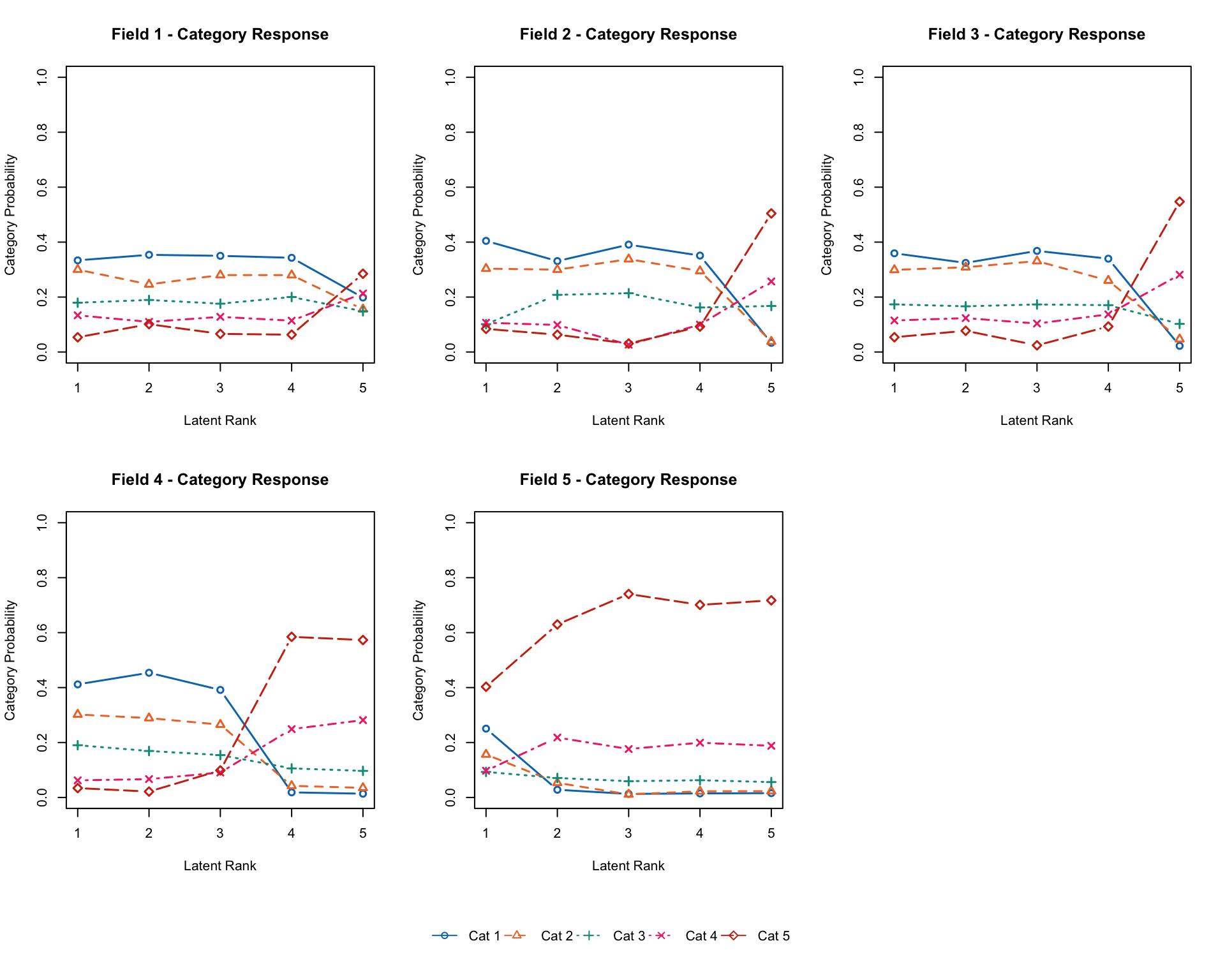
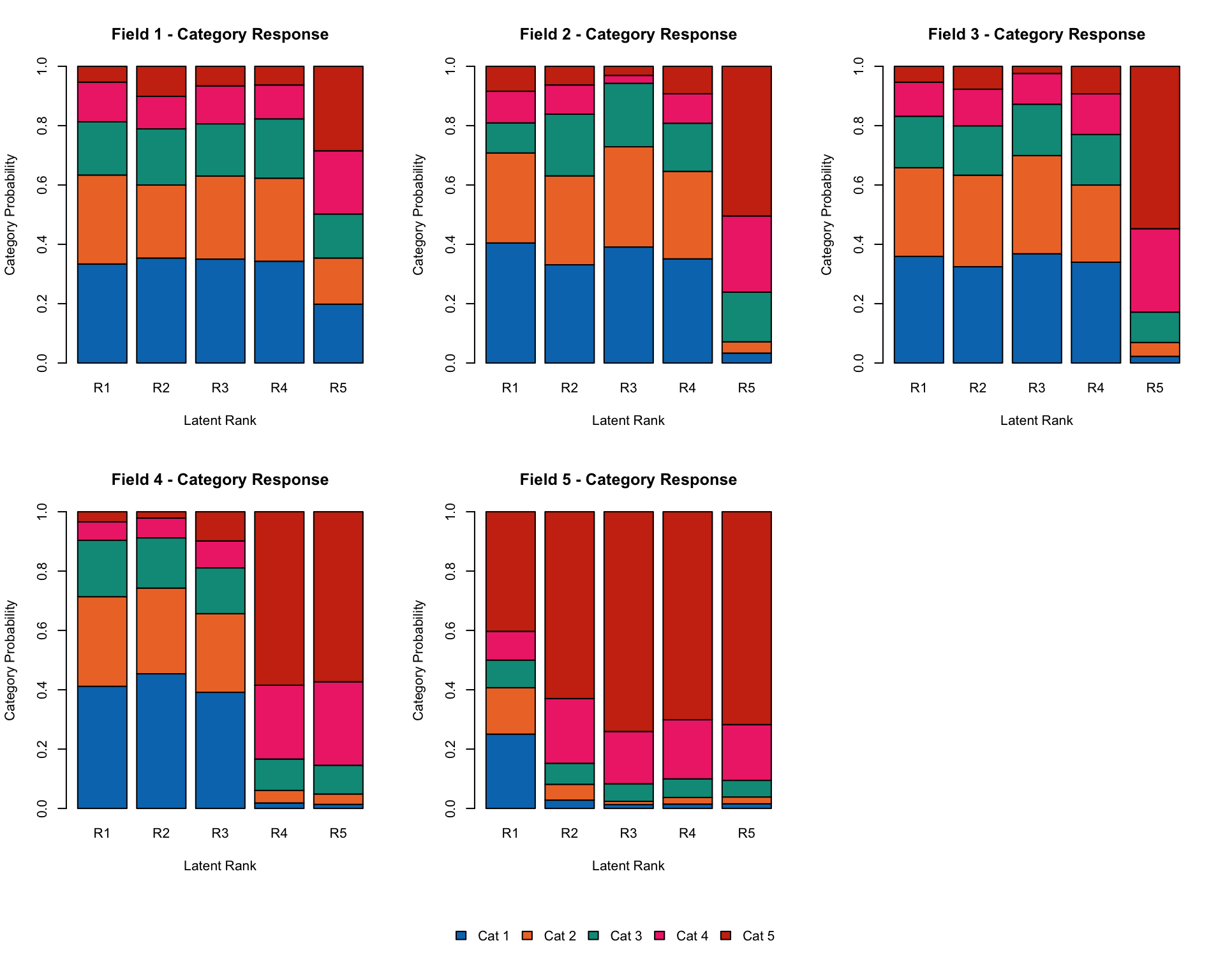
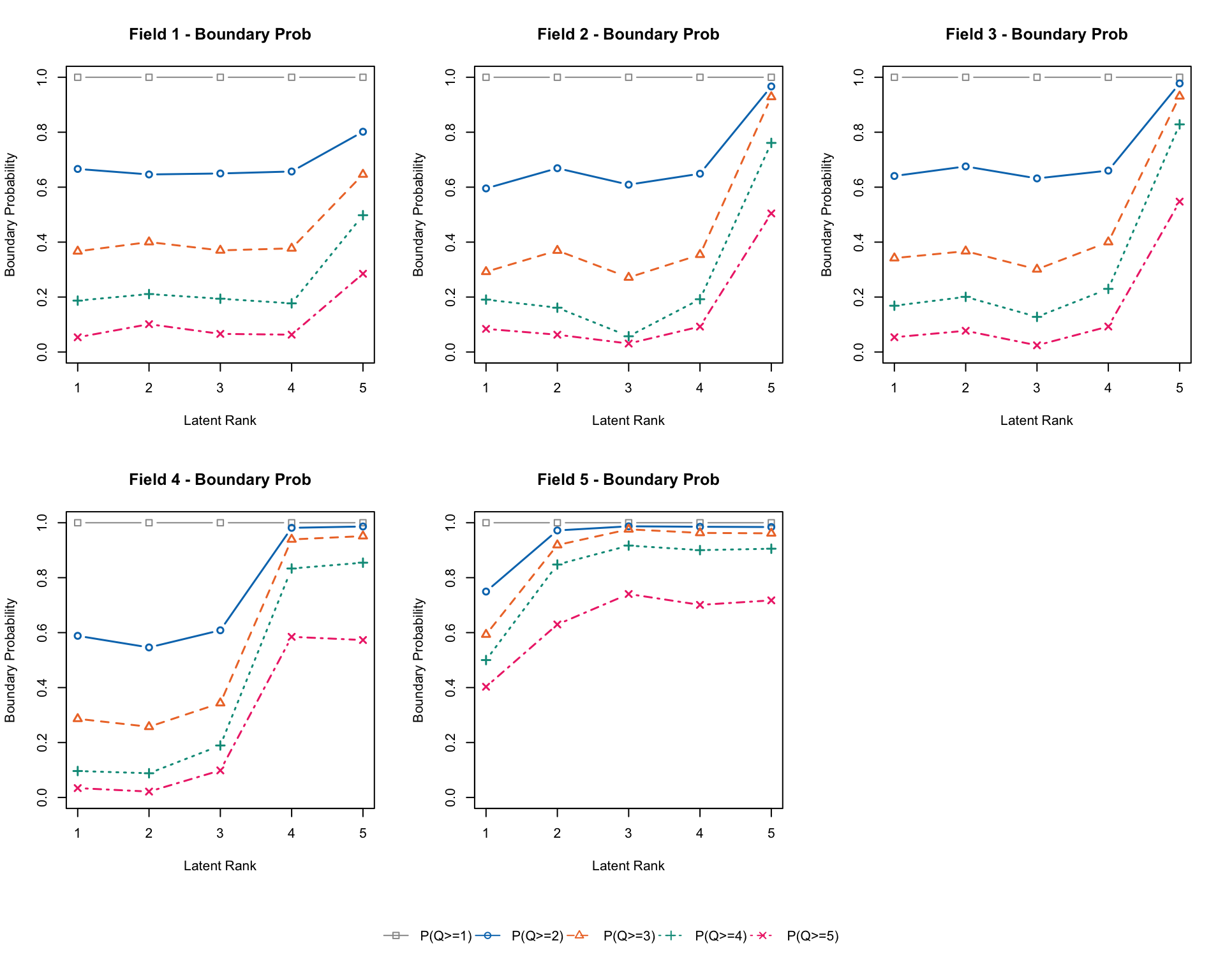
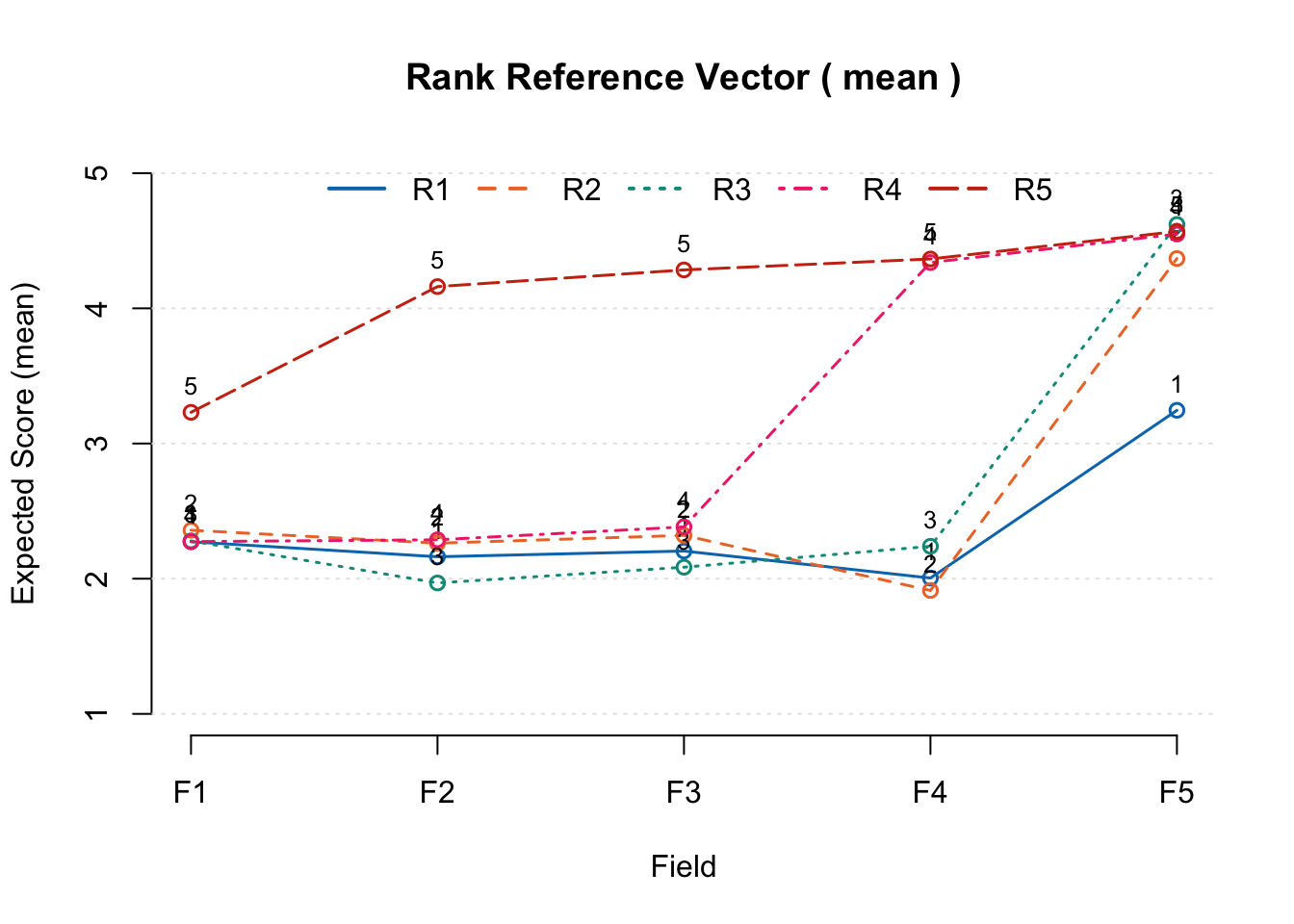
6  バイクラスタリング

この章では,項目と受検者の同時クラスタリングであるバイクラスタリングについて紹介します。サンプルデータJ35S515(35項目・515人の二値データ)を使用します。

dat <- J35S515
dat$U |> head()
     Item01 Item02 Item03 Item04 Item05 Item06 Item07 Item08 Item09 Item10
[1,]      0      0      0      0      0      0      0      1      1      0
[2,]      1      1      0      0      0      0      1      0      1      1
[3,]      1      0      0      0      0      0      1      1      0      1
[4,]      0      0      1      0      0      0      0      1      1      0
[5,]      1      0      0      0      0      0      1      0      0      0
[6,]      1      0      0      0      0      0      0      0      0      0
     Item11 Item12 Item13 Item14 Item15 Item16 Item17 Item18 Item19 Item20
[1,]      0      0      0      0      0      1      0      0      0      0
[2,]      1      1      1      1      0      0      1      0      0      0
[3,]      0      0      0      0      0      0      0      0      1      1
[4,]      0      0      0      0      0      0      0      0      0      0
[5,]      0      0      0      0      0      0      0      0      0      0
[6,]      0      0      0      0      0      0      0      0      0      0
     Item21 Item22 Item23 Item24 Item25 Item26 Item27 Item28 Item29 Item30
[1,]      0      0      0      0      0      0      0      0      0      0
[2,]      1      1      1      1      1      1      1      0      0      0
[3,]      0      0      0      0      0      0      0      0      0      0
[4,]      1      0      1      1      1      1      1      1      0      0
[5,]      0      0      0      0      0      0      0      0      0      0
[6,]      1      1      0      0      0      0      1      0      0      0
     Item31 Item32 Item33 Item34 Item35
[1,]      1      1      1      0      0
[2,]      1      1      0      0      0
[3,]      1      0      0      0      0
[4,]      1      1      0      1      0
[5,]      1      1      1      0      1
[6,]      1      1      0      0      1

6.1 クラス型バイクラスタリング(method = “B”)

method = "B"でクラス型(順序性なし)のバイクラスタリングを実行します。nfldでフィールド数,nclsでクラス数を指定します。

result.B <- Biclustering(dat, nfld = 5, ncls = 6, method = "B")
Biclustering is chosen.

iter 1 log_lik -7966.66                                                         
iter 2 log_lik -7442.38                                                         
iter 3 log_lik -7266.35                                                         
iter 4 log_lik -7151.01                                                         
iter 5 log_lik -7023.94                                                         
iter 6 log_lik -6984.82                                                         
iter 7 log_lik -6950.27                                                         
iter 8 log_lik -6939.34                                                         
iter 9 log_lik -6930.89                                                         
iter 10 log_lik -6923.5                                                         
iter 11 log_lik -6914.56                                                        
iter 12 log_lik -6908.89                                                        
iter 13 log_lik -6906.84                                                        
iter 14 log_lik -6905.39                                                        
iter 15 log_lik -6904.24                                                        
iter 16 log_lik -6903.28                                                        
iter 17 log_lik -6902.41                                                        
iter 18 log_lik -6901.58                                                        
iter 19 log_lik -6900.74                                                        
iter 20 log_lik -6899.86                                                        
iter 21 log_lik -6898.9                                                         
iter 22 log_lik -6897.84                                                        
iter 23 log_lik -6896.66                                                        
iter 24 log_lik -6895.35                                                        
iter 25 log_lik -6893.92                                                        
iter 26 log_lik -6892.4                                                         
iter 27 log_lik -6890.85                                                        
iter 28 log_lik -6889.32                                                        
iter 29 log_lik -6887.9                                                         
iter 30 log_lik -6886.66                                                        
iter 31 log_lik -6885.67                                                        
iter 32 log_lik -6884.98                                                        
iter 33 log_lik -6884.58                                                        
No ID column detected. All columns treated as response data. Sequential IDs (Student1, Student2, ...) were generated. Use id= parameter to specify the ID column explicitly.
result.B
Biclustering Analysis

Biclustering Reference Matrix Profile
       Class1 Class2 Class3 Class4 Class5 Class6
Field1 0.6236 0.8636 0.8718  0.898  0.952  1.000
Field2 0.0627 0.3332 0.4255  0.919  0.990  1.000
Field3 0.2008 0.5431 0.2281  0.475  0.706  1.000
Field4 0.0495 0.2455 0.0782  0.233  0.648  0.983
Field5 0.0225 0.0545 0.0284  0.043  0.160  0.983

Field Reference Profile Indices
       Alpha     A Beta     B Gamma       C
Field1     1 0.240    1 0.624   0.0  0.0000
Field2     3 0.493    3 0.426   0.0  0.0000
Field3     1 0.342    4 0.475   0.2 -0.3149
Field4     4 0.415    5 0.648   0.2 -0.1673
Field5     5 0.823    5 0.160   0.2 -0.0261

                              Class 1 Class 2 Class 3 Class 4 Class 5 Class 6
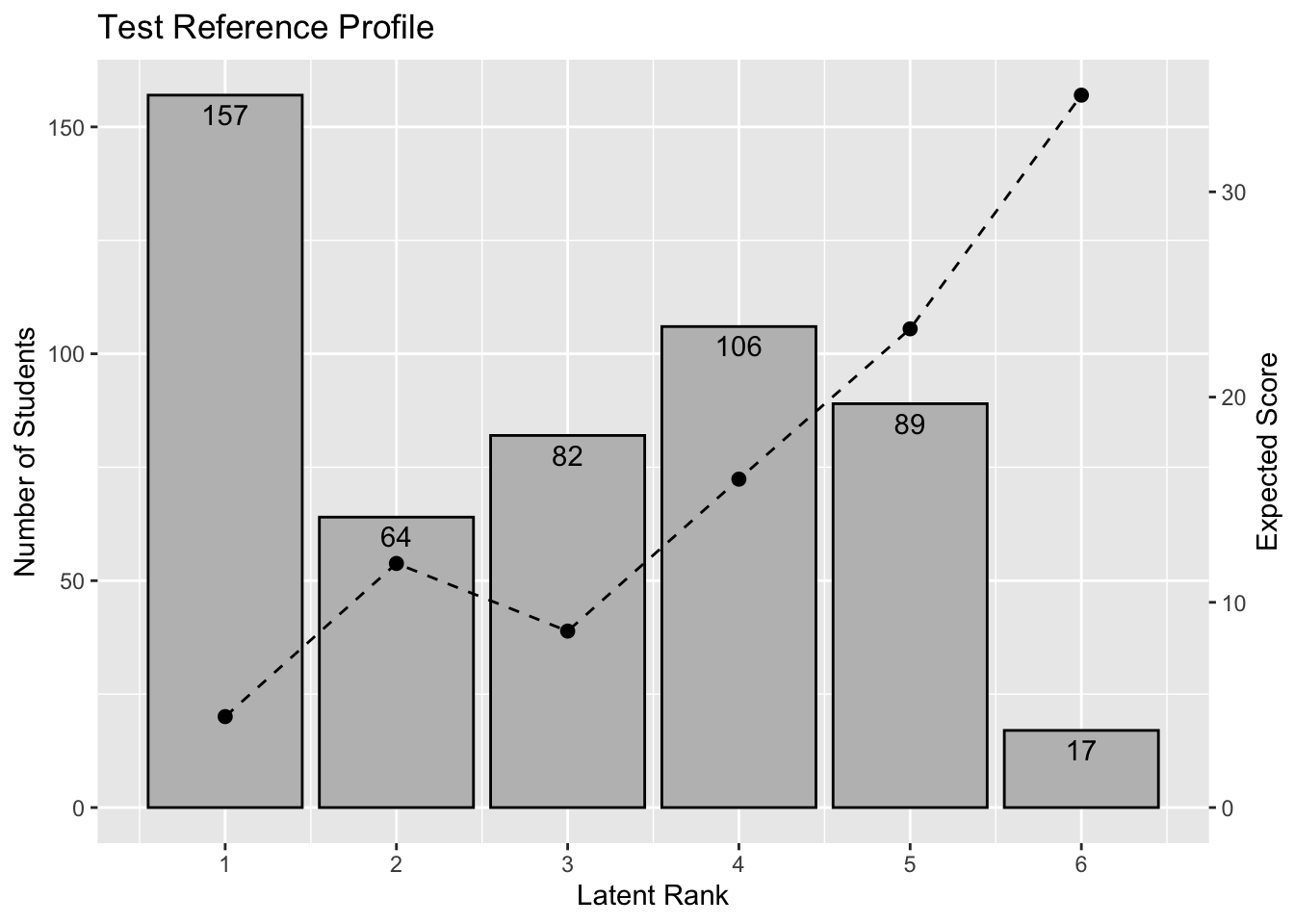
Test Reference Profile          4.431  11.894   8.598  16.002  23.326  34.713
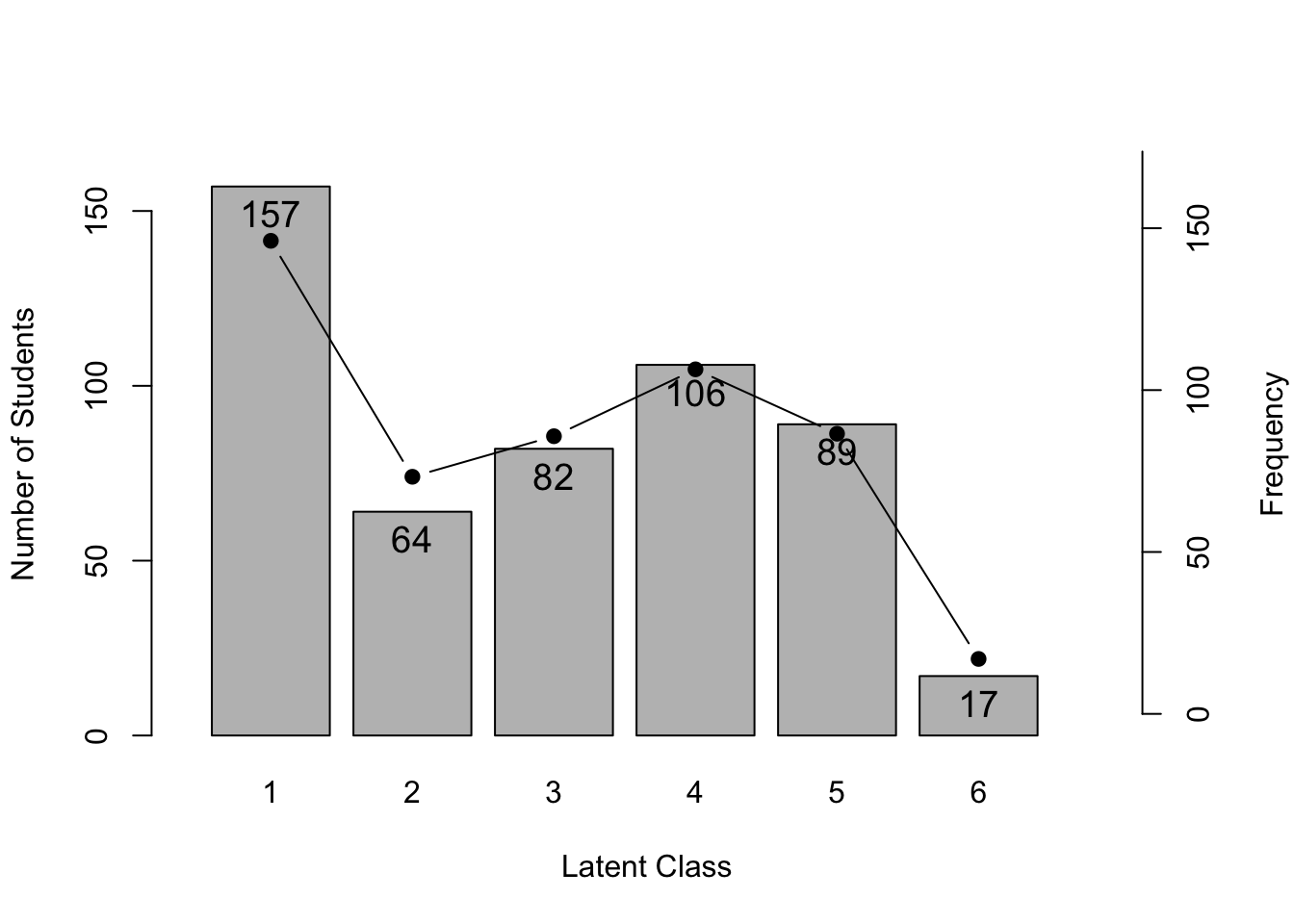
Latent Class Ditribution      157.000  64.000  82.000 106.000  89.000  17.000
Class Membership Distribution 146.105  73.232  85.753 106.414  86.529  16.968

Field Membership Profile
         CRR   LFE Field1 Field2 Field3 Field4 Field5
Item01 0.850 1.000  1.000  0.000  0.000  0.000  0.000
Item31 0.812 1.000  1.000  0.000  0.000  0.000  0.000
Item32 0.808 1.000  1.000  0.000  0.000  0.000  0.000
Item21 0.616 2.000  0.000  1.000  0.000  0.000  0.000
Item23 0.600 2.000  0.000  1.000  0.000  0.000  0.000
Item22 0.586 2.000  0.000  1.000  0.000  0.000  0.000
Item24 0.567 2.000  0.000  1.000  0.000  0.000  0.000
Item25 0.491 2.000  0.000  1.000  0.000  0.000  0.000
Item11 0.476 2.000  0.000  1.000  0.000  0.000  0.000
Item26 0.452 2.000  0.000  1.000  0.000  0.000  0.000
Item27 0.414 2.000  0.000  1.000  0.000  0.000  0.000
Item07 0.573 3.000  0.000  0.000  1.000  0.000  0.000
Item03 0.458 3.000  0.000  0.000  1.000  0.000  0.000
Item33 0.437 3.000  0.000  0.000  1.000  0.000  0.000
Item02 0.392 3.000  0.000  0.000  1.000  0.000  0.000
Item09 0.390 3.000  0.000  0.000  1.000  0.000  0.000
Item10 0.353 3.000  0.000  0.000  1.000  0.000  0.000
Item08 0.350 3.000  0.000  0.000  1.000  0.000  0.000
Item12 0.340 4.000  0.000  0.000  0.000  1.000  0.000
Item04 0.303 4.000  0.000  0.000  0.000  1.000  0.000
Item17 0.276 4.000  0.000  0.000  0.000  1.000  0.000
Item05 0.250 4.000  0.000  0.000  0.000  1.000  0.000
Item13 0.237 4.000  0.000  0.000  0.000  1.000  0.000
Item34 0.229 4.000  0.000  0.000  0.000  1.000  0.000
Item29 0.227 4.000  0.000  0.000  0.000  1.000  0.000
Item28 0.221 4.000  0.000  0.000  0.000  1.000  0.000
Item06 0.216 4.000  0.000  0.000  0.000  1.000  0.000
Item16 0.216 4.000  0.000  0.000  0.000  1.000  0.000
Item35 0.155 5.000  0.000  0.000  0.000  0.000  1.000
Item14 0.126 5.000  0.000  0.000  0.000  0.000  1.000
Item15 0.087 5.000  0.000  0.000  0.000  0.000  1.000
Item30 0.085 5.000  0.000  0.000  0.000  0.000  1.000
Item20 0.054 5.000  0.000  0.000  0.000  0.000  1.000
Item19 0.052 5.000  0.000  0.000  0.000  0.000  1.000
Item18 0.049 5.000  0.000  0.000  0.000  0.000  1.000
Latent Field Distribution
           Field 1 Field 2 Field 3 Field 4 Field 5
N of Items       3       8       7      10       7

Model Fit Indices
Number of Latent Class : 6
Number of Latent Field: 5
Number of EM cycle: 33 
                   value
model_log_like -6884.582
bench_log_like -5891.314
null_log_like  -9862.114
model_Chi_sq    1986.535
null_Chi_sq     7941.601
model_df        1160.000
null_df         1155.000
NFI                0.750
RFI                0.751
IFI                0.878
TLI                0.879
CFI                0.878
RMSEA              0.037
AIC             -333.465
CAIC           -6416.699
BIC            -5256.699

6.1.1 可視化(baseグラフィックス)

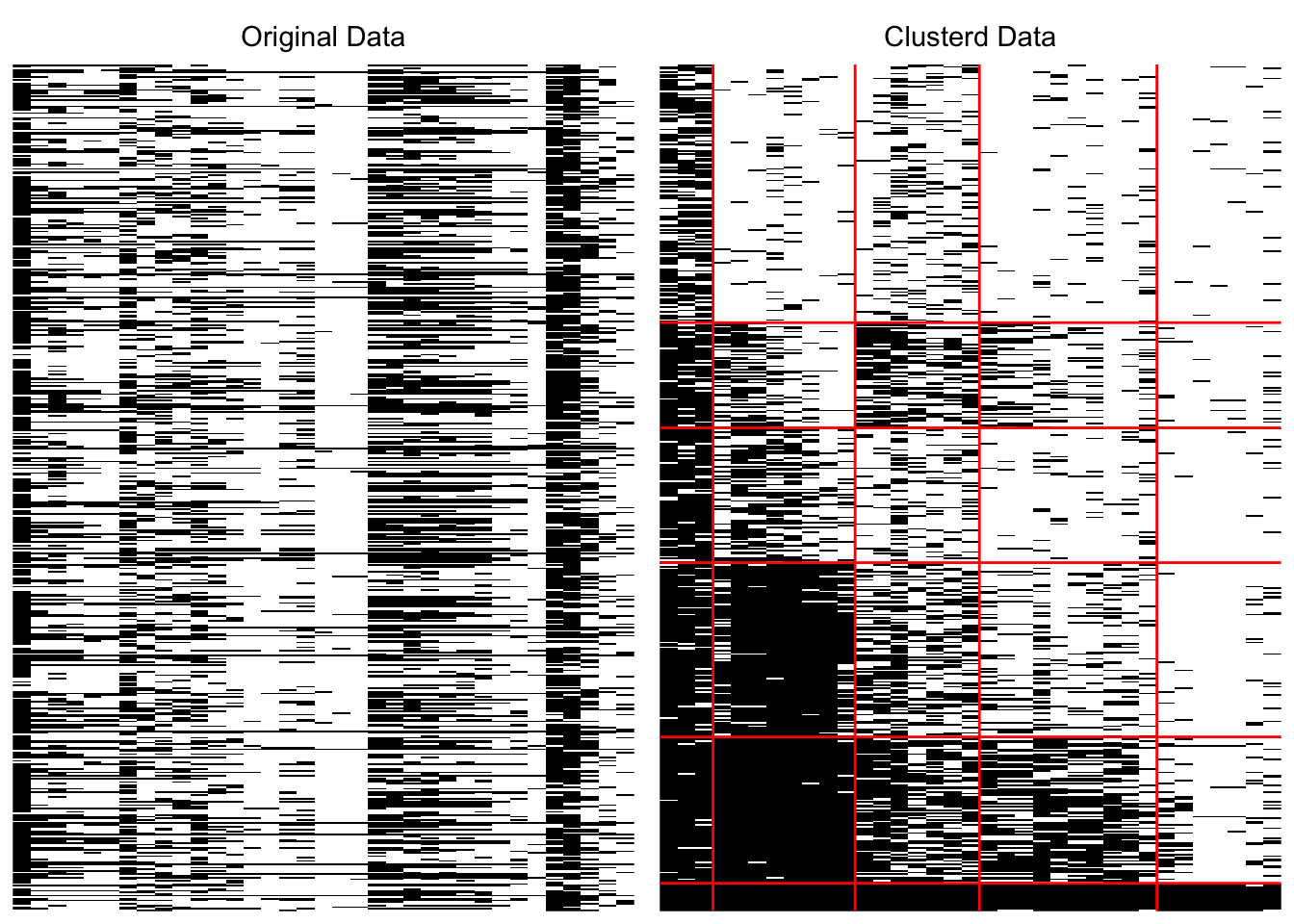
6.1.1.1 アレイプロット

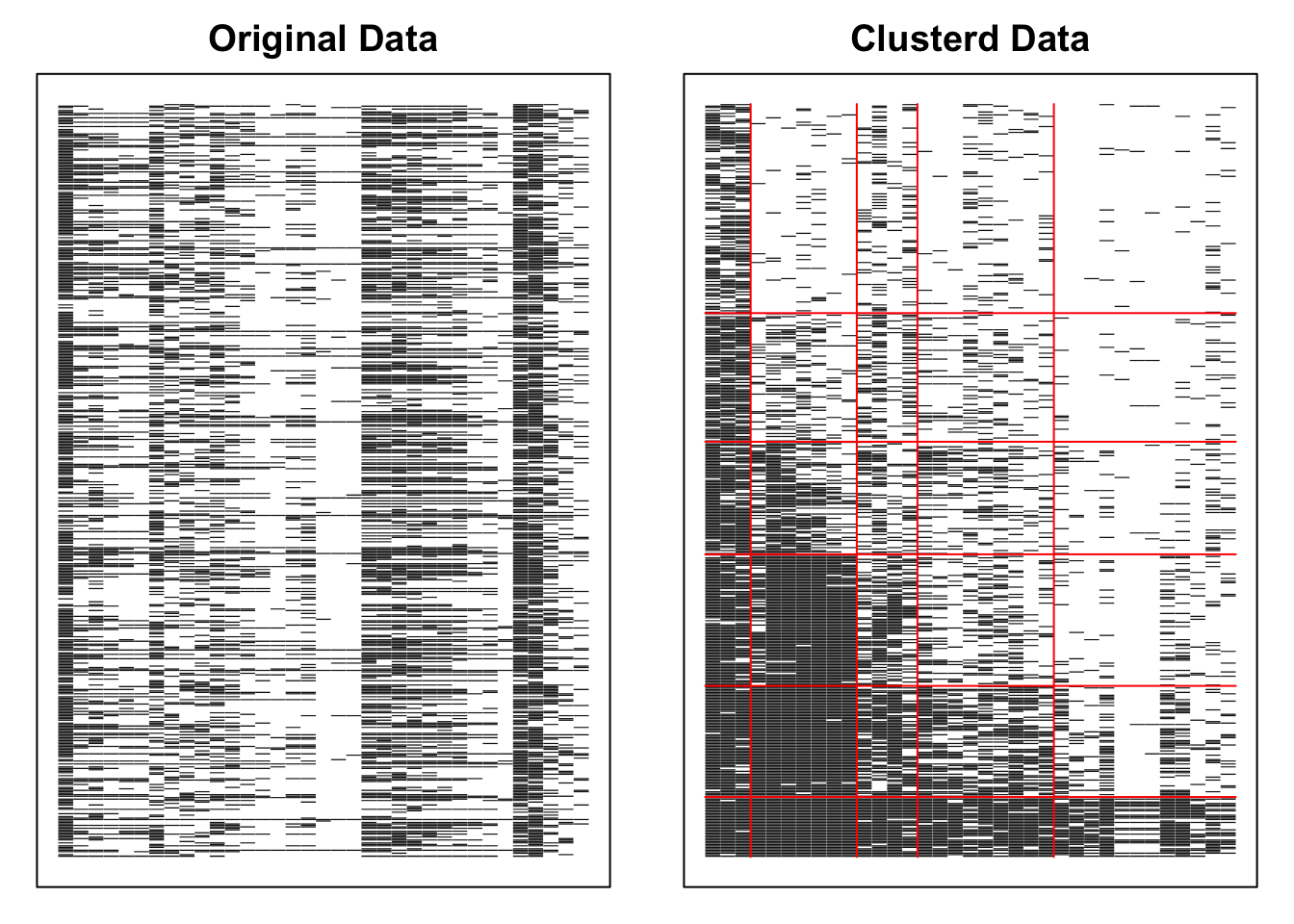
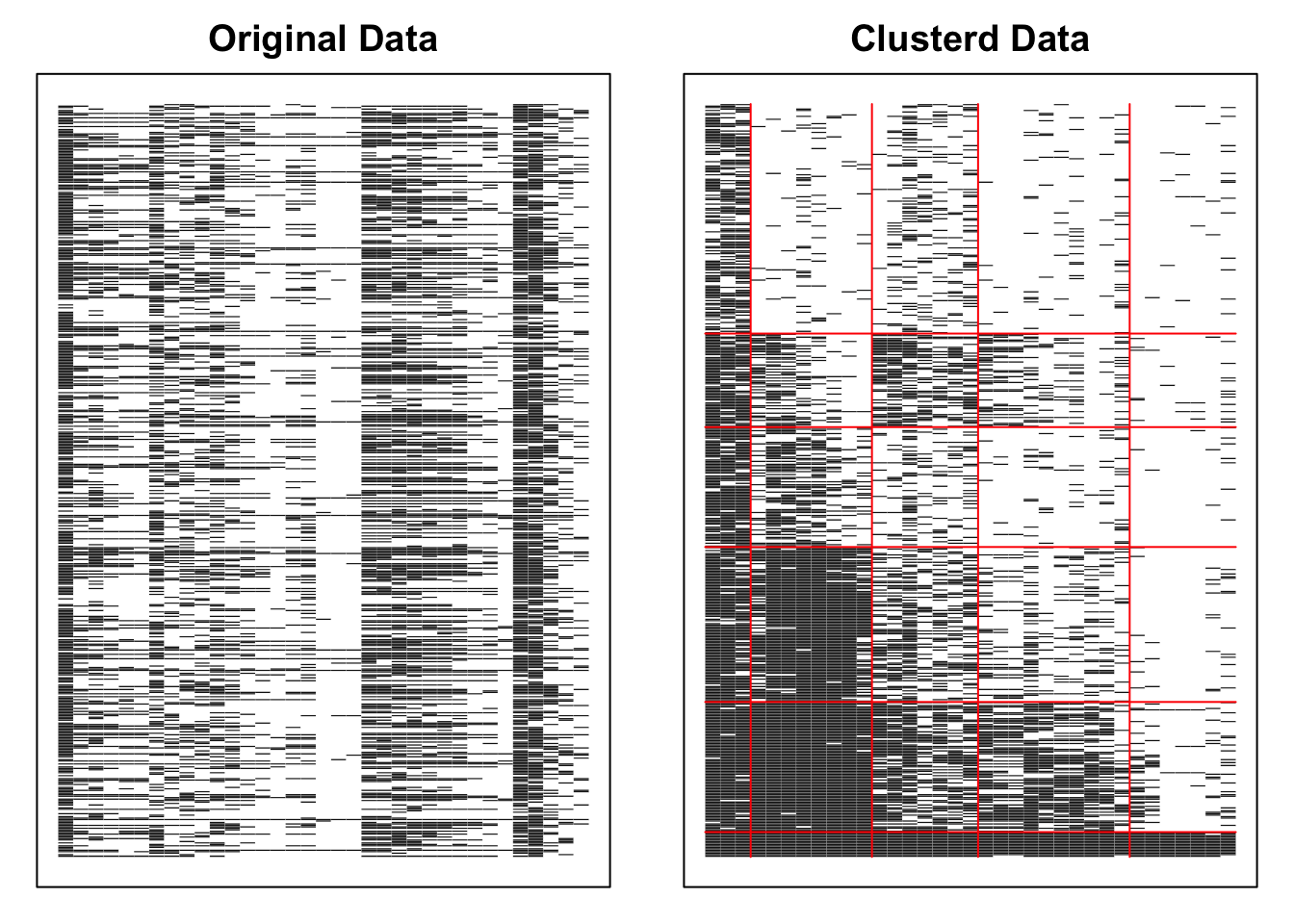
分類結果を行列形式で表示します。

plot(result.B, type = "Array")

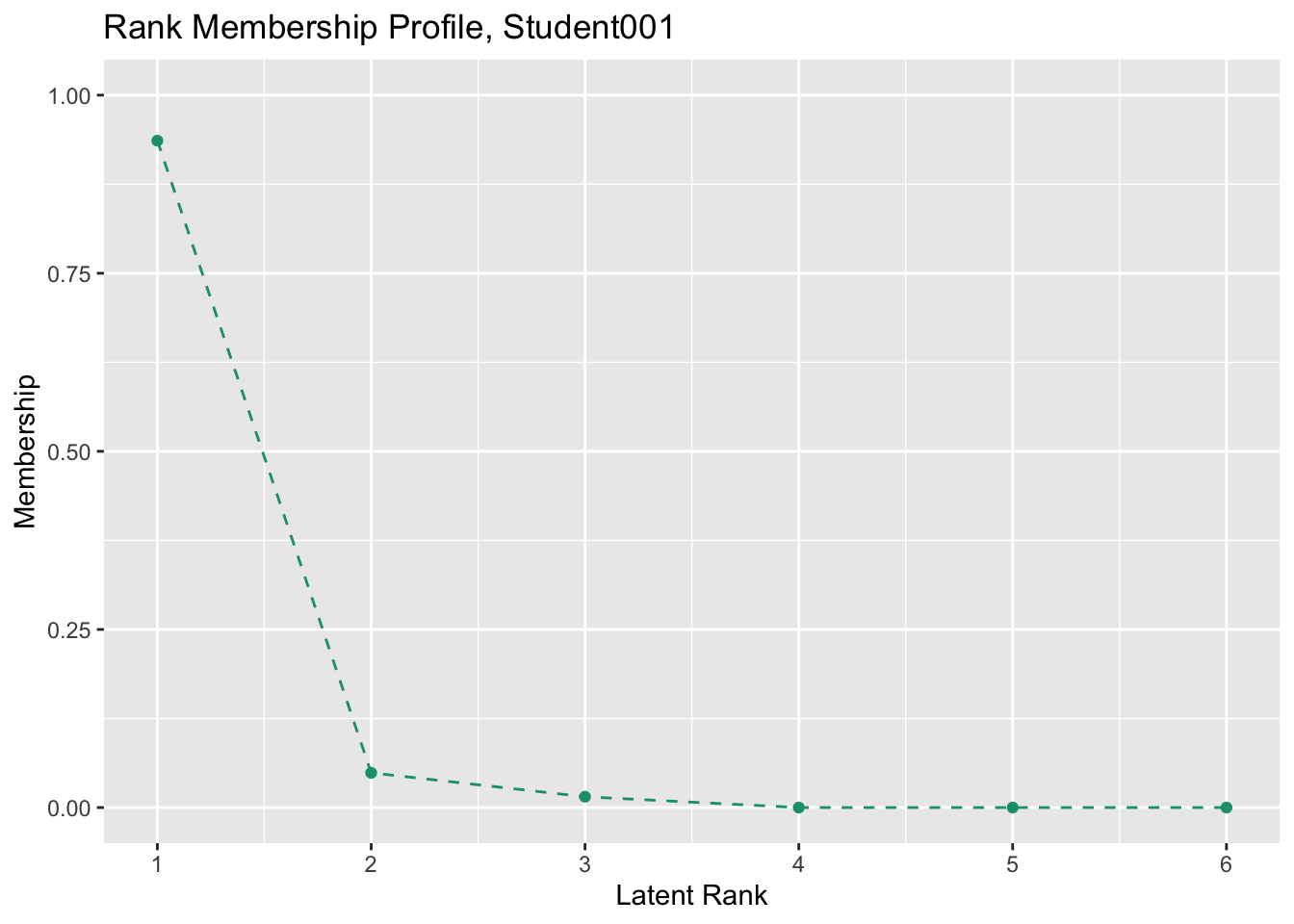
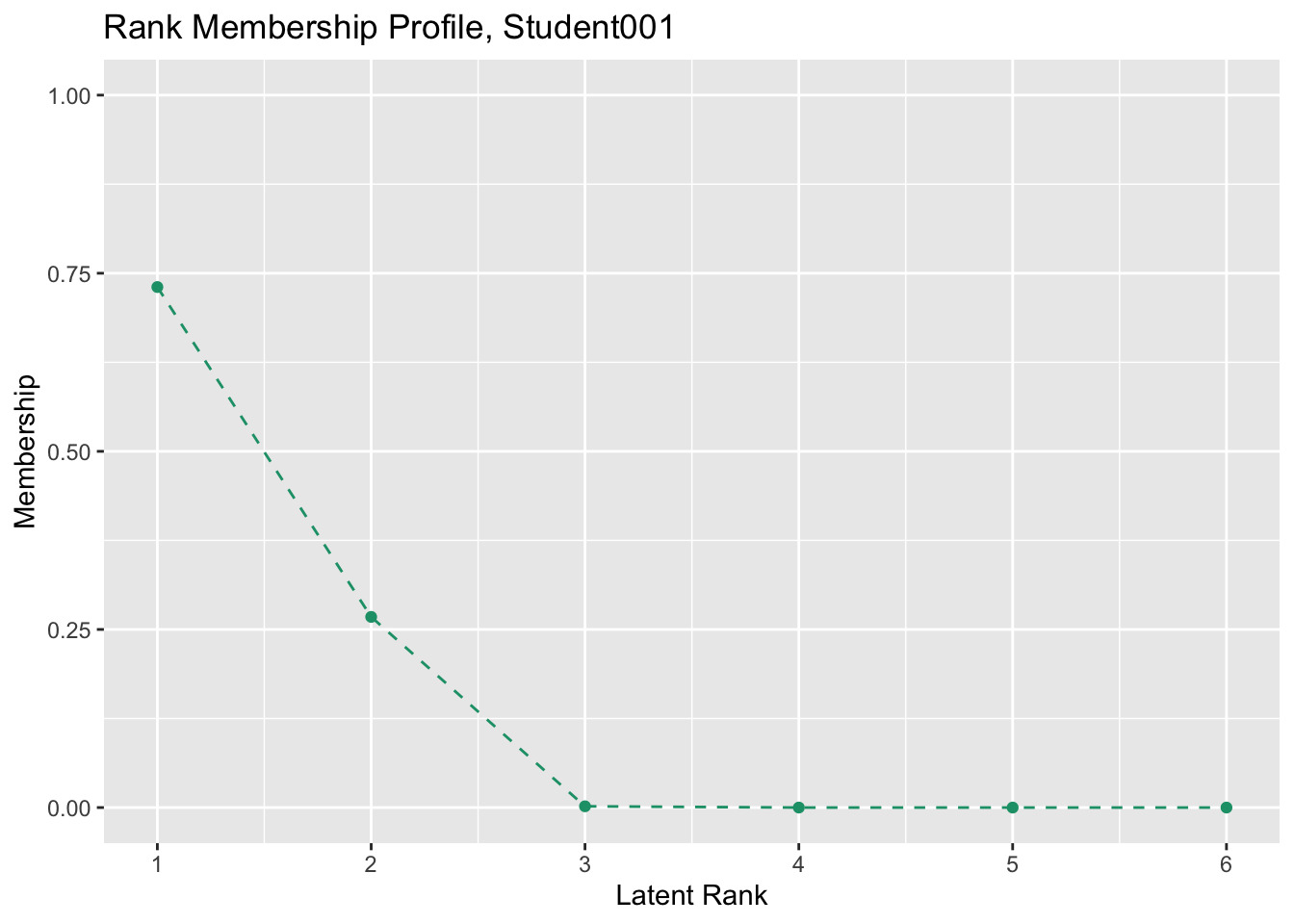
6.1.1.2 クラスメンバーシッププロファイル(CMP)

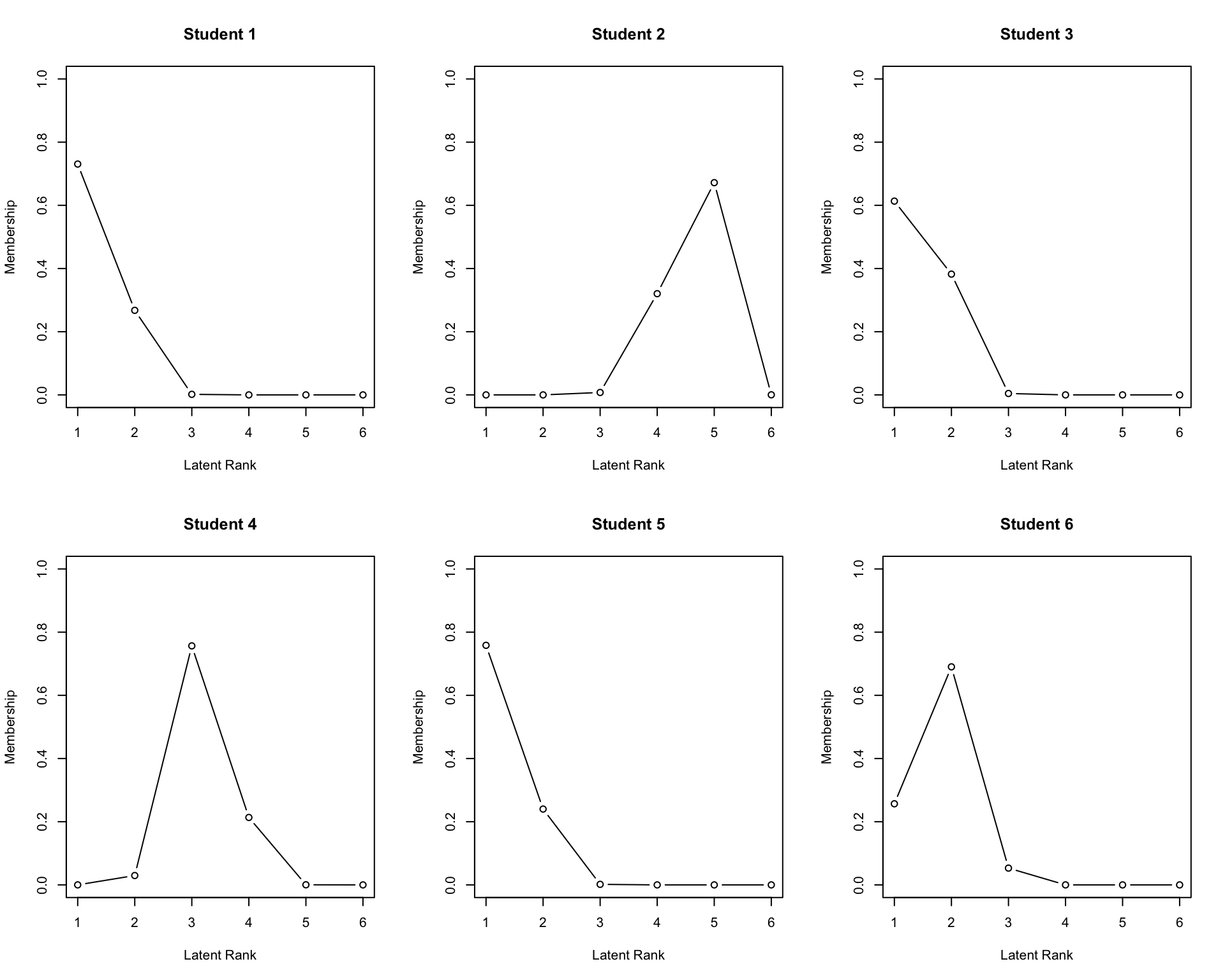
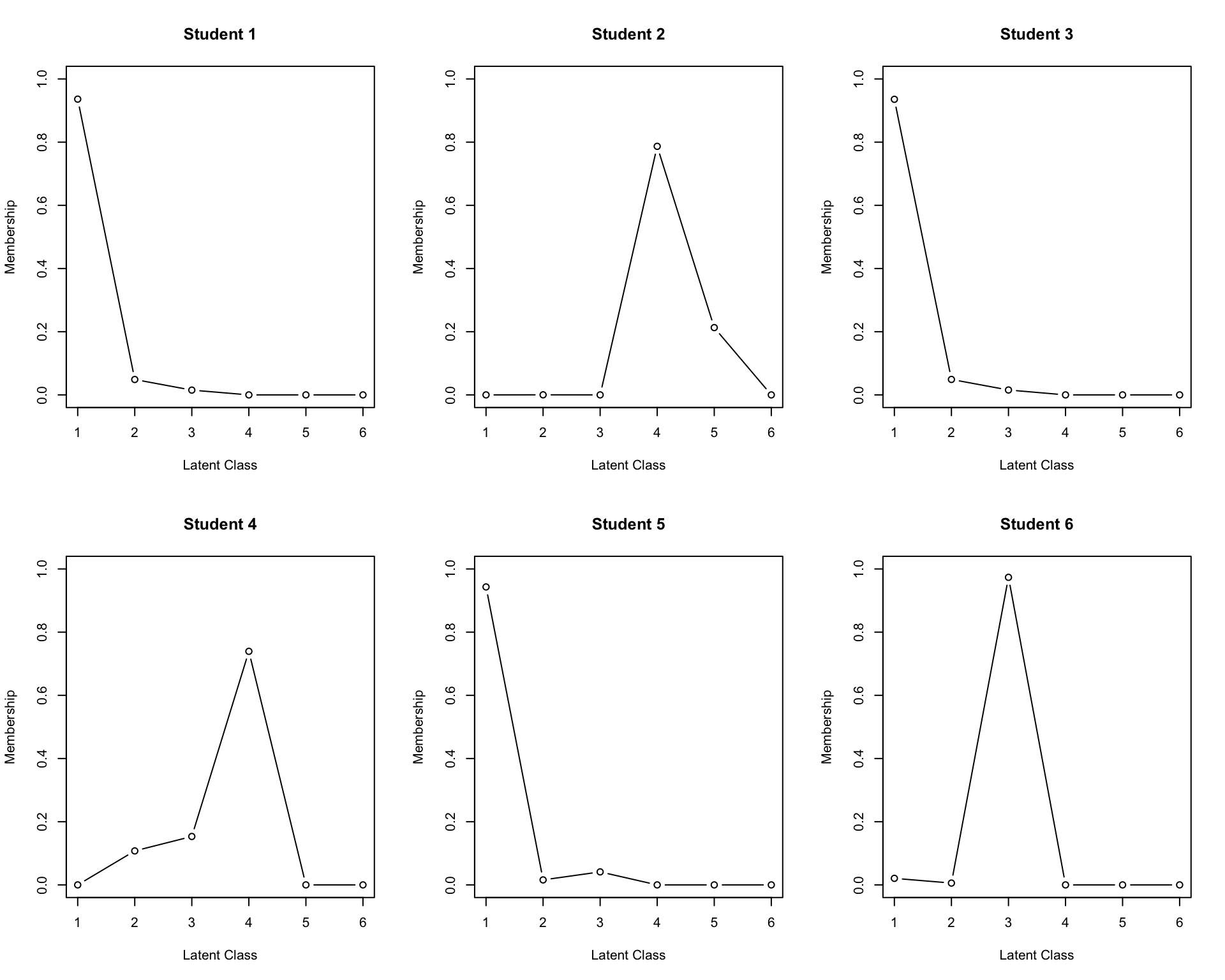
round(result.B$ClassMembership, 6) |> head()
             Class1   Class2   Class3   Class4   Class5 Class6
Student001 0.936080 0.048748 0.015172 0.000000 0.000000      0
Student002 0.000000 0.000247 0.000035 0.786721 0.212997      0
Student003 0.935542 0.048932 0.015526 0.000000 0.000000      0
Student004 0.000002 0.107544 0.153249 0.739188 0.000016      0
Student005 0.943018 0.015802 0.041179 0.000000 0.000000      0
Student006 0.020760 0.005789 0.973443 0.000008 0.000000      0
plot(result.B, type = "CMP", students = 1:6, nr = 2, nc = 3)

6.1.1.3 推定された所属クラス

result.B$ClassEstimated |> head()
[1] 1 4 1 4 1 3

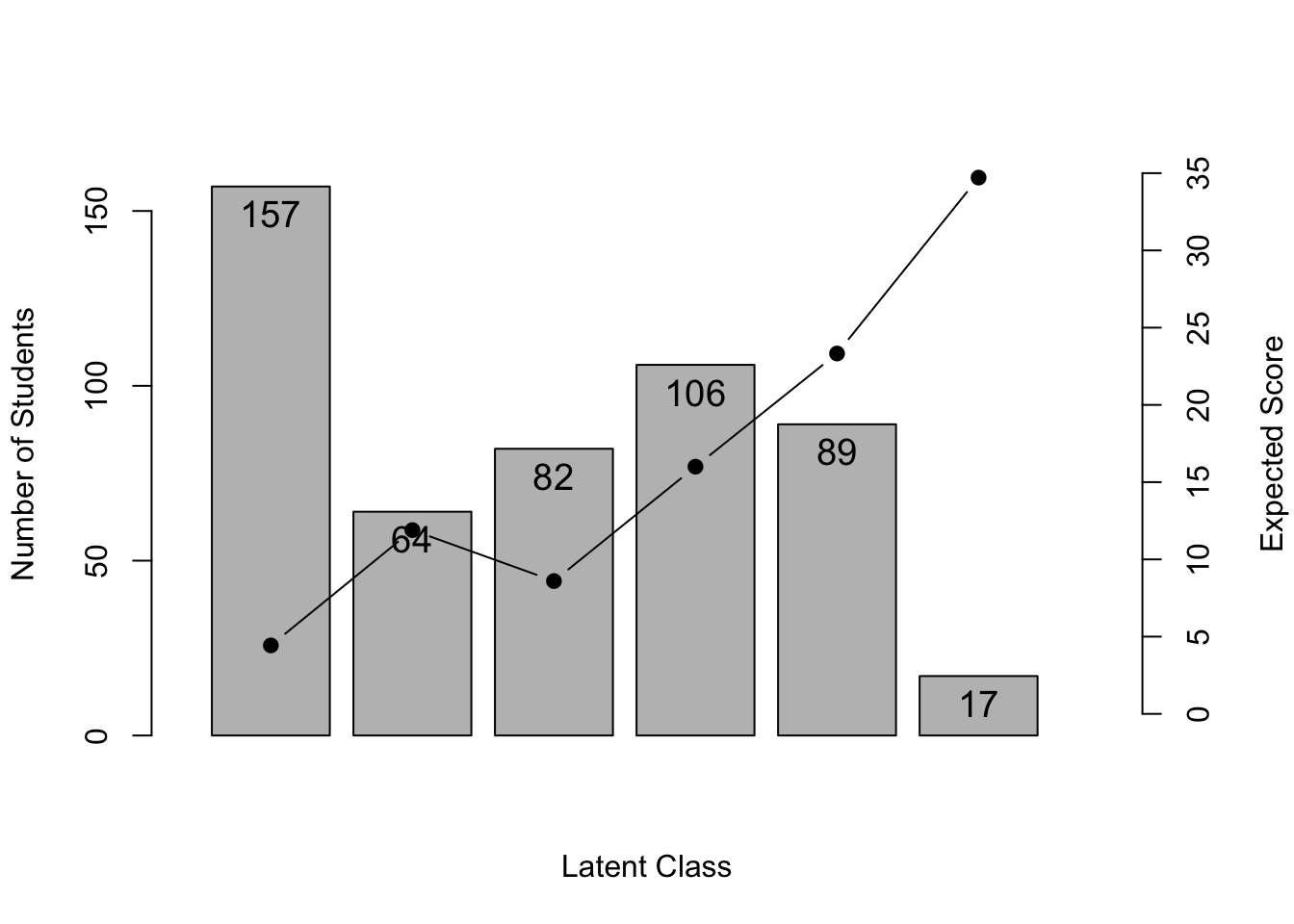
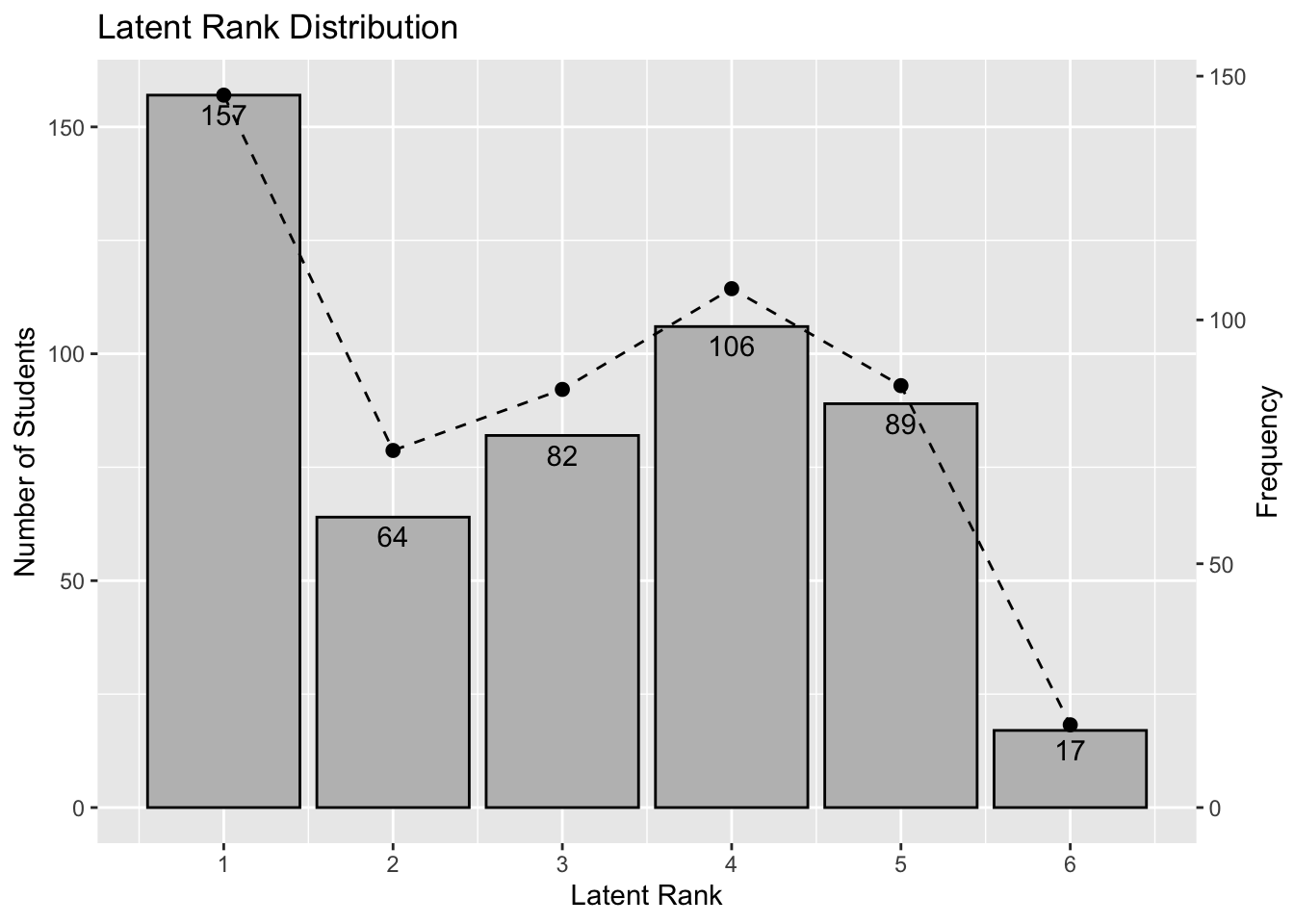
6.1.1.4 潜在クラス分布(LCD)

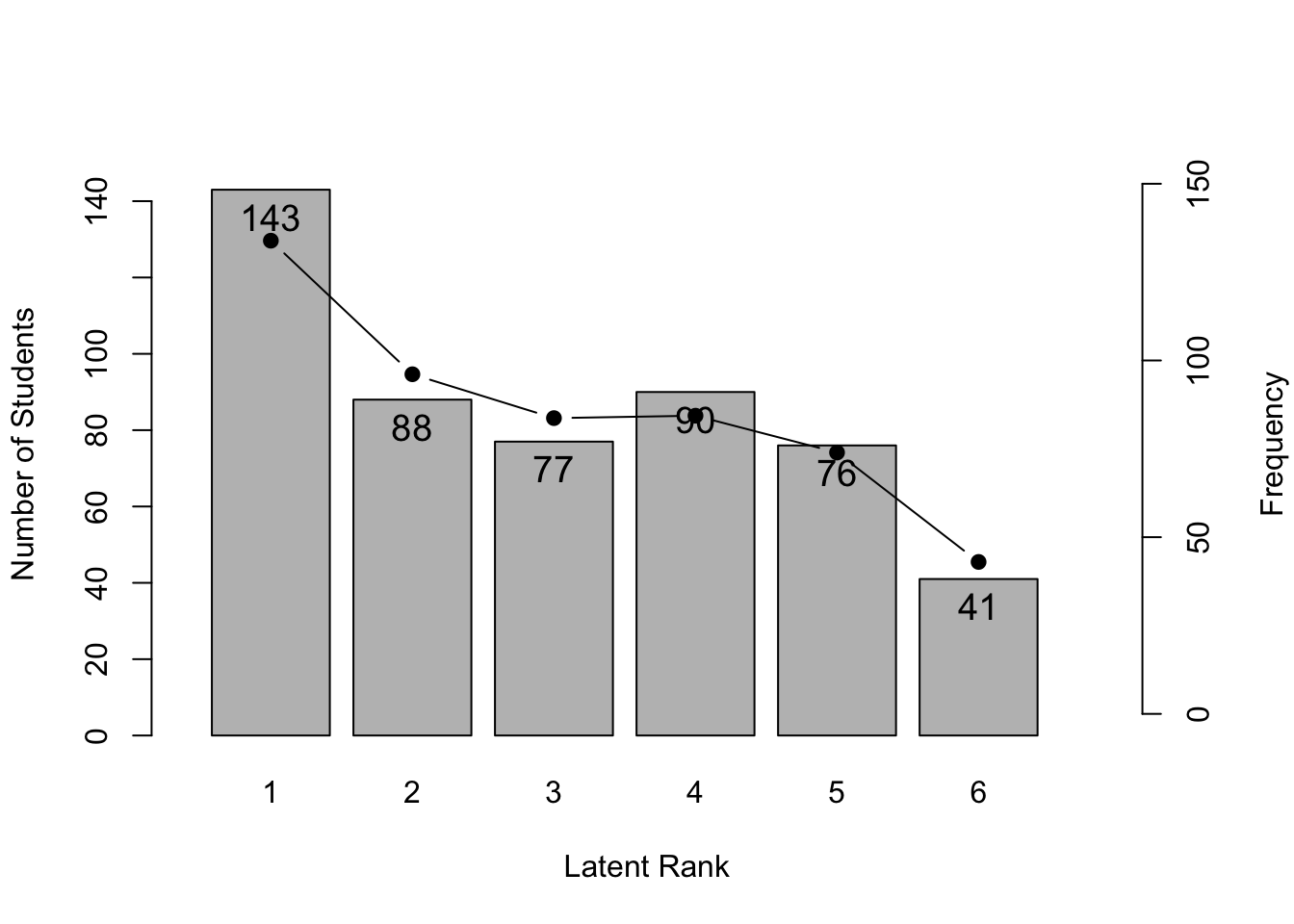
棒グラフがLatent Class Distribution,折れ線グラフがClass Membership Distributionです。

plot(result.B, type = "LCD")

6.1.1.5 フィールドメンバーシップ

各項目がどのフィールドに所属するかの確率を示します。

round(result.B$FieldMembership, 5)
       Field1 Field2  Field3  Field4 Field5
Item01      1      0 0.00000 0.00000      0
Item02      0      0 1.00000 0.00000      0
Item03      0      0 1.00000 0.00000      0
Item04      0      0 0.00000 1.00000      0
Item05      0      0 0.00000 1.00000      0
Item06      0      0 0.00000 1.00000      0
Item07      0      0 1.00000 0.00000      0
Item08      0      0 1.00000 0.00000      0
Item09      0      0 1.00000 0.00000      0
Item10      0      0 1.00000 0.00000      0
Item11      0      1 0.00000 0.00000      0
Item12      0      0 0.00012 0.99988      0
Item13      0      0 0.00000 1.00000      0
Item14      0      0 0.00000 0.00000      1
Item15      0      0 0.00000 0.00000      1
Item16      0      0 0.00000 1.00000      0
Item17      0      0 0.00000 1.00000      0
Item18      0      0 0.00000 0.00000      1
Item19      0      0 0.00000 0.00000      1
Item20      0      0 0.00000 0.00000      1
Item21      0      1 0.00000 0.00000      0
Item22      0      1 0.00000 0.00000      0
Item23      0      1 0.00000 0.00000      0
Item24      0      1 0.00000 0.00000      0
Item25      0      1 0.00000 0.00000      0
Item26      0      1 0.00000 0.00000      0
Item27      0      1 0.00000 0.00000      0
Item28      0      0 0.00000 1.00000      0
Item29      0      0 0.00000 1.00000      0
Item30      0      0 0.00000 0.00000      1
Item31      1      0 0.00000 0.00000      0
Item32      1      0 0.00000 0.00000      0
Item33      0      0 1.00000 0.00000      0
Item34      0      0 0.00000 1.00000      0
Item35      0      0 0.00000 0.00000      1

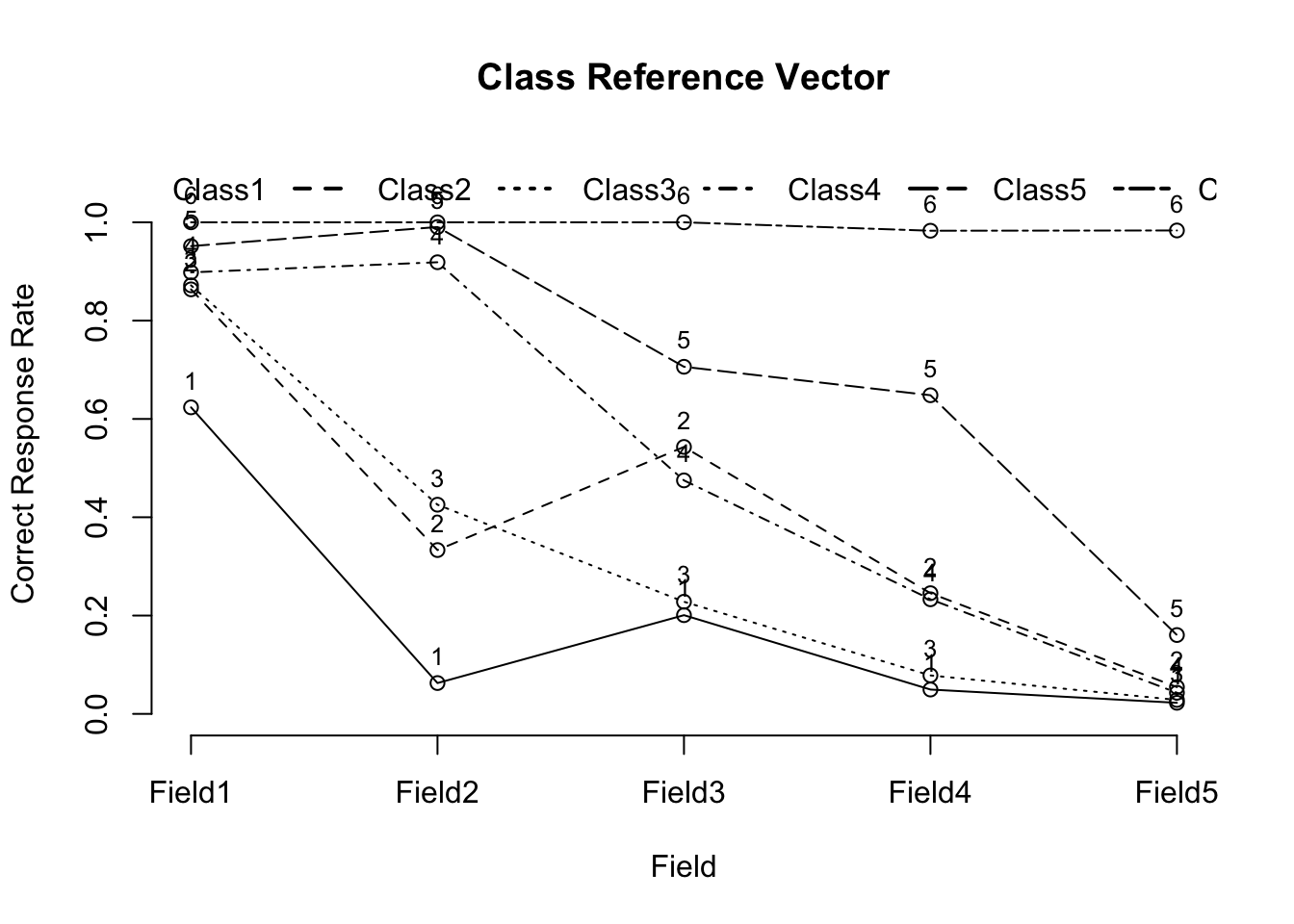
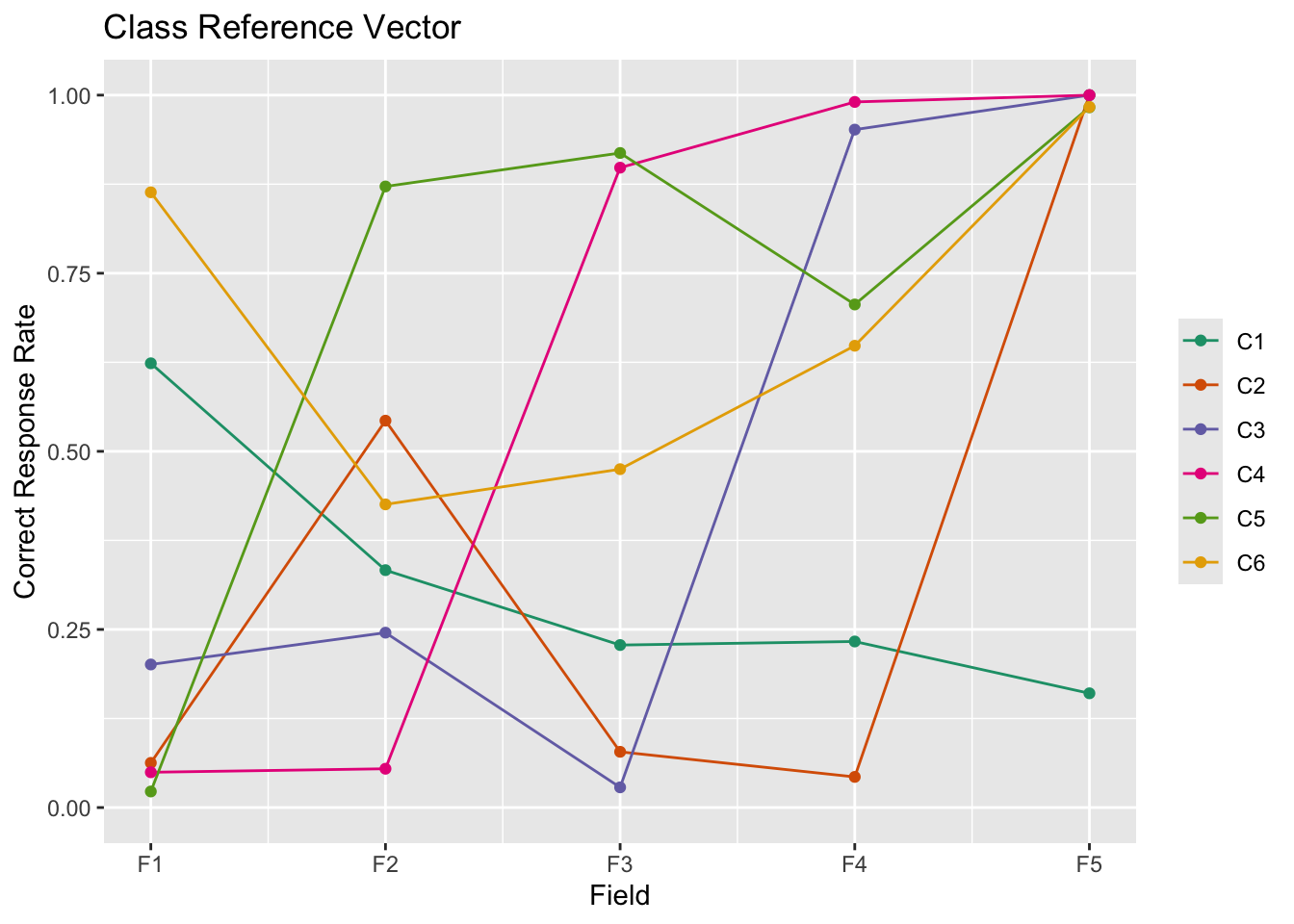
6.1.1.6 クラス参照ベクトル(CRV)

フィールドにおけるクラスごとの正答率を表示します。

plot(result.B, type = "CRV")

result.B$FRP
           Class1     Class2     Class3     Class4    Class5    Class6
Field1 0.62358989 0.86362311 0.87179729 0.89818946 0.9515799 1.0000000
Field2 0.06270755 0.33323234 0.42554990 0.91879529 0.9904507 1.0000000
Field3 0.20081642 0.54305218 0.22811379 0.47498694 0.7061406 1.0000000
Field4 0.04954076 0.24549999 0.07824042 0.23310794 0.6482247 0.9828854
Field5 0.02254831 0.05446897 0.02836654 0.04301178 0.1603798 0.9834310

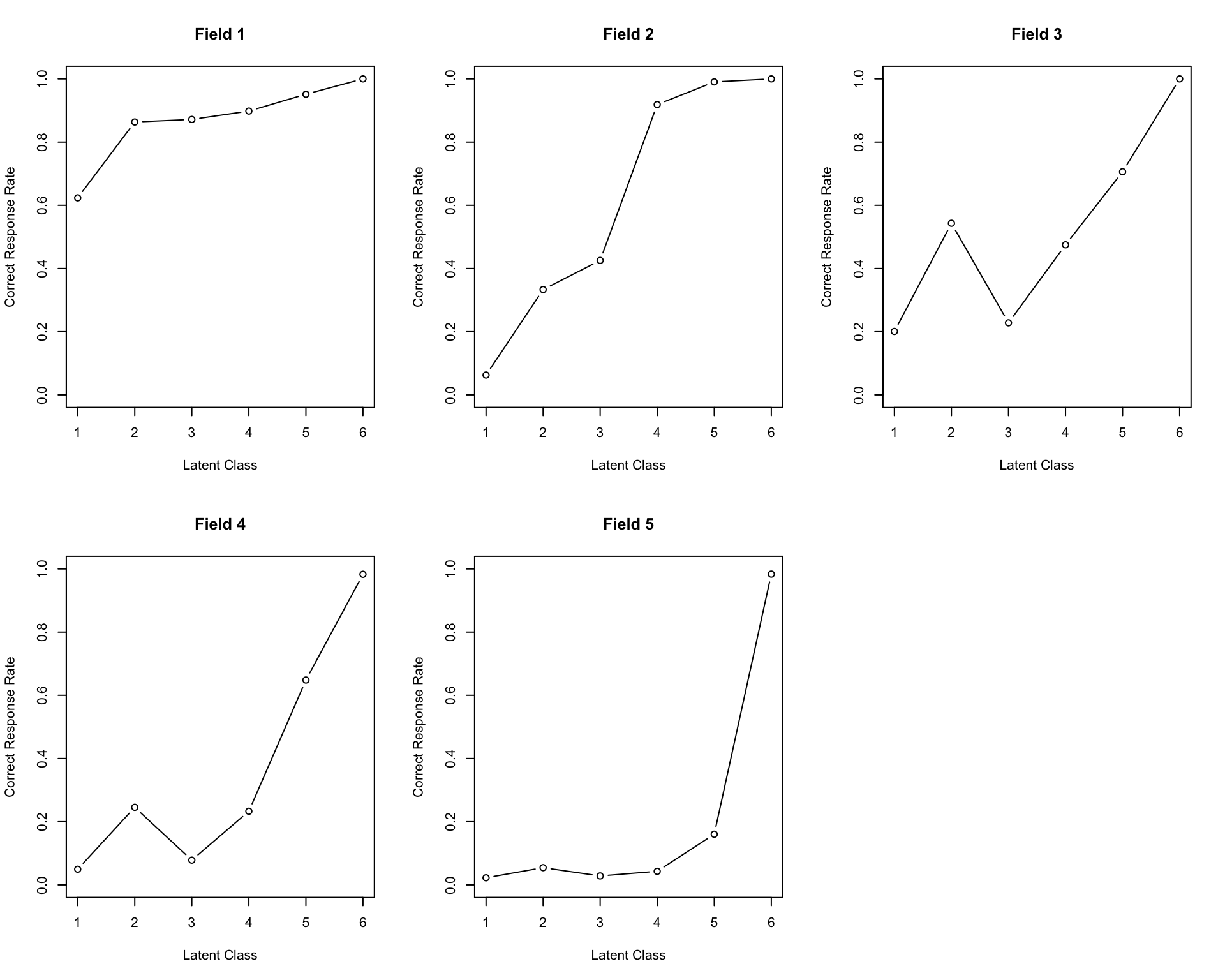
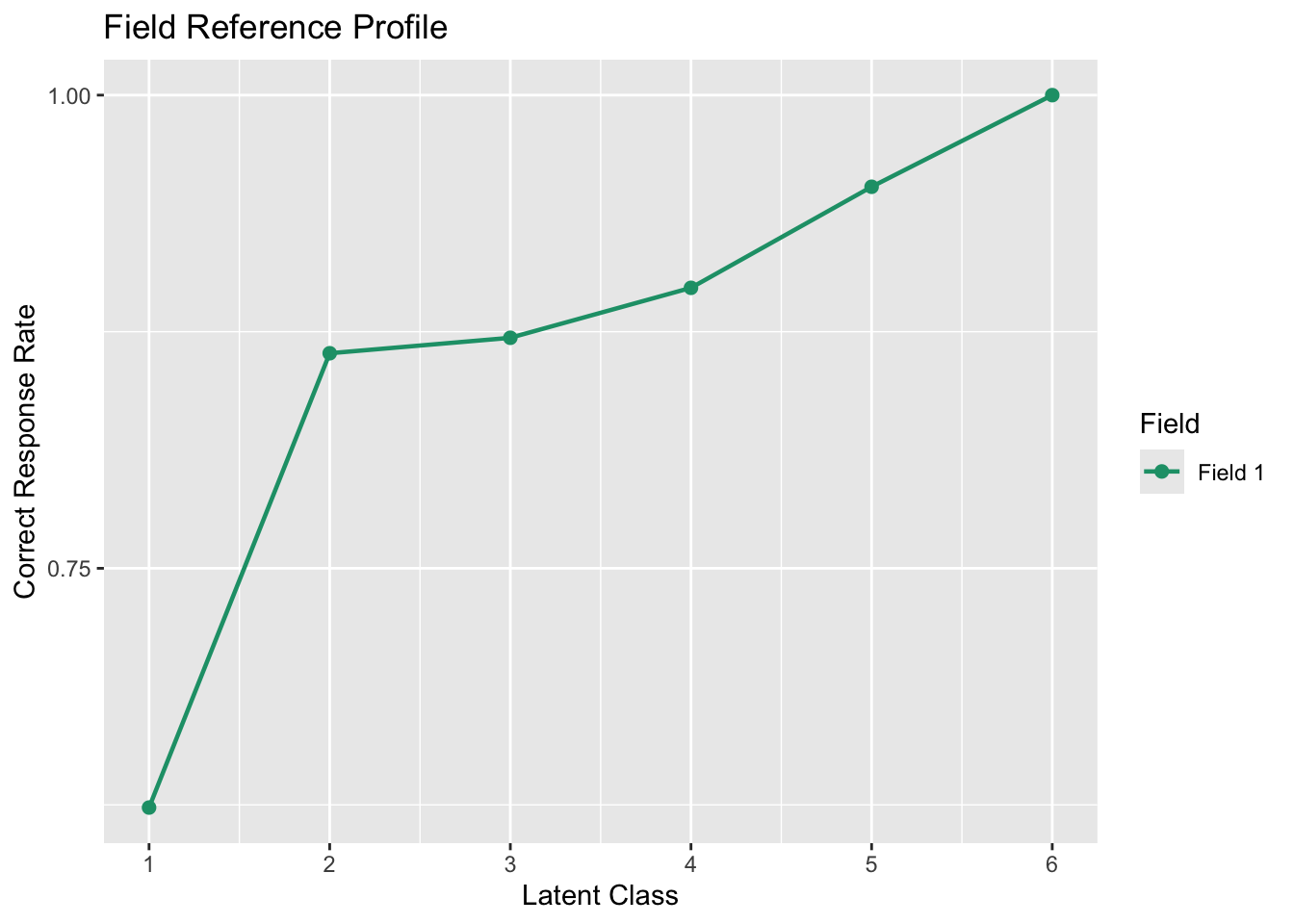
6.1.1.7 フィールド参照プロファイル(FRP)

plot(result.B, type = "FRP", nr = 2, nc = 3)

6.1.1.8 テスト参照プロファイル(TRP)

plot(result.B, type = "TRP")

6.1.2 可視化(ggExametrika)

library(ggExametrika)
plotArray_gg(result.B)

TableGrob (1 x 2) "arrange": 2 grobs
  z     cells    name           grob
1 1 (1-1,1-1) arrange gtable[layout]
2 2 (1-1,2-2) arrange gtable[layout]
plotCMP_gg(result.B)[[1]]
Warning in plotCMP_gg(result.B): The input data was supposed to be visualized
with The Rank Membership Profile, so I will plot the RMP.

plotLCD_gg(result.B)
Warning in plotLCD_gg(result.B): The input data was supposed to be visualized
with The Latent Rank Distribution, so I will plot the LRD.

plotCRV_gg(result.B)

plotFRP_gg(result.B, fields = 1)

plotTRP_gg(result.B)

6.2 ランク型バイクラスタリング(method = “R”)

method = "R"で潜在ランク(順序性あり)のバイクラスタリングを実行します。アルゴリズムとしてはLRAと同じ順序性を保ったフィルタ行列を通しています。

result.R <- Biclustering(dat, nfld = 5, ncls = 6, method = "R")
Ranklustering is chosen.

iter 1 log_lik -8097.56                                                         
iter 2 log_lik -7669.21                                                         
iter 3 log_lik -7586.72                                                         
iter 4 log_lik -7568.24                                                         
iter 5 log_lik -7561.02                                                         
iter 6 log_lik -7557.34                                                         
iter 7 log_lik -7557.36                                                         

Strongly ordinal alignment condition was satisfied.
No ID column detected. All columns treated as response data. Sequential IDs (Student1, Student2, ...) were generated. Use id= parameter to specify the ID column explicitly.
result.R
Ranklustering Analysis

Ranklustering Reference Matrix Profile
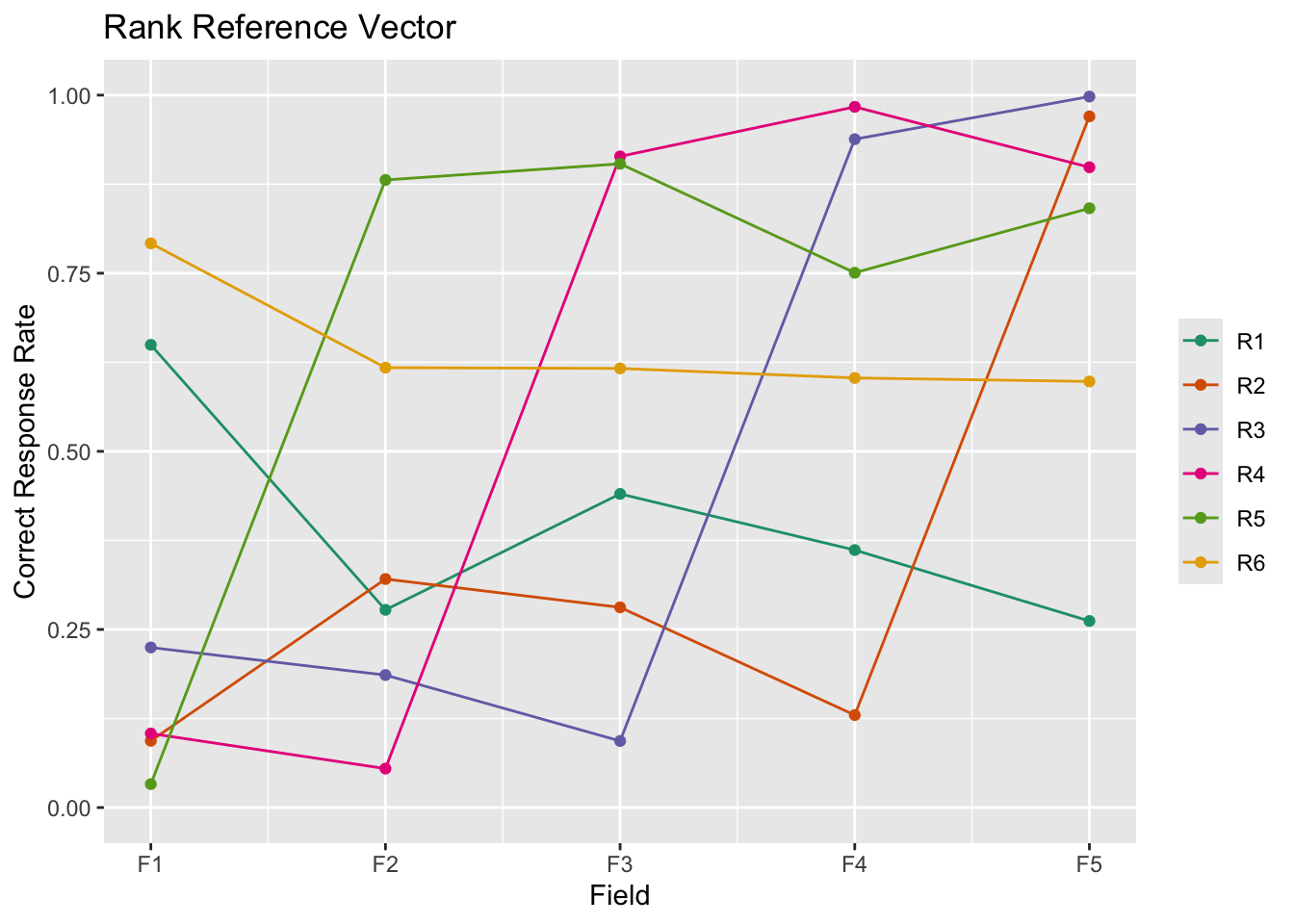
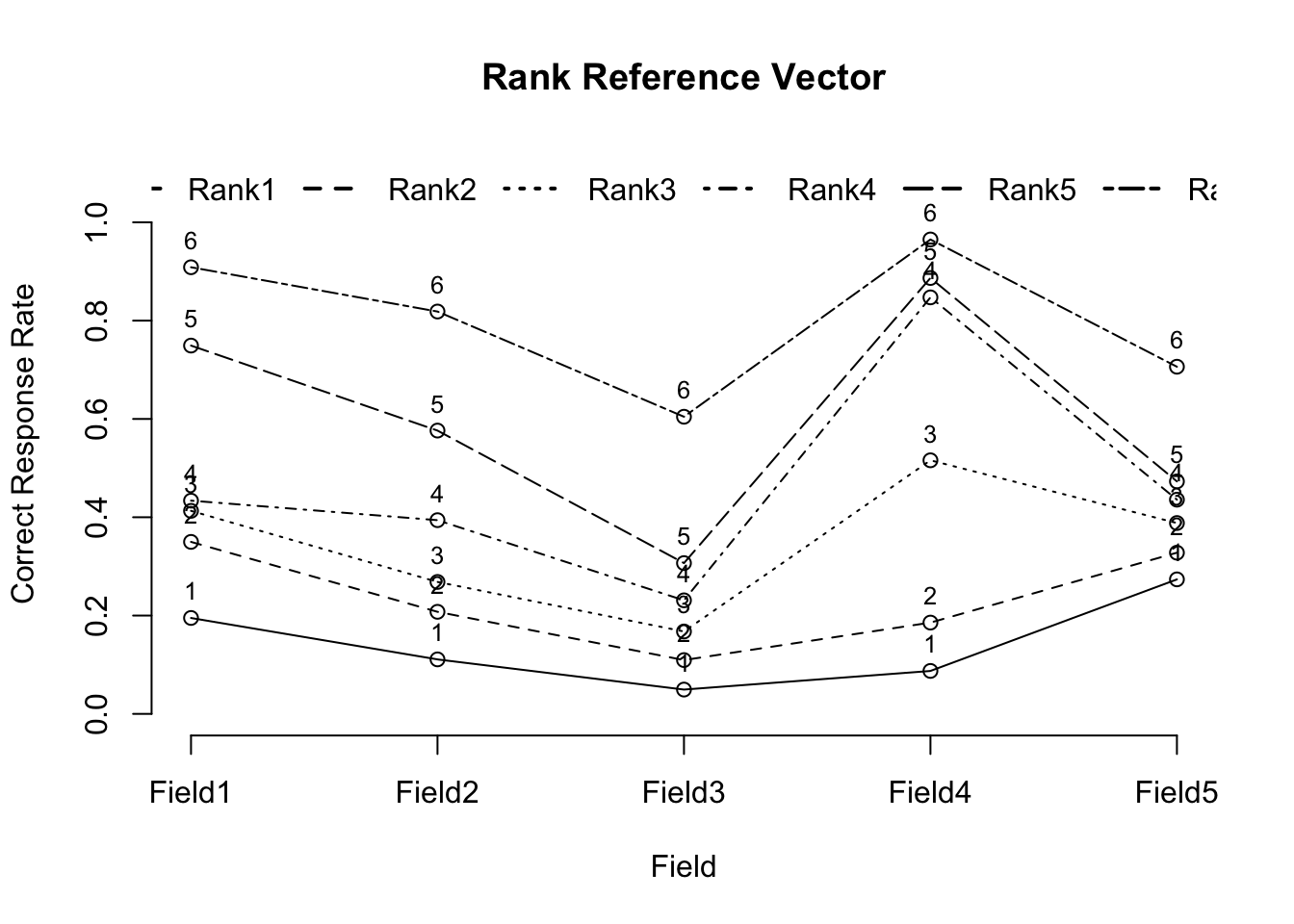
        Rank1  Rank2  Rank3 Rank4 Rank5 Rank6
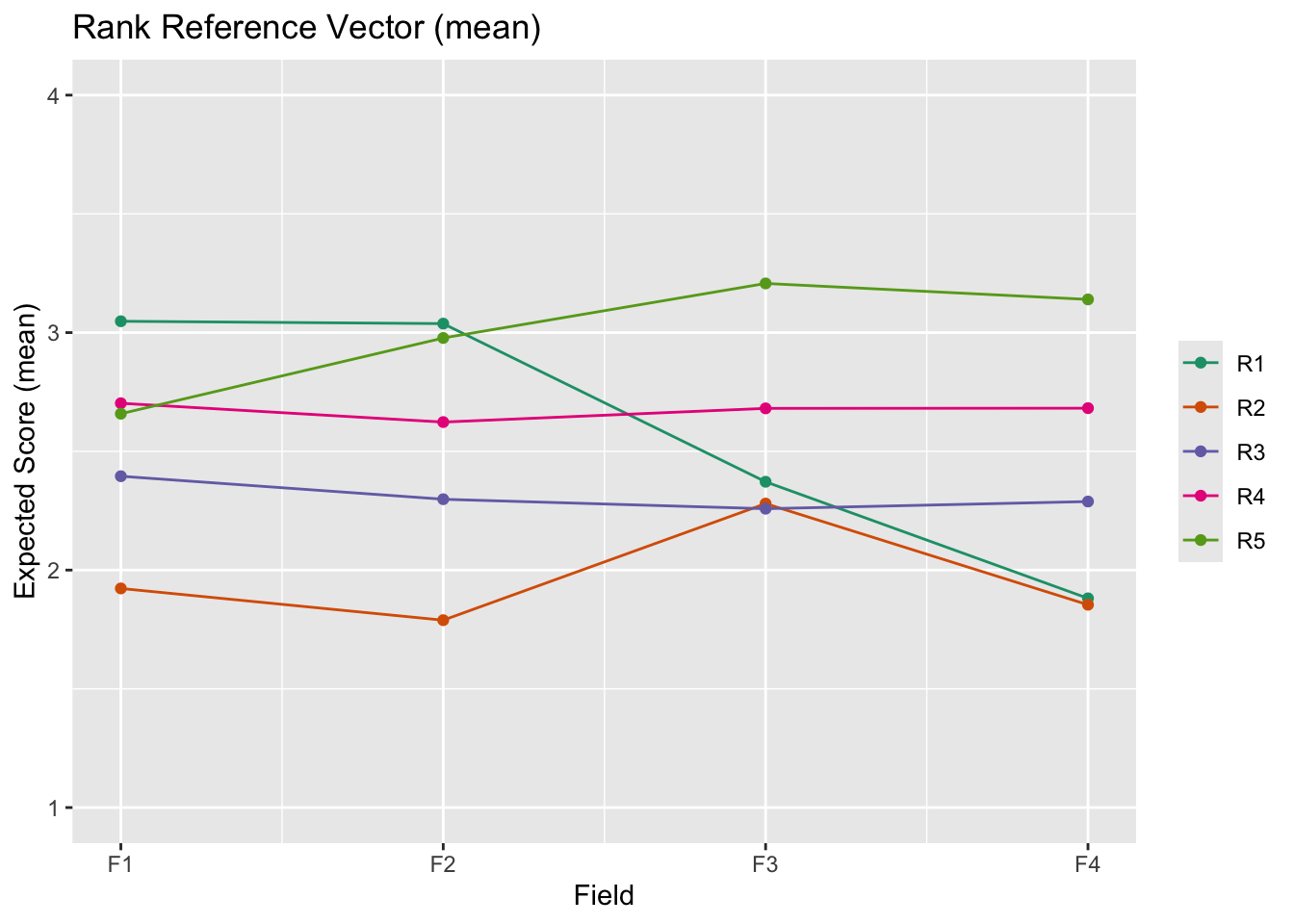
Field1 0.6495 0.7920 0.8809 0.914 0.938 0.970
Field2 0.0936 0.2775 0.6175 0.904 0.984 0.998
Field3 0.2247 0.3208 0.4403 0.616 0.751 0.899
Field4 0.1039 0.1860 0.2810 0.361 0.603 0.841
Field5 0.0329 0.0547 0.0934 0.130 0.262 0.598

Field Reference Profile Indices
       Alpha     A Beta     B Gamma C
Field1     1 0.142    1 0.650     0 0
Field2     2 0.340    3 0.617     0 0
Field3     3 0.176    3 0.440     0 0
Field4     4 0.242    5 0.603     0 0
Field5     5 0.336    6 0.598     0 0

                              Rank 1 Rank 2 Rank 3 Rank 4 Rank 5 Rank 6
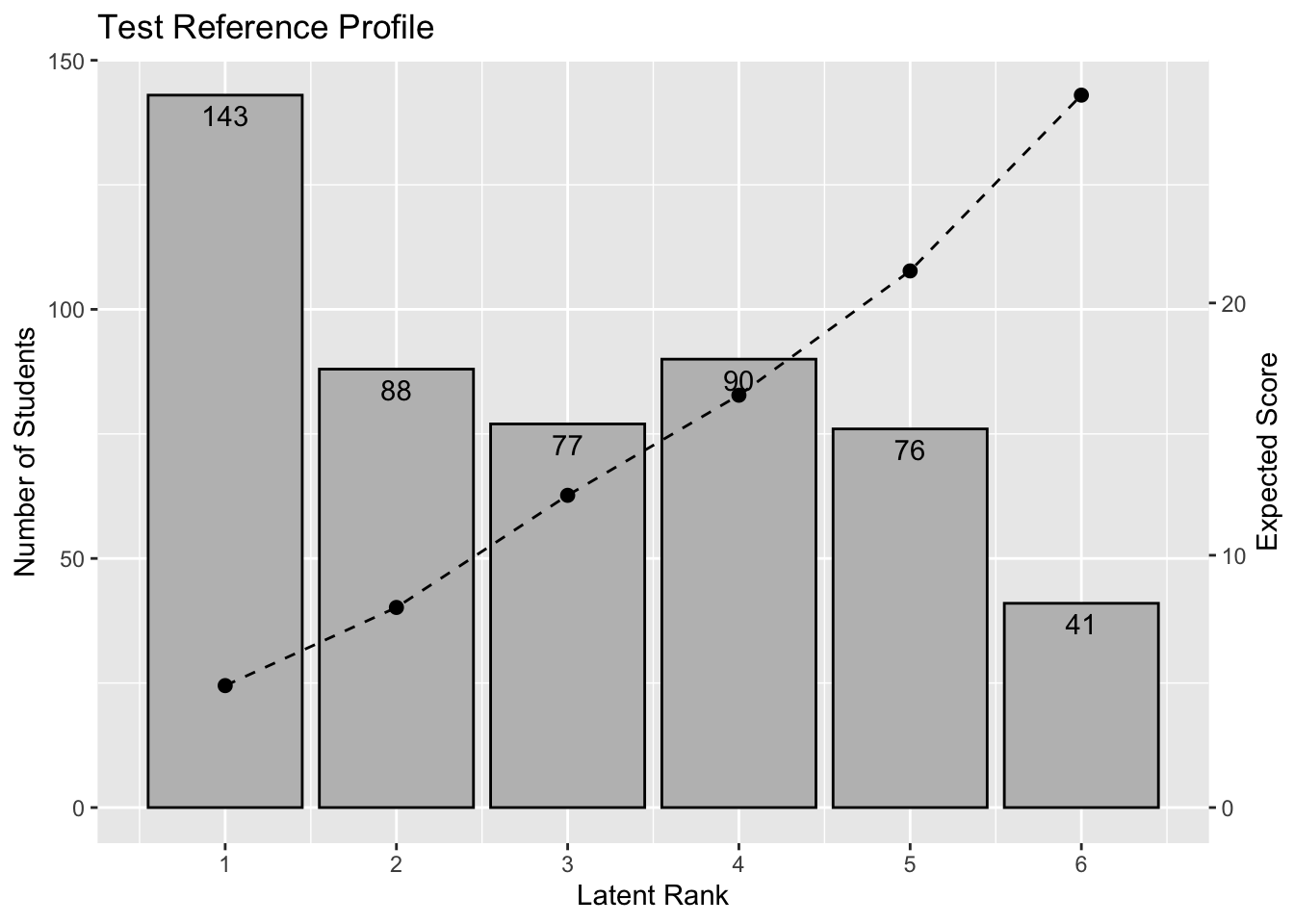
Test Reference Profile         4.834  7.932 12.376 16.345 21.272 28.239
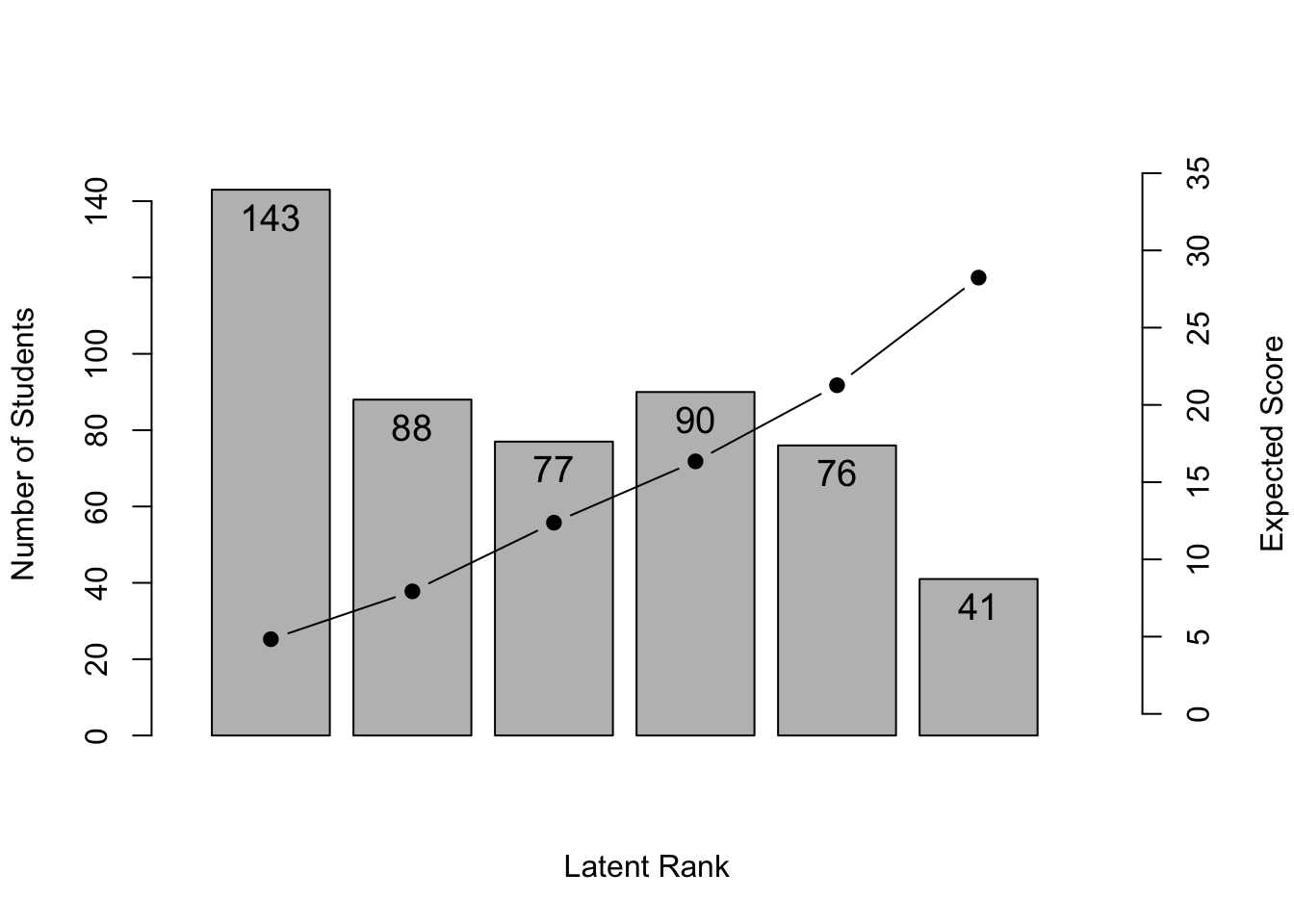
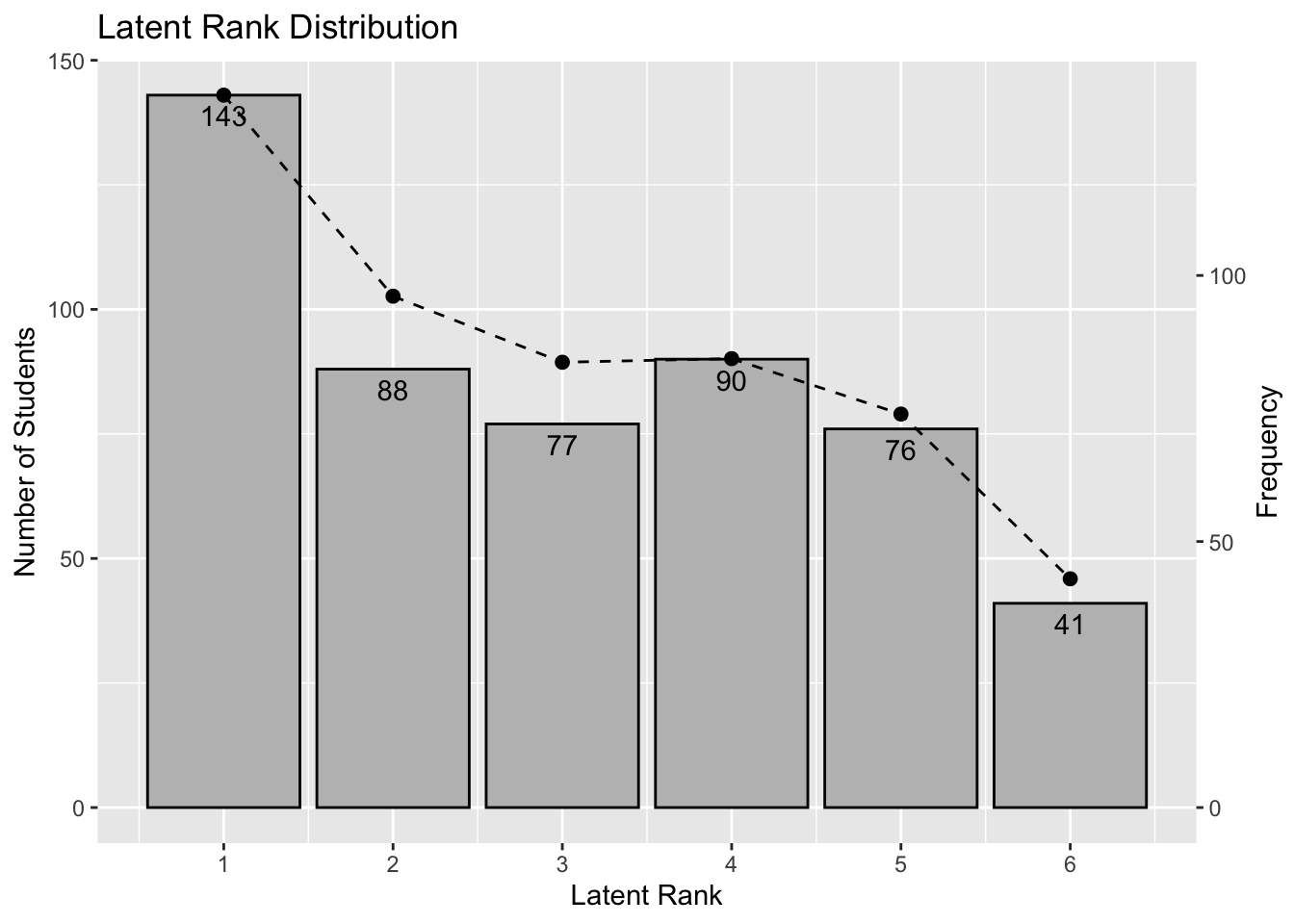
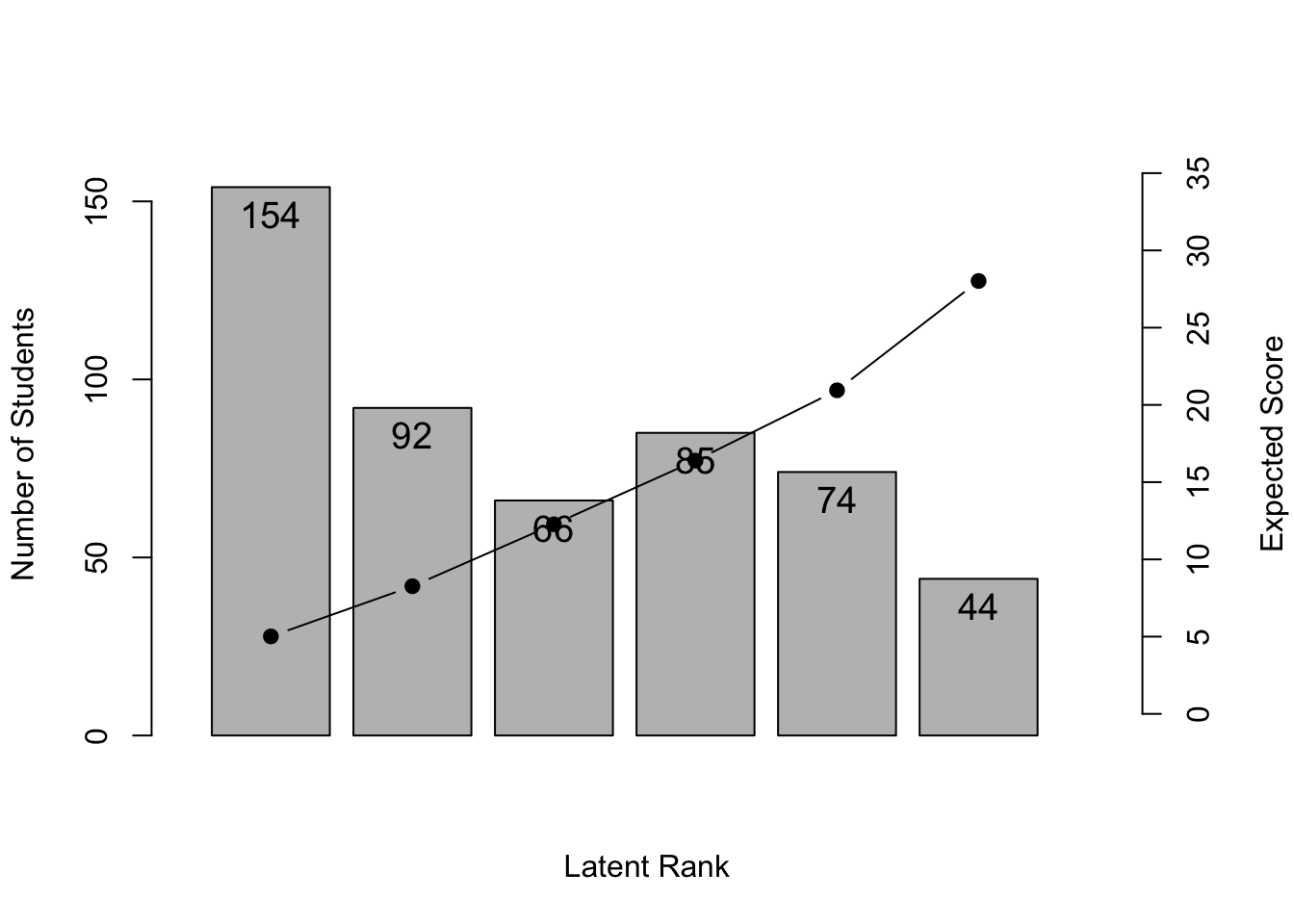
Latent Rank Ditribution      143.000 88.000 77.000 90.000 76.000 41.000
Rank Membership Distribution 133.892 96.100 83.688 84.373 73.955 42.992

Field Membership Profile
         CRR   LFE Field1 Field2 Field3 Field4 Field5
Item01 0.850 1.000  1.000  0.000  0.000  0.000  0.000
Item31 0.812 1.000  1.000  0.000  0.000  0.000  0.000
Item32 0.808 1.000  1.000  0.000  0.000  0.000  0.000
Item21 0.616 2.000  0.000  1.000  0.000  0.000  0.000
Item23 0.600 2.000  0.000  1.000  0.000  0.000  0.000
Item22 0.586 2.000  0.000  1.000  0.000  0.000  0.000
Item24 0.567 2.000  0.000  1.000  0.000  0.000  0.000
Item25 0.491 2.000  0.000  1.000  0.000  0.000  0.000
Item11 0.476 2.000  0.000  1.000  0.000  0.000  0.000
Item26 0.452 2.000  0.000  1.000  0.000  0.000  0.000
Item07 0.573 3.000  0.000  0.000  1.000  0.000  0.000
Item03 0.458 3.000  0.000  0.000  1.000  0.000  0.000
Item33 0.437 3.000  0.000  0.000  1.000  0.000  0.000
Item27 0.414 3.000  0.000  0.000  0.999  0.001  0.000
Item02 0.392 4.000  0.000  0.000  0.005  0.995  0.000
Item09 0.390 4.000  0.000  0.000  0.024  0.976  0.000
Item10 0.353 4.000  0.000  0.000  0.000  1.000  0.000
Item08 0.350 4.000  0.000  0.000  0.000  1.000  0.000
Item12 0.340 4.000  0.000  0.000  0.000  1.000  0.000
Item04 0.303 4.000  0.000  0.000  0.000  1.000  0.000
Item17 0.276 4.000  0.000  0.000  0.000  1.000  0.000
Item05 0.250 4.000  0.000  0.000  0.000  1.000  0.000
Item13 0.237 4.000  0.000  0.000  0.000  0.997  0.003
Item34 0.229 5.000  0.000  0.000  0.000  0.094  0.906
Item29 0.227 5.000  0.000  0.000  0.000  0.273  0.727
Item28 0.221 5.000  0.000  0.000  0.000  0.017  0.983
Item06 0.216 5.000  0.000  0.000  0.000  0.000  1.000
Item16 0.216 5.000  0.000  0.000  0.000  0.000  1.000
Item35 0.155 5.000  0.000  0.000  0.000  0.000  1.000
Item14 0.126 5.000  0.000  0.000  0.000  0.000  1.000
Item15 0.087 5.000  0.000  0.000  0.000  0.000  1.000
Item30 0.085 5.000  0.000  0.000  0.000  0.000  1.000
Item20 0.054 5.000  0.000  0.000  0.000  0.000  1.000
Item19 0.052 5.000  0.000  0.000  0.000  0.000  1.000
Item18 0.049 5.000  0.000  0.000  0.000  0.000  1.000
Latent Field Distribution
           Field 1 Field 2 Field 3 Field 4 Field 5
N of Items       3       7       4       9      12

Model Fit Indices
Number of Latent Rank : 6
Number of Latent Field: 5
Number of EM cycle: 7 
                   value
model_log_like -7273.063
bench_log_like -5891.314
null_log_like  -9862.114
model_Chi_sq    2763.498
null_Chi_sq     7941.601
model_df        1166.164
null_df         1155.000
NFI                0.652
RFI                0.655
IFI                0.764
TLI                0.767
CFI                0.765
RMSEA              0.052
AIC              431.170
CAIC           -5684.386
BIC            -4518.223
Strongly Ordinal Alignment Condition is Satisfied.
Weakly Ordinal Alignment Condition is Satisfied.

6.2.1 可視化(baseグラフィックス)

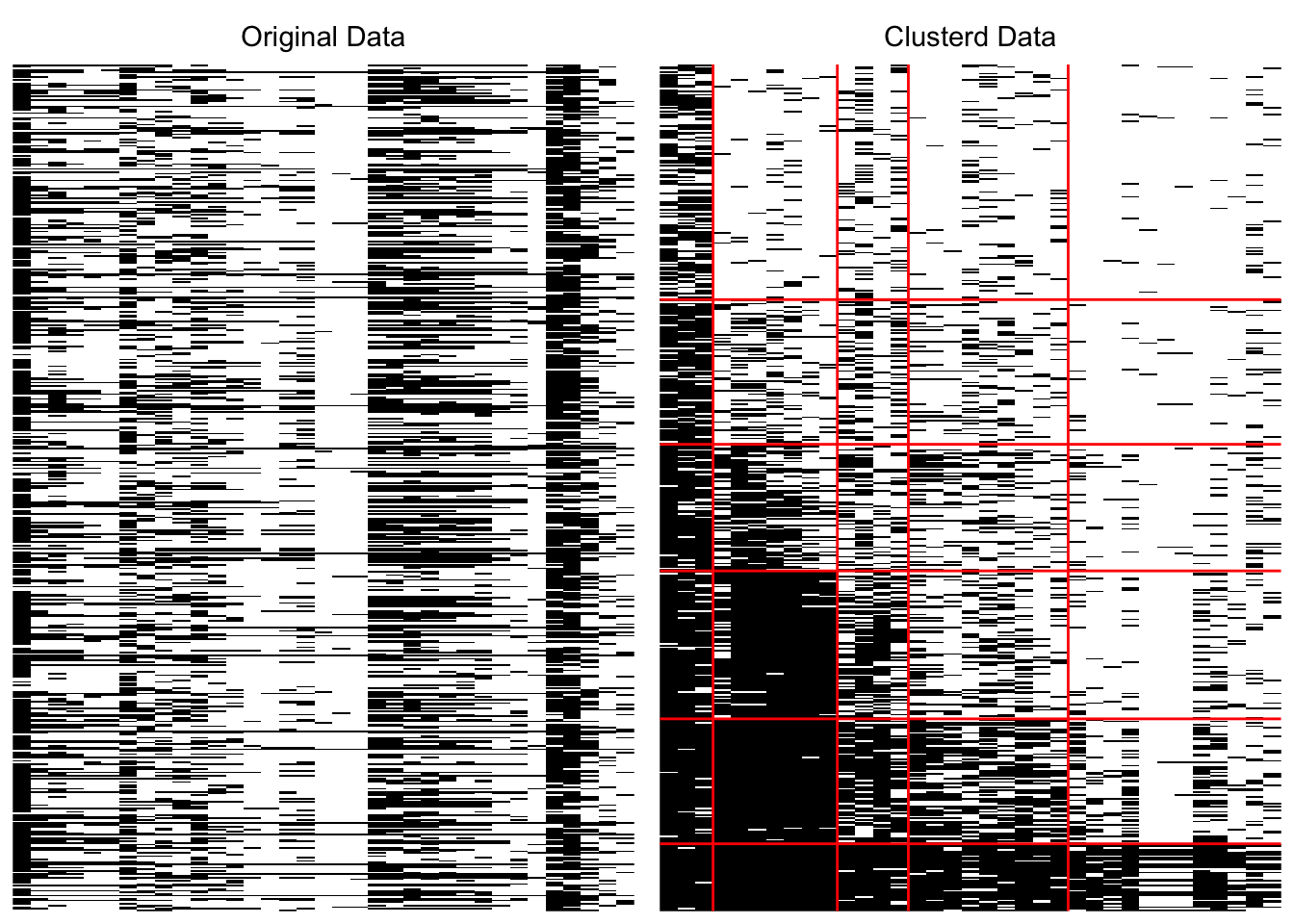
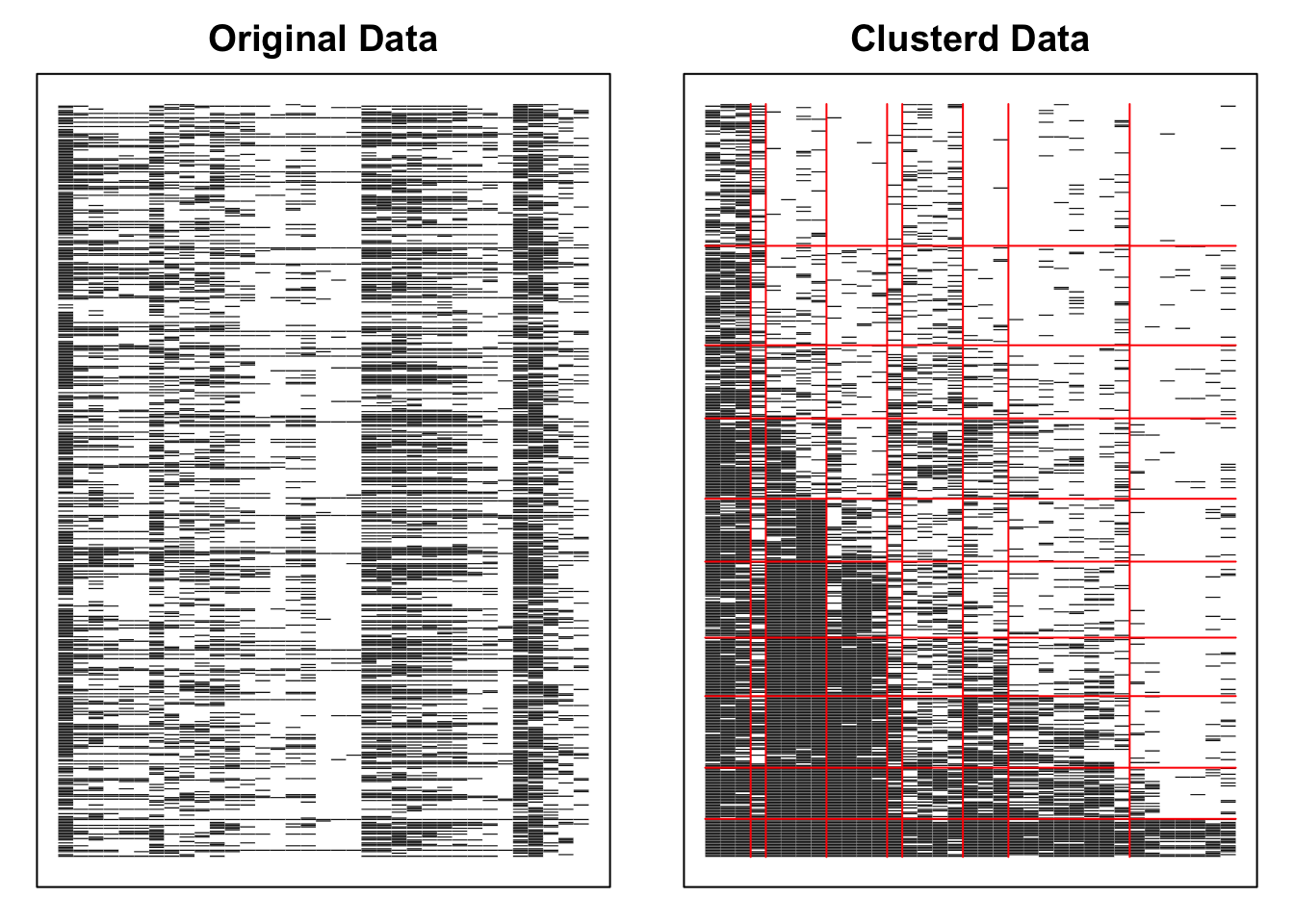
plot(result.R, type = "Array")

plot(result.R, type = "RMP", students = 1:6, nr = 2, nc = 3)

plot(result.R, type = "LRD")

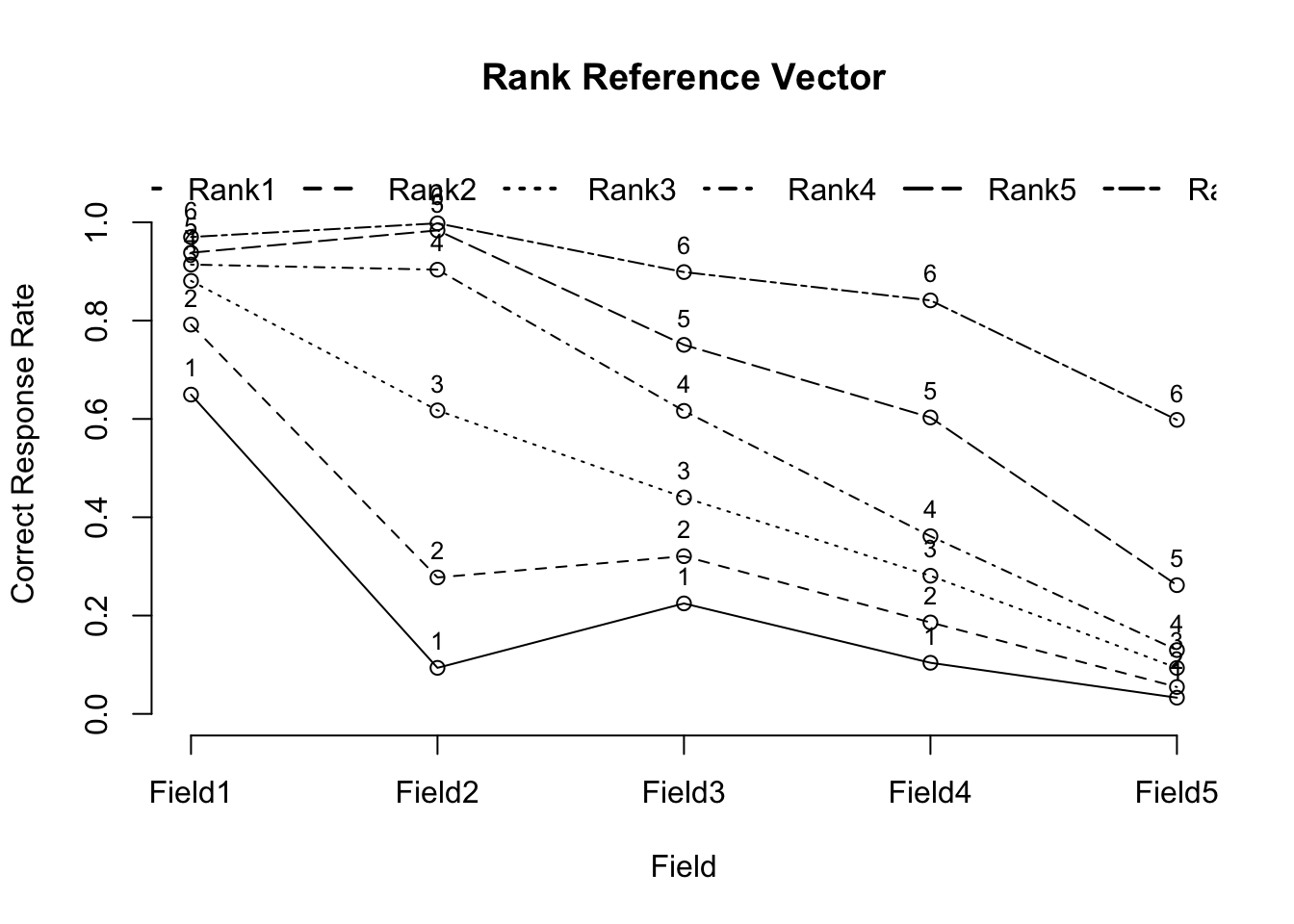
plot(result.R, type = "RRV")

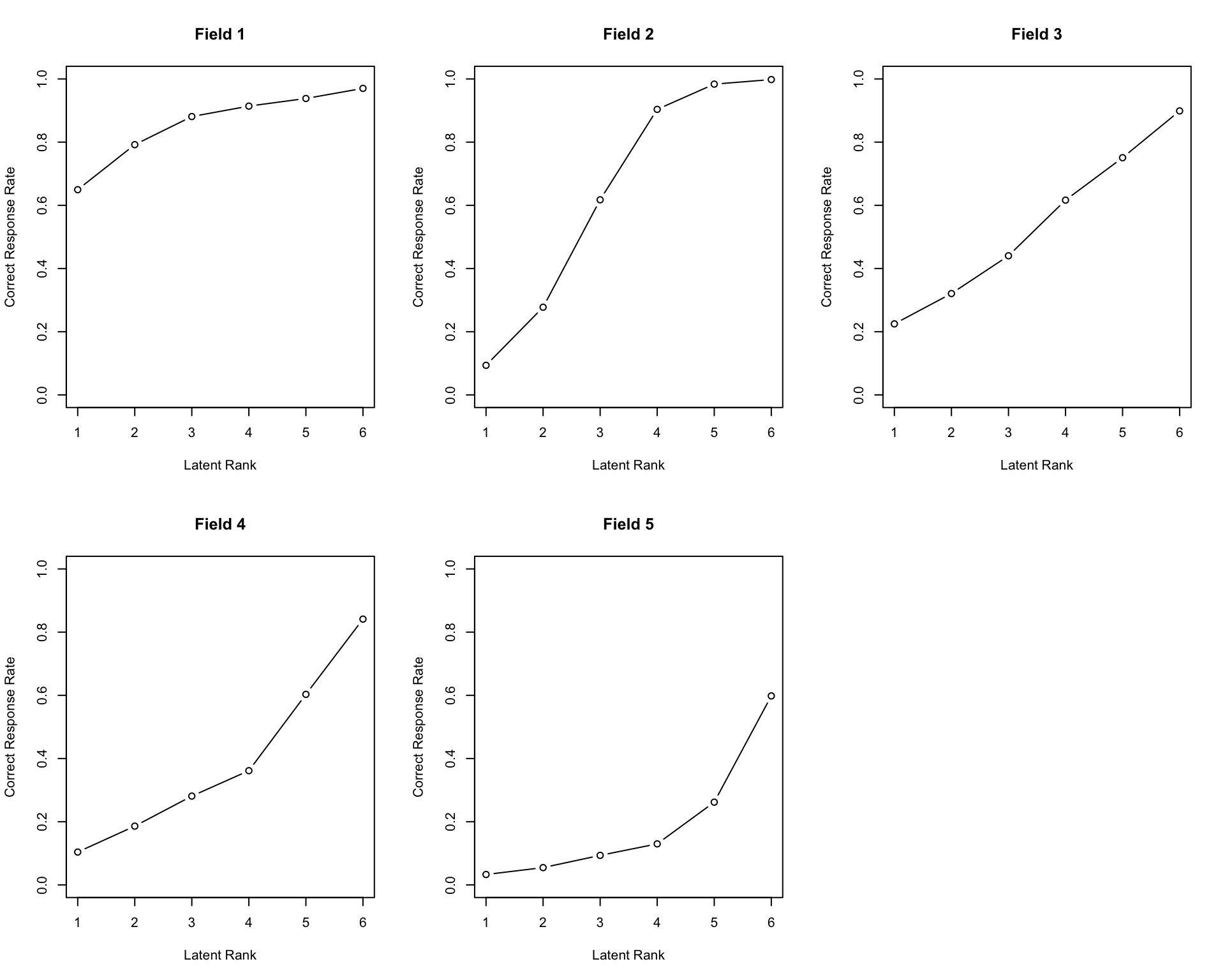
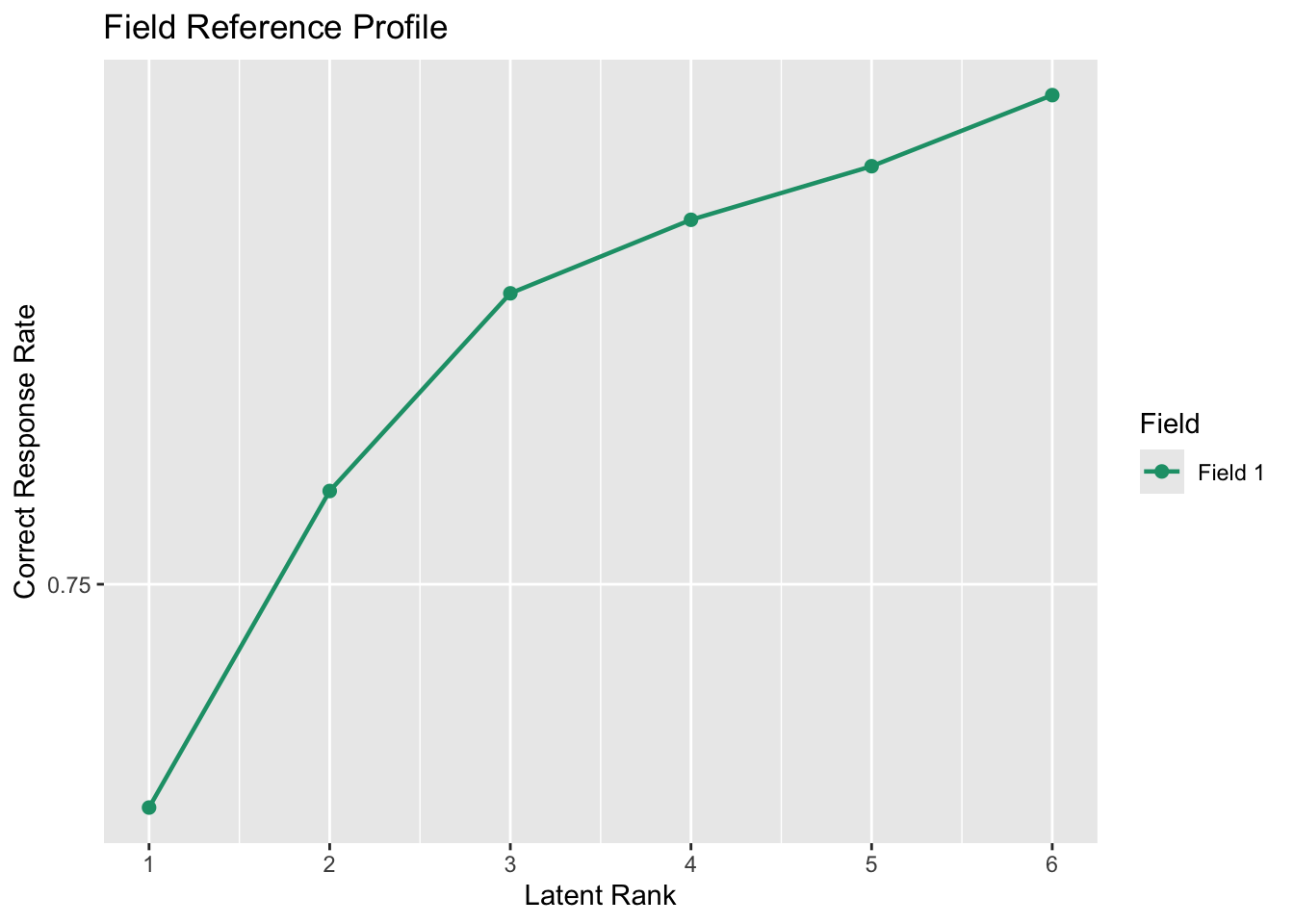
result.R$FRP
            Rank1      Rank2      Rank3     Rank4     Rank5     Rank6
Field1 0.64951141 0.79197342 0.88093148 0.9140316 0.9381373 0.9701273
Field2 0.09362918 0.27752126 0.61746787 0.9036746 0.9835653 0.9979939
Field3 0.22472428 0.32079306 0.44027355 0.6163989 0.7507110 0.8988009
Field4 0.10394873 0.18598451 0.28100007 0.3614656 0.6030432 0.8411943
Field5 0.03293073 0.05469207 0.09344104 0.1298351 0.2618470 0.5980969
plot(result.R, type = "FRP", nr = 2, nc = 3)

plot(result.R, type = "TRP")

6.2.2 可視化(ggExametrika)

plotArray_gg(result.R)

TableGrob (1 x 2) "arrange": 2 grobs
  z     cells    name           grob
1 1 (1-1,1-1) arrange gtable[layout]
2 2 (1-1,2-2) arrange gtable[layout]
plotRMP_gg(result.R)[[1]]

plotLRD_gg(result.R)

plotRRV_gg(result.R)

plotFRP_gg(result.R, fields = 1)

plotTRP_gg(result.R)

6.3 確認的分析(conf引数)

どの項目がどのフィールドに入るかを事前に指定して分析できます。項目がテストの領域などに対応している仮説がある場合に便利です。

result.R.conf <- Biclustering(dat,
  nfld = 5, ncls = 6, method = "R",
  conf = c(
    1, 1, 1, 1, 1, 1, 1,
    2, 2, 2, 2, 2, 2, 2,
    3, 3, 3, 3, 3, 3, 3,
    4, 4, 4, 4, 4, 4, 4,
    5, 5, 5, 5, 5, 5, 5
  )
)
Ranklustering is chosen.
Confirmatory Clustering is chosen.

iter 1 log_lik -9468.24                                                         
iter 2 log_lik -9272.71                                                         
iter 3 log_lik -9258.44                                                         
iter 4 log_lik -9250.23                                                         
iter 5 log_lik -9244.67                                                         
iter 6 log_lik -9242.74                                                         
iter 7 log_lik -9243.17                                                         

Strongly ordinal alignment condition was satisfied.
No ID column detected. All columns treated as response data. Sequential IDs (Student1, Student2, ...) were generated. Use id= parameter to specify the ID column explicitly.
plot(result.R.conf, type = "RRV")

plot(result.R.conf, type = "TRP")

6.4 グリッドサーチ(GridSearch)

最適なフィールド数とクラス数がわからない場合は,グリッドサーチで総当たり探索ができます。index引数で最適化基準(BIC, AIC等)を指定します。

result.GS <- GridSearch(dat, method = "R", max_ncls = 10, max_nfld = 10, index = "BIC", verbose = FALSE)
No ID column detected. All columns treated as response data. Sequential IDs (Student1, Student2, ...) were generated. Use id= parameter to specify the ID column explicitly.

Optimal ncls/nrank is  10 and Optimal nfld is 9
Running analysis with optimal parameters...
Ranklustering is chosen.

iter 1 log_lik -7879.51                                                         
iter 2 log_lik -7331.98                                                         
iter 3 log_lik -7131.01                                                         
iter 4 log_lik -7072.58                                                         
iter 5 log_lik -7053.31                                                         
iter 6 log_lik -7045.83                                                         
iter 7 log_lik -7043.5                                                          
iter 8 log_lik -7043.72                                                         

Weakly ordinal alignment condition was satisfied.
No ID column detected. All columns treated as response data. Sequential IDs (Student1, Student2, ...) were generated. Use id= parameter to specify the ID column explicitly.
result.GS$optimal_ncls
[1] 10
result.GS$optimal_nfld
[1] 9
plot(result.GS$optimal_result, type = "Array")

6.5 無限関係モデル(IRM)

Biclustering_IRM()は,ノンパラメトリックベイズの手法により潜在的なクラスとフィールドの数を自動で推定します。gamma_cgamma_fはCRP(Chinese Restaurant Process)の集中度パラメータです。

result.IRM <- Biclustering_IRM(dat, gamma_c = 1, gamma_f = 1, verbose = FALSE)
result.IRM
Bicluster Reference Matrix
        Class1 Class2  Class3 Class4 Class5 Class6 Class7 Class8 Class9 Class10
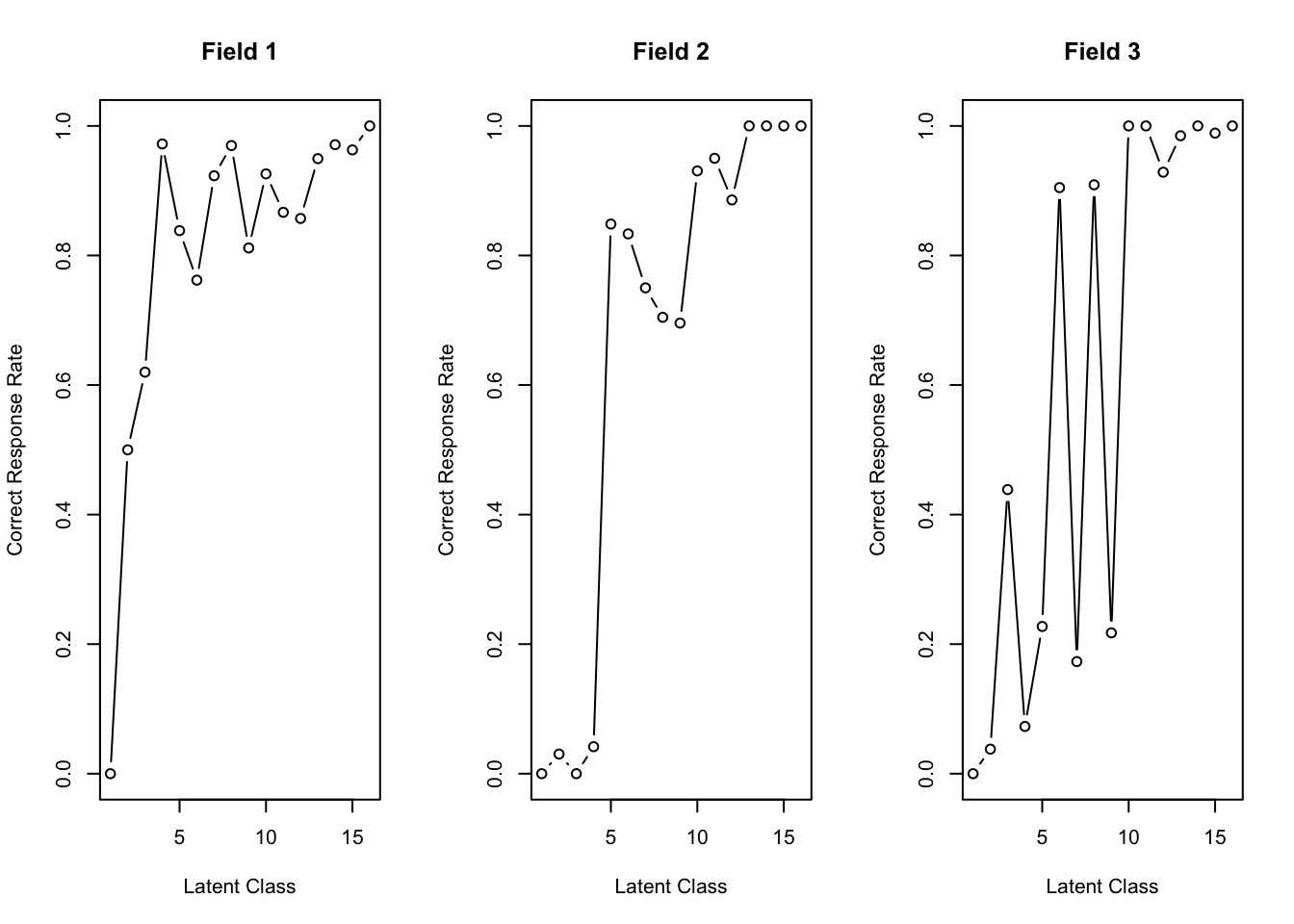
Field1       0 0.5000 0.61988 0.9722 0.8384 0.7619 0.9231 0.9697 0.8116  0.9259
Field2       0 0.0303 0.00000 0.0417 0.8485 0.8333 0.7500 0.7045 0.6957  0.9306
Field3       0 0.0379 0.43860 0.0729 0.2273 0.9048 0.1731 0.9091 0.2174  1.0000
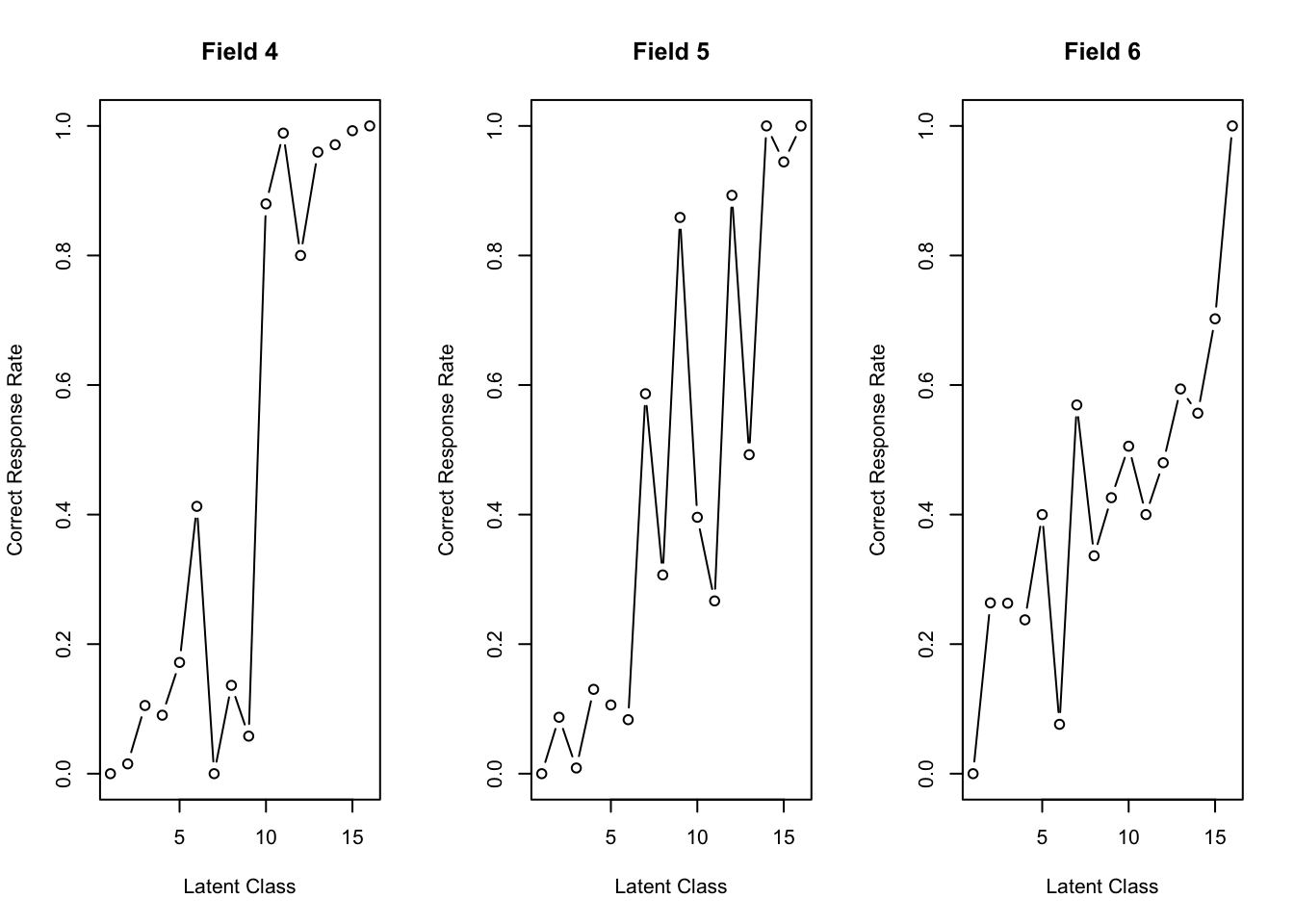
Field4       0 0.0152 0.10526 0.0903 0.1717 0.4127 0.0000 0.1364 0.0580  0.8796
Field5       0 0.0871 0.00877 0.1302 0.1061 0.0833 0.5865 0.3068 0.8587  0.3958
Field6       0 0.2636 0.26316 0.2375 0.4000 0.0762 0.5692 0.3364 0.4261  0.5056
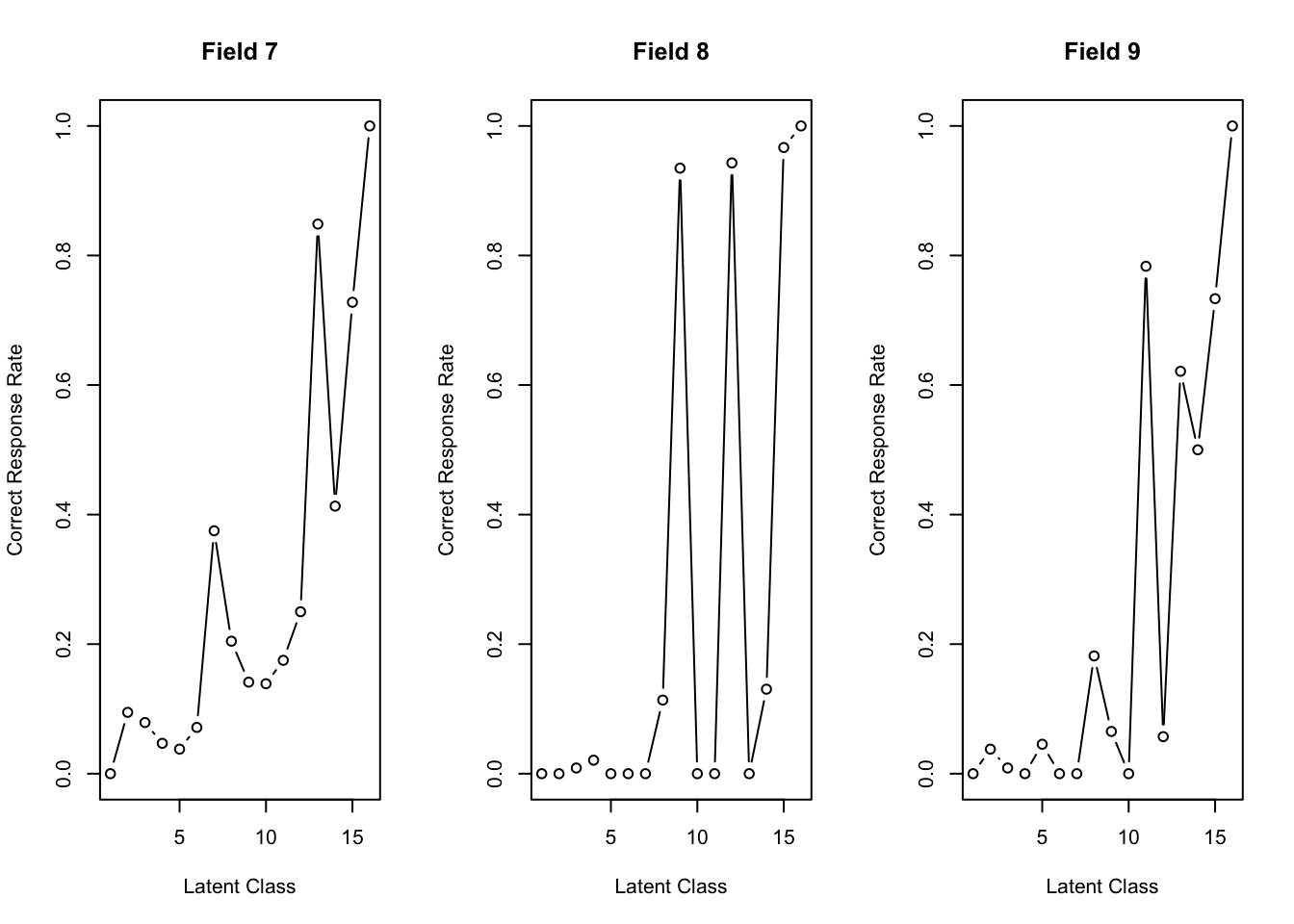
Field7       0 0.0947 0.07895 0.0469 0.0379 0.0714 0.3750 0.2045 0.1413  0.1389
Field8       0 0.0000 0.00877 0.0208 0.0000 0.0000 0.0000 0.1136 0.9348  0.0000
Field9       0 0.0379 0.00877 0.0000 0.0455 0.0000 0.0000 0.1818 0.0652  0.0000
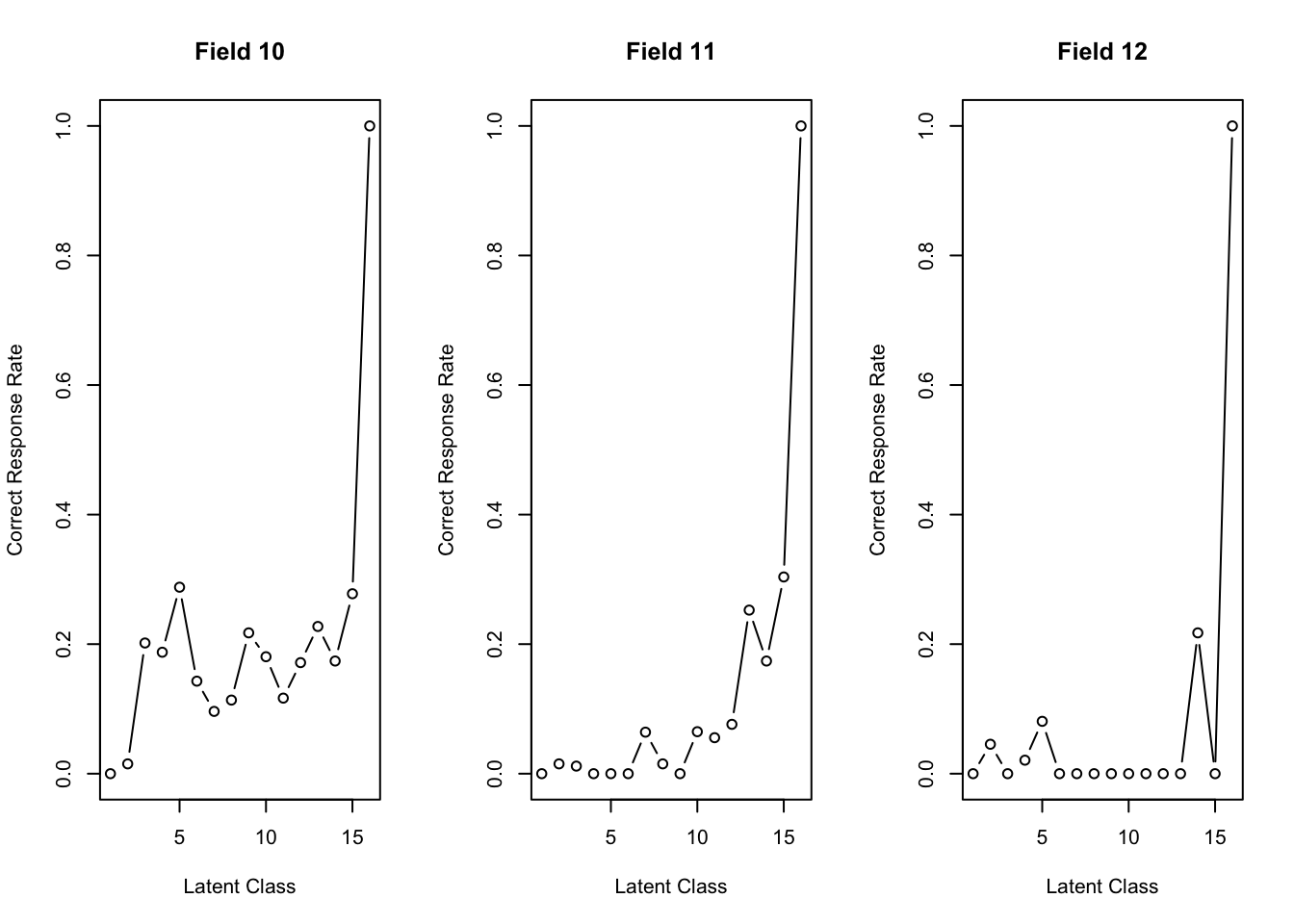
Field10      0 0.0152 0.20175 0.1875 0.2879 0.1429 0.0962 0.1136 0.2174  0.1806
Field11      0 0.0152 0.01170 0.0000 0.0000 0.0000 0.0641 0.0152 0.0000  0.0648
Field12      0 0.0455 0.00000 0.0208 0.0808 0.0000 0.0000 0.0000 0.0000  0.0000
        Class11 Class12 Class13 Class14 Class15 Class16
Field1   0.8667  0.8571   0.949   0.971   0.963       1
Field2   0.9500  0.8857   1.000   1.000   1.000       1
Field3   1.0000  0.9286   0.985   1.000   0.989       1
Field4   0.9889  0.8000   0.960   0.971   0.993       1
Field5   0.2667  0.8929   0.492   1.000   0.944       1
Field6   0.4000  0.4800   0.594   0.557   0.702       1
Field7   0.1750  0.2500   0.848   0.413   0.728       1
Field8   0.0000  0.9429   0.000   0.130   0.967       1
Field9   0.7833  0.0571   0.621   0.500   0.733       1
Field10  0.1167  0.1714   0.227   0.174   0.278       1
Field11  0.0556  0.0762   0.253   0.174   0.304       1
Field12  0.0000  0.0000   0.000   0.217   0.000       1
                         class 1 class 2 class 3 class 4 class 5 class 6
Test Reference Profile         0   4.015   5.193   5.792   8.667   8.286
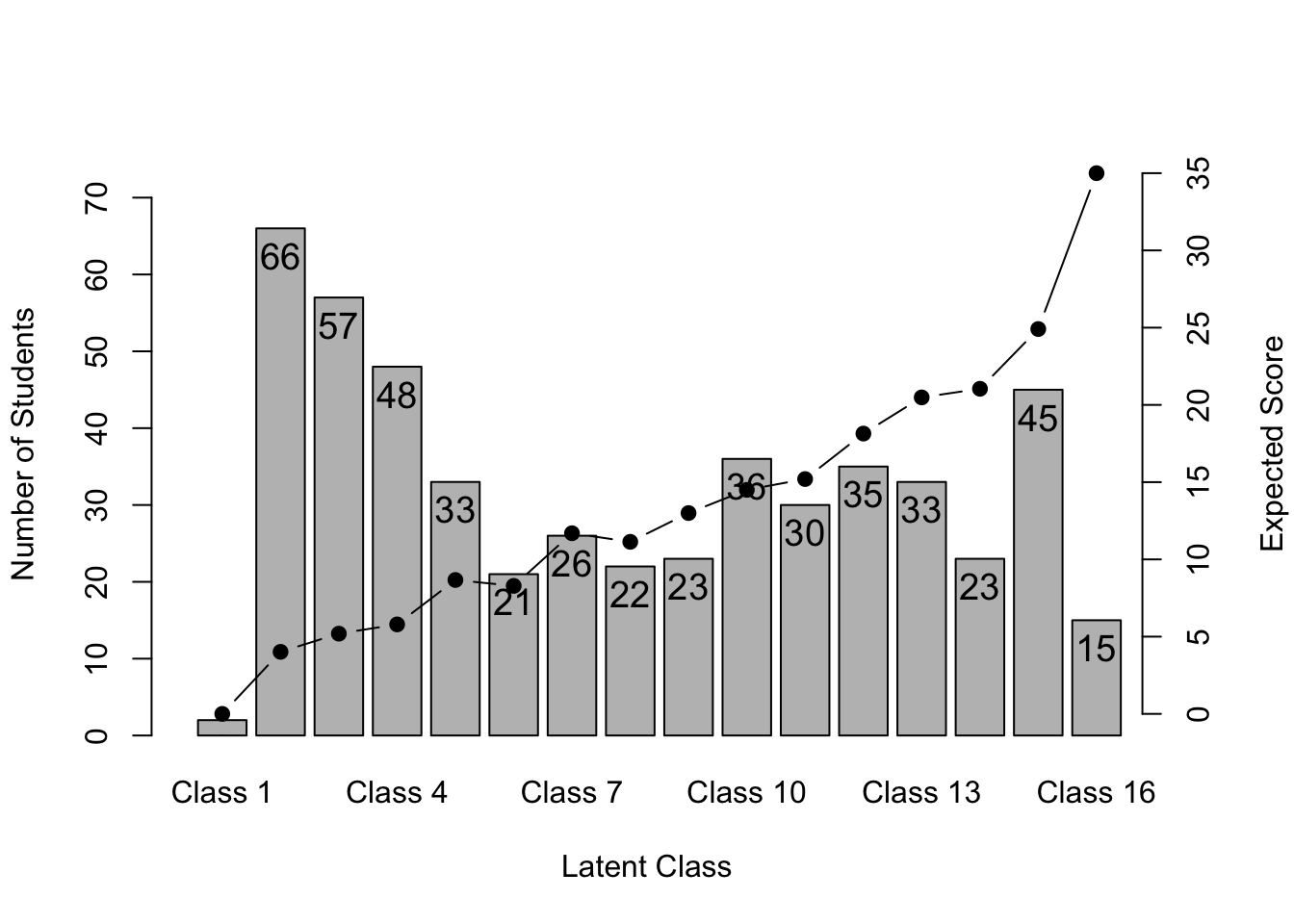
Latent class Ditribution       2  66.000  57.000  48.000  33.000  21.000
                         class 7 class 8 class 9 class 10 class 11 class 12
Test Reference Profile    11.692  11.136      13     14.5     15.2   18.143
Latent class Ditribution  26.000  22.000      23     36.0     30.0   35.000
                         class 13 class 14 class 15 class 16
Test Reference Profile     20.485   21.043   24.911       35
Latent class Ditribution   33.000   23.000   45.000       15
Latent Field Distribution
           Field 1 Field 2 Field 3 Field 4 Field 5 Field 6 Field 7 Field 8
N of Items       3       2       2       3       4       5       4       2
           Field 9 Field 10 Field 11 Field 12
N of Items       2        2        3        3

Model Fit Indices
Number of Latent Class : 16
Number of Latent Field: 12
Number of EM cycle: 6 
                   value
model_log_like -5664.270
bench_log_like -5891.314
null_log_like  -9862.114
model_Chi_sq    -454.089
null_Chi_sq     7941.601
model_df         998.000
null_df         1155.000
NFI                1.000
RFI                1.000
IFI                1.000
TLI                1.000
CFI                1.000
RMSEA              0.000
AIC            -2450.089
CAIC           -7683.768
BIC            -6685.768
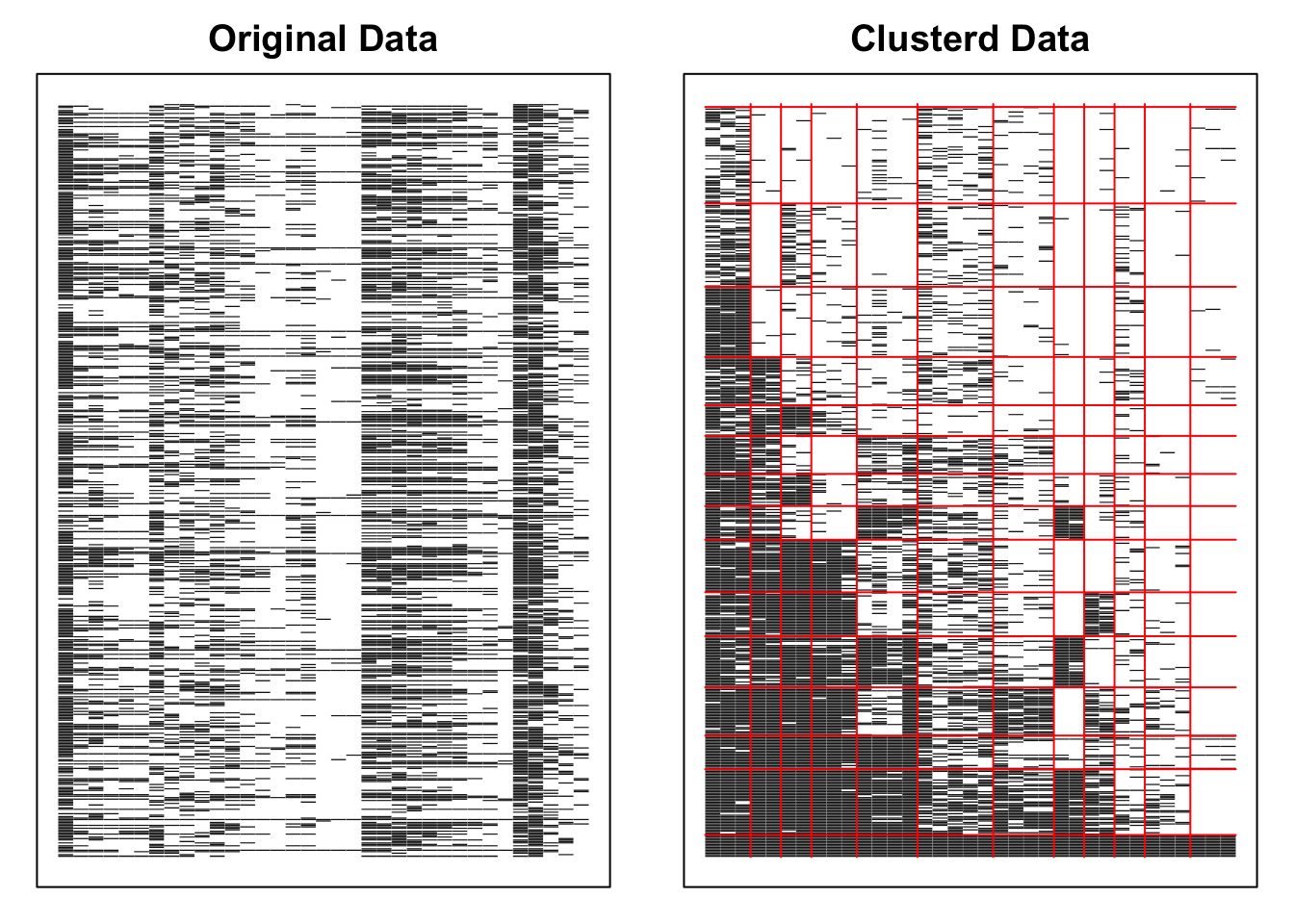
plot(result.IRM, type = "Array")

plot(result.IRM, type = "FRP", nc = 3)

plot(result.IRM, type = "TRP")

6.6 多値バイクラスタリング

6.6.1 順序データ

サンプルデータJ35S500(5件法・35項目・500人)を使用します。

result.B.ord <- Biclustering(J35S500, ncls = 5, nfld = 5, method = "R")
Ranklustering is chosen.
iter 1 log_lik -22710.5 
iter 2 log_lik -21311.9 
iter 3 log_lik -21002.5 
iter 4
log_lik -20945.8 
iter 5 log_lik -20932.3 
iter 6 log_lik -20929.2 
iter 7 log_lik
-20929.8
result.B.ord
Ranklustering Analysis

Ranklustering Reference Matrix Profile
For category 1 
        Rank 1 Rank 2 Rank 3 Rank 4 Rank 5
Field 1  0.334  0.354 0.3501 0.3429 0.1982
Field 2  0.405  0.331 0.3909 0.3510 0.0333
Field 3  0.359  0.324 0.3681 0.3397 0.0224
Field 4  0.412  0.454 0.3914 0.0185 0.0137
Field 5  0.251  0.028 0.0129 0.0147 0.0156
For category 2 
        Rank 1 Rank 2 Rank 3 Rank 4 Rank 5
Field 1  0.300 0.2461  0.280 0.2799 0.1556
Field 2  0.303 0.2997  0.338 0.2948 0.0381
Field 3  0.299 0.3085  0.331 0.2601 0.0468
Field 4  0.302 0.2889  0.265 0.0422 0.0350
Field 5  0.156 0.0532  0.011 0.0223 0.0230
For category 3 
        Rank 1 Rank 2 Rank 3 Rank 4 Rank 5
Field 1  0.179 0.1893 0.1759 0.2001 0.1483
Field 2  0.101 0.2080 0.2139 0.1621 0.1674
Field 3  0.173 0.1663 0.1731 0.1704 0.1023
Field 4  0.190 0.1692 0.1543 0.1058 0.0967
Field 5  0.093 0.0709 0.0592 0.0627 0.0560
For category 4 
        Rank 1 Rank 2 Rank 3 Rank 4 Rank 5
Field 1 0.1335 0.1096 0.1280 0.1141  0.213
Field 2 0.1065 0.0983 0.0266 0.0996  0.257
Field 3 0.1147 0.1234 0.1036 0.1371  0.281
Field 4 0.0622 0.0667 0.0907 0.2488  0.282
Field 5 0.0971 0.2182 0.1762 0.1993  0.188
For category 5 
        Rank 1 Rank 2 Rank 3 Rank 4 Rank 5
Field 1 0.0535 0.1013 0.0660 0.0631  0.285
Field 2 0.0842 0.0629 0.0307 0.0925  0.504
Field 3 0.0537 0.0773 0.0243 0.0927  0.547
Field 4 0.0340 0.0214 0.0985 0.5847  0.573
Field 5 0.4030 0.6297 0.7406 0.7010  0.717
                             Rank 1 Rank 2 Rank 3  Rank 4  Rank 5
Test Reference Profile       10.527 11.932 11.810  15.173  22.488
Latent Rank Ditribution      97.000 49.000 58.000 103.000 193.000
Rank Membership Distribution 97.995 49.936 55.738 105.120 191.211
Latent Field Distribution
           Field 1 Field 2 Field 3 Field 4 Field 5
N of Items       7       2       5       7      14
Boundary field reference profile
Weighted
        Rank 1 Rank 2 Rank 3 Rank 4 Rank 5
Field 1  1.864  1.846  1.824  1.852  3.466
Field 2  1.616  1.875  1.666  1.767  4.627
Field 3  1.760  1.876  1.714  1.865  4.721
Field 4  1.596  1.484  1.671  4.782  4.755
Field 5  3.692  4.851  4.933  4.907  4.920
Observed
        Rank 1 Rank 2 Rank 3 Rank 4 Rank 5
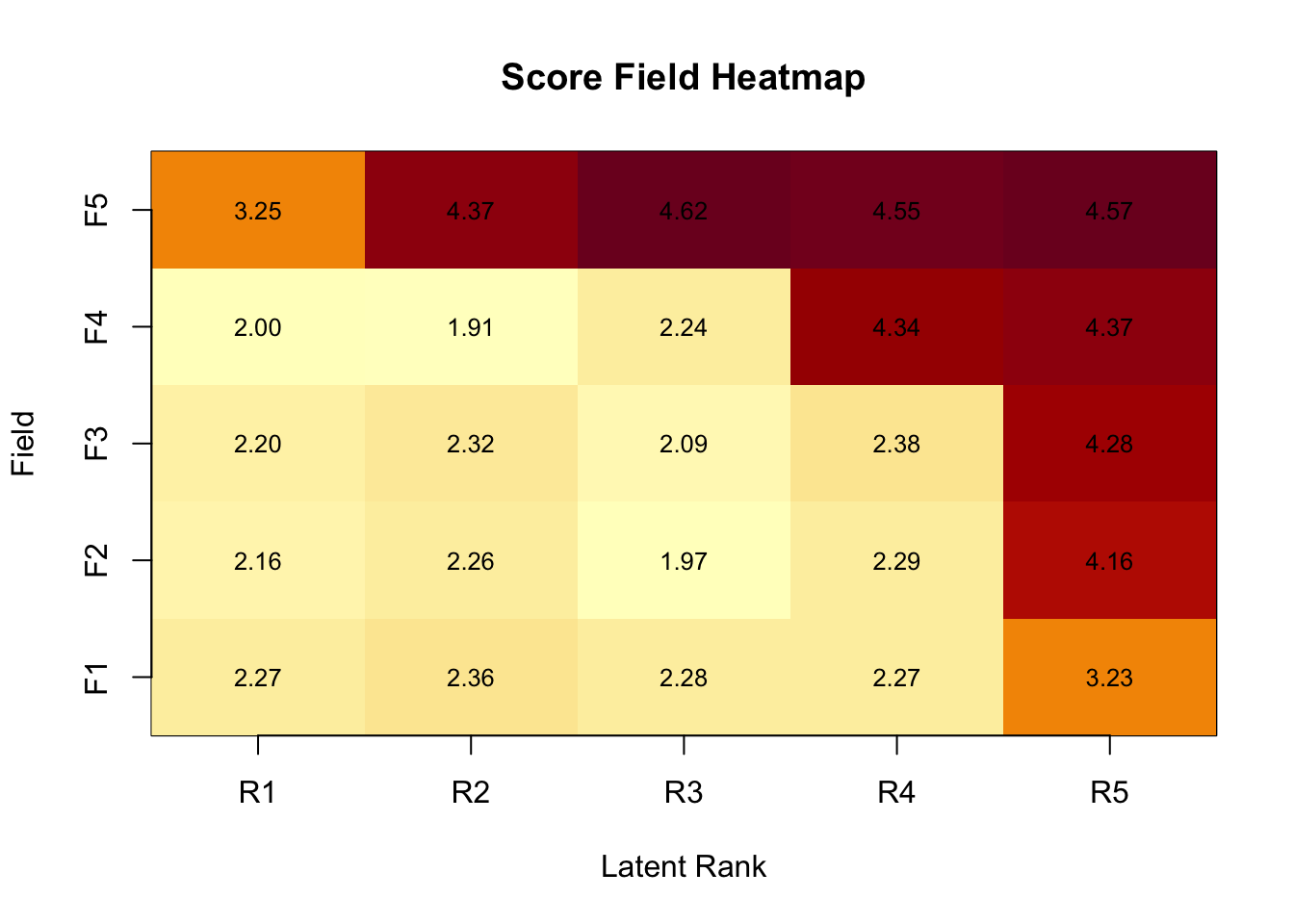
Field 1  2.270  2.379  2.251  2.280  3.179
Field 2  2.149  2.337  1.897  2.180  4.119
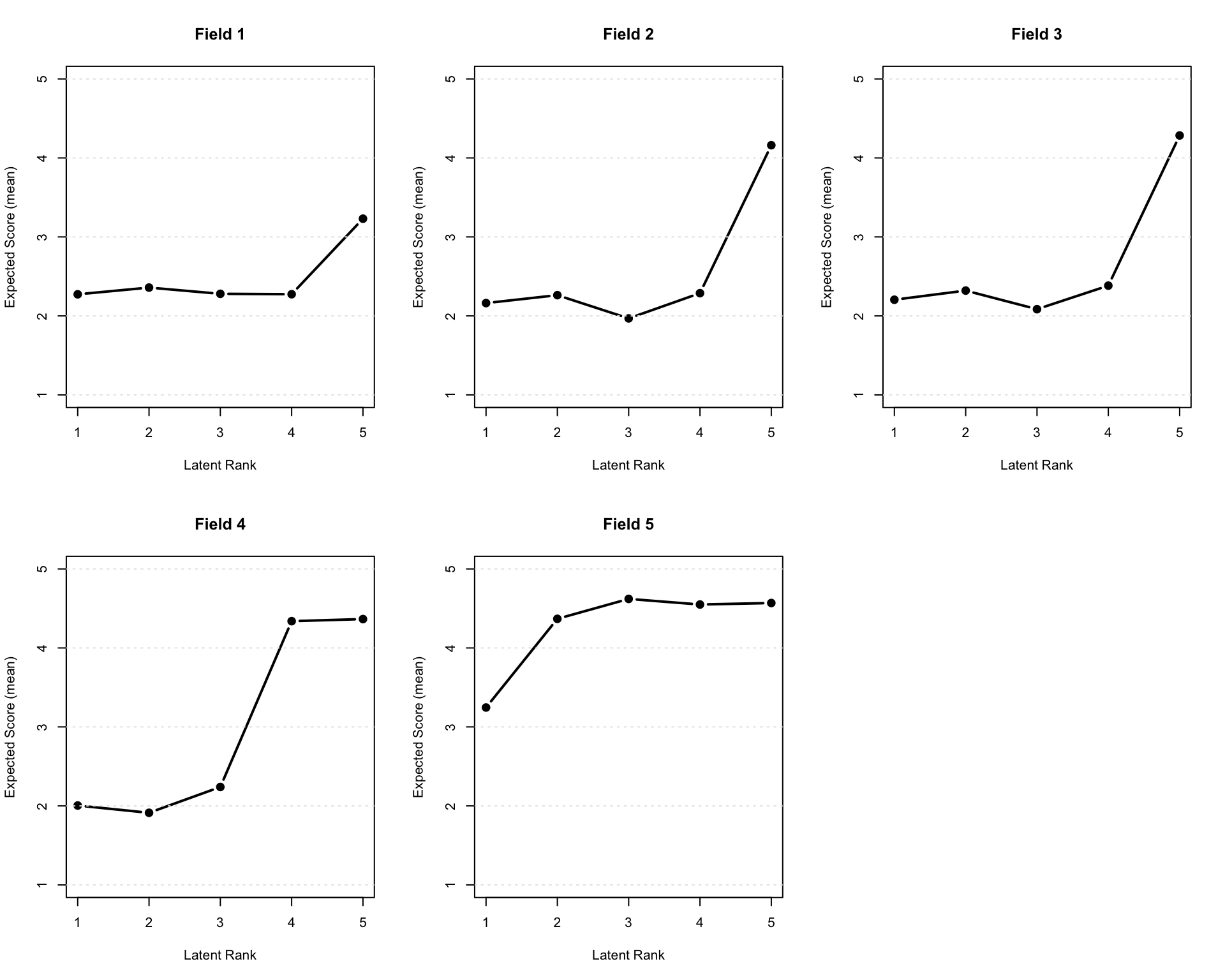
Field 3  2.196  2.331  2.066  2.243  4.248
Field 4  2.000  1.880  2.222  4.298  4.338
Field 5  3.222  4.327  4.618  4.537  4.550

Field Reference Profile Indices
(Based on normalized expected scores: (E[score]-1)/(maxQ-1))
  Alpha     A Beta     B Gamma       C
1     4 0.239    5 0.558  0.50 -0.0210
2     4 0.468    4 0.322  0.25 -0.0735
3     4 0.475    4 0.346  0.25 -0.0589
4     3 0.525    3 0.310  0.25 -0.0230
5     1 0.281    1 0.561  0.25 -0.0177

Model Fit Indices
Number of Latent Rank : 5
Number of Latent Field: 5
Number of EM cycle: 7 
                    value
model_log_like -20929.785
bench_log_like      0.000
null_log_like  -23559.334
model_Chi_sq    41859.569
null_Chi_sq     47118.667
model_df        17416.444
null_df         17465.000
NFI                 0.112
RFI                 0.109
IFI                 0.177
TLI                 0.173
CFI                 0.176
RMSEA               0.053
AIC              7026.680
CAIC           -83793.252
BIC            -66376.808
LogLik         -20929.785

6.6.1.1 可視化(baseグラフィックス)

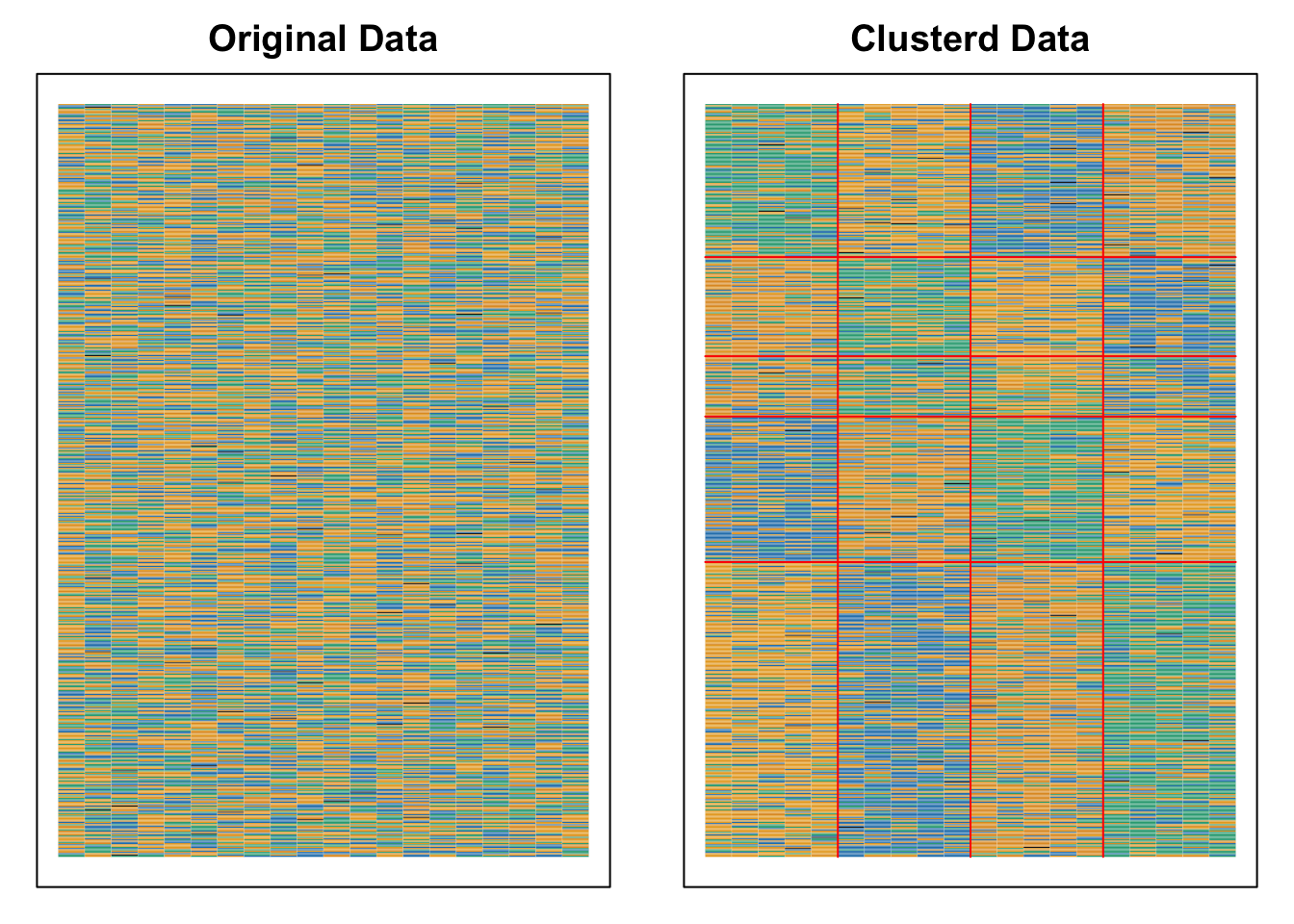
plot(result.B.ord, type = "Array")

plot(result.B.ord, type = "FRP", nc = 3, nr = 2)

plot(result.B.ord, type = "FCRP", nc = 3, nr = 2)

plot(result.B.ord, type = "FCRP", style = "bar", nc = 3, nr = 2)

plot(result.B.ord, type = "FCBR", nc = 3, nr = 2)

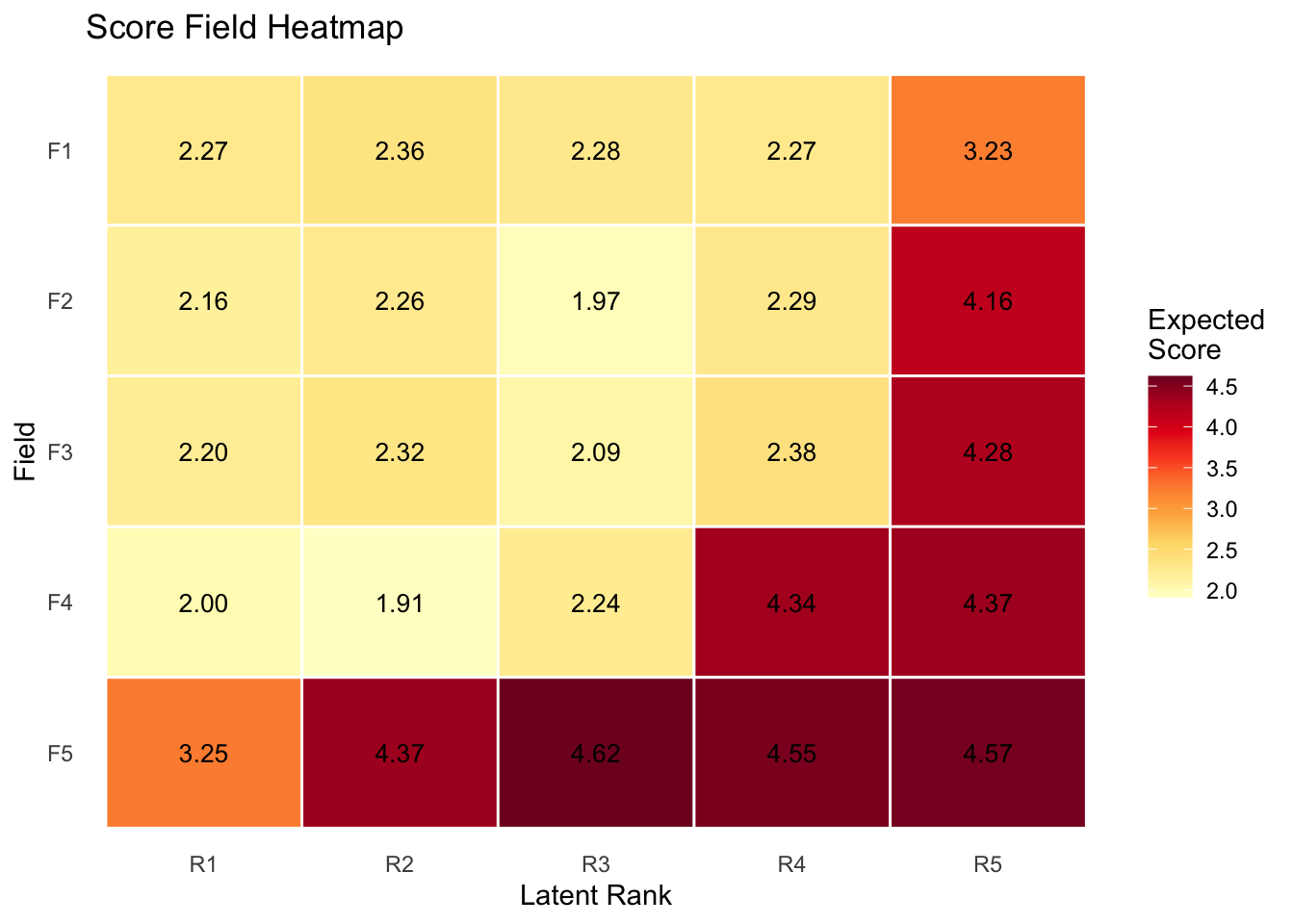
plot(result.B.ord, type = "ScoreField")

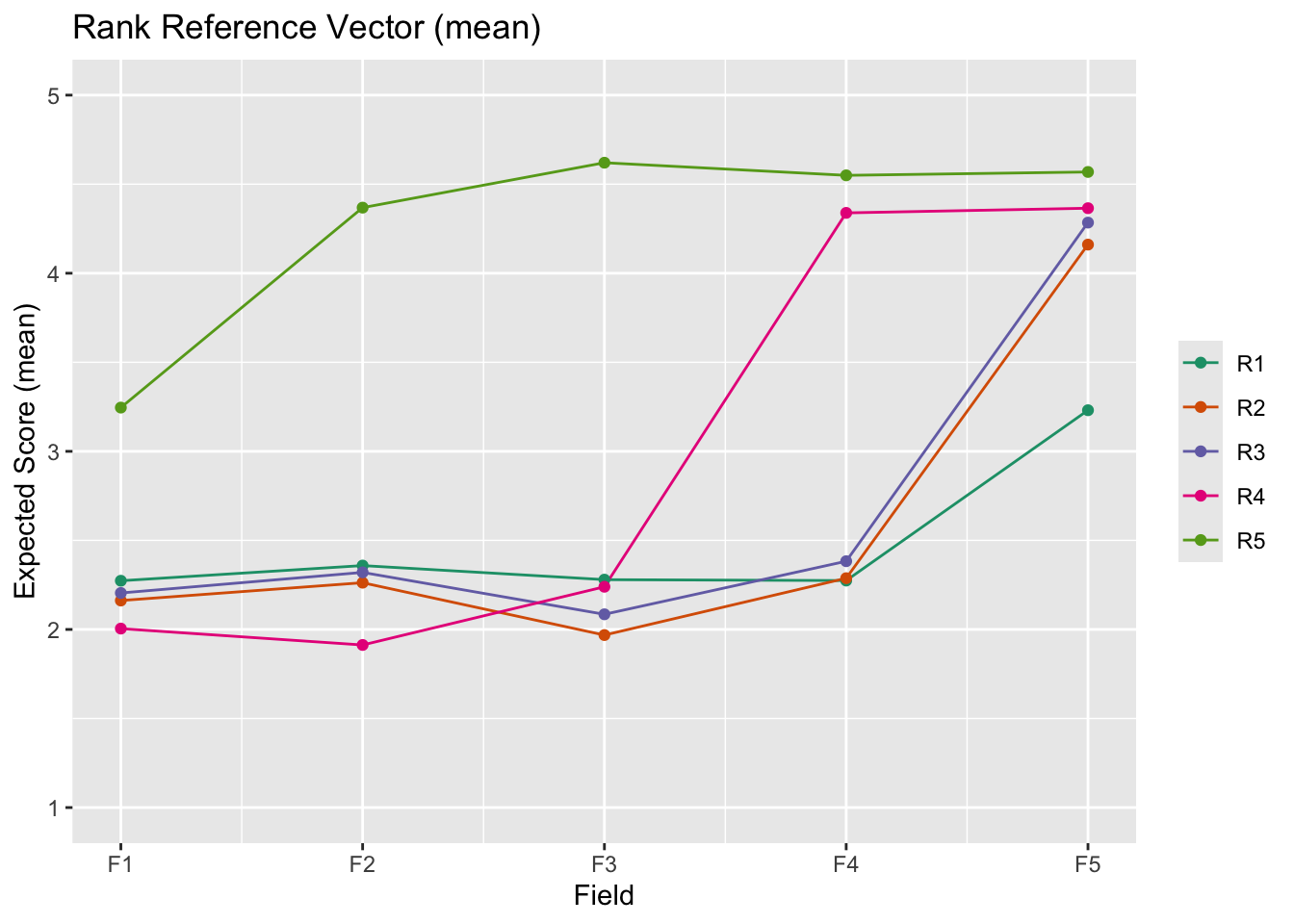
plot(result.B.ord, type = "RRV")

6.6.1.2 可視化(ggExametrika)

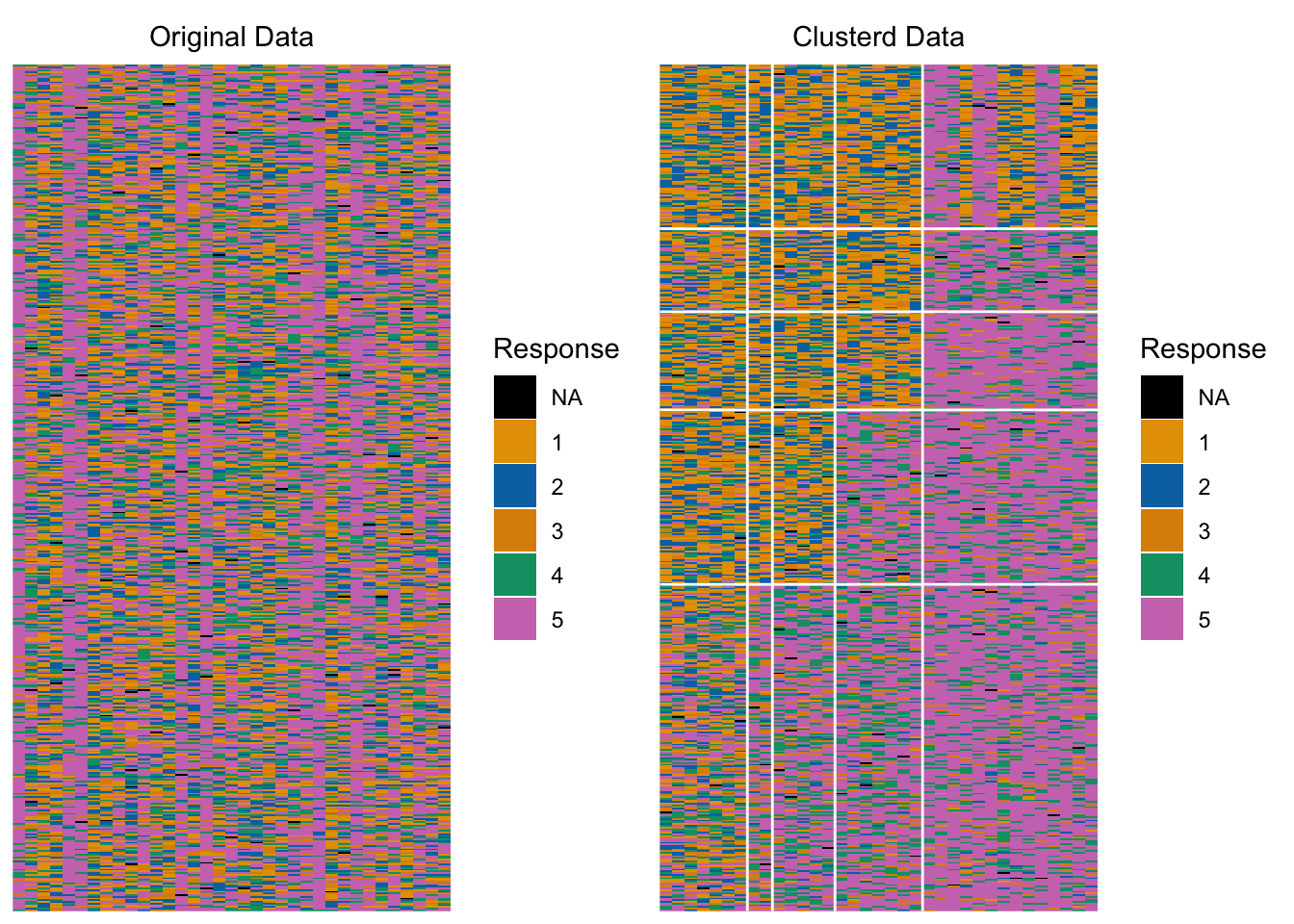
plotArray_gg(result.B.ord)

TableGrob (1 x 2) "arrange": 2 grobs
  z     cells    name           grob
1 1 (1-1,1-1) arrange gtable[layout]
2 2 (1-1,2-2) arrange gtable[layout]
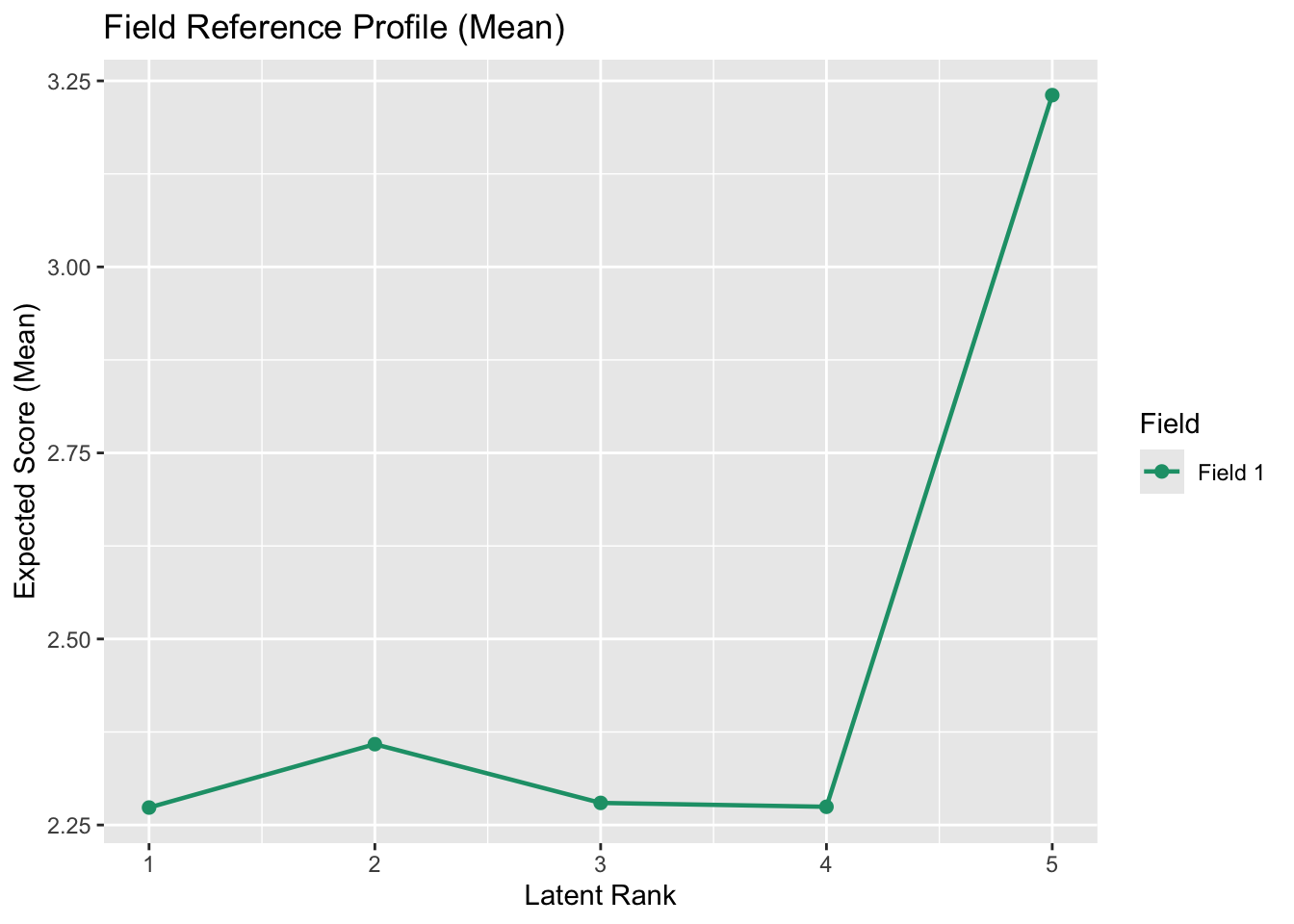
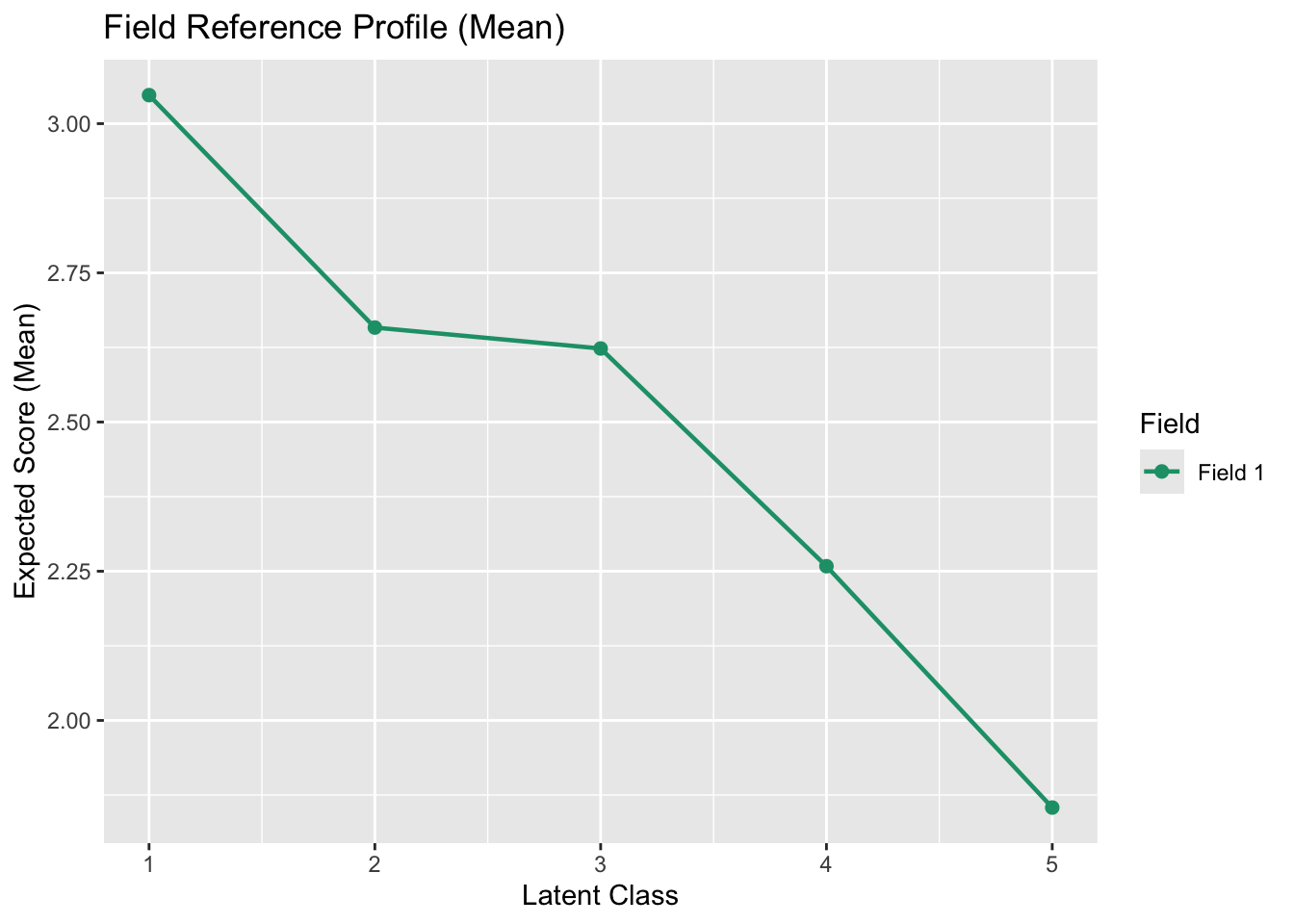
plotFRP_gg(result.B.ord, fields = 1)

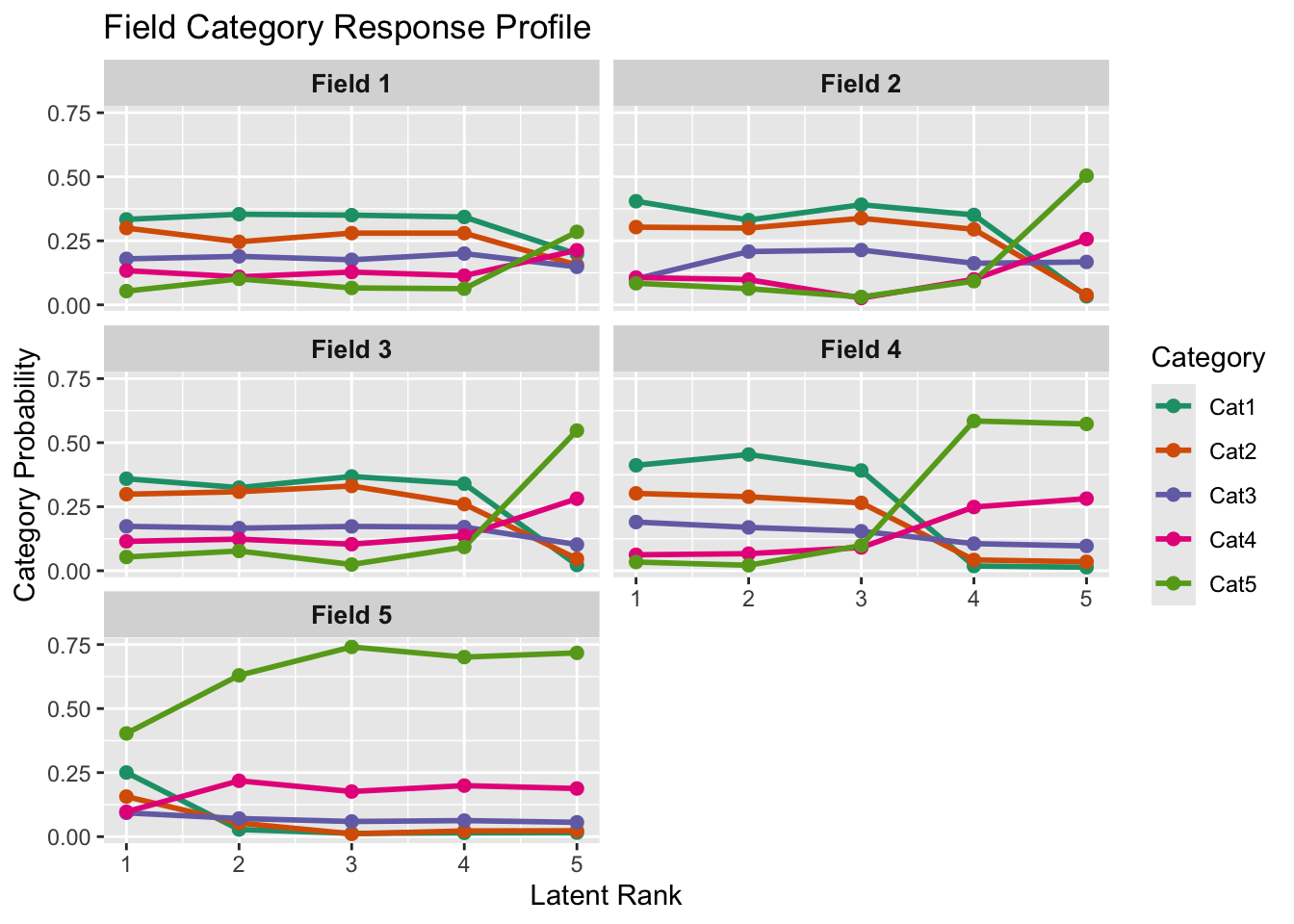
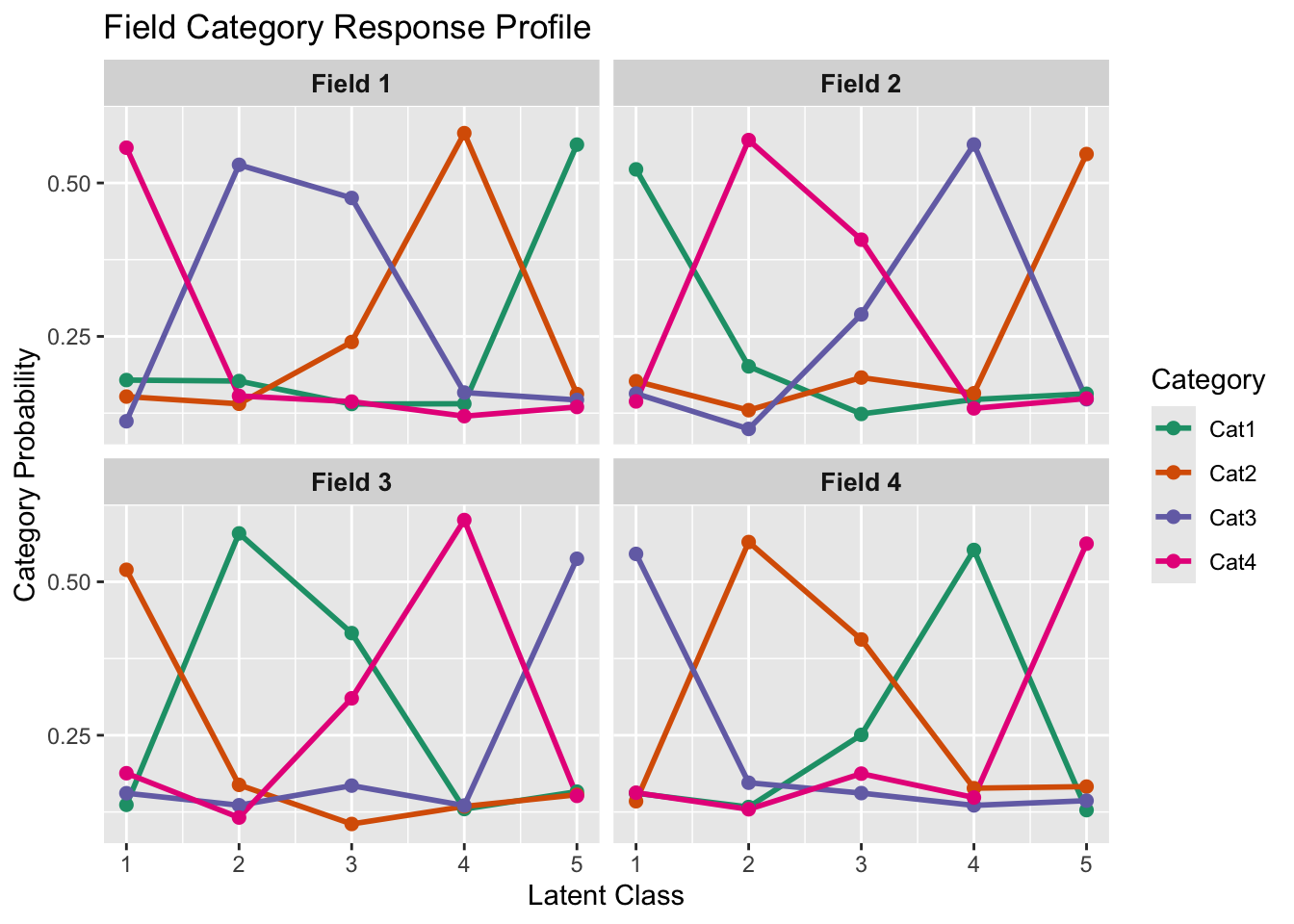
plotFCRP_gg(result.B.ord)

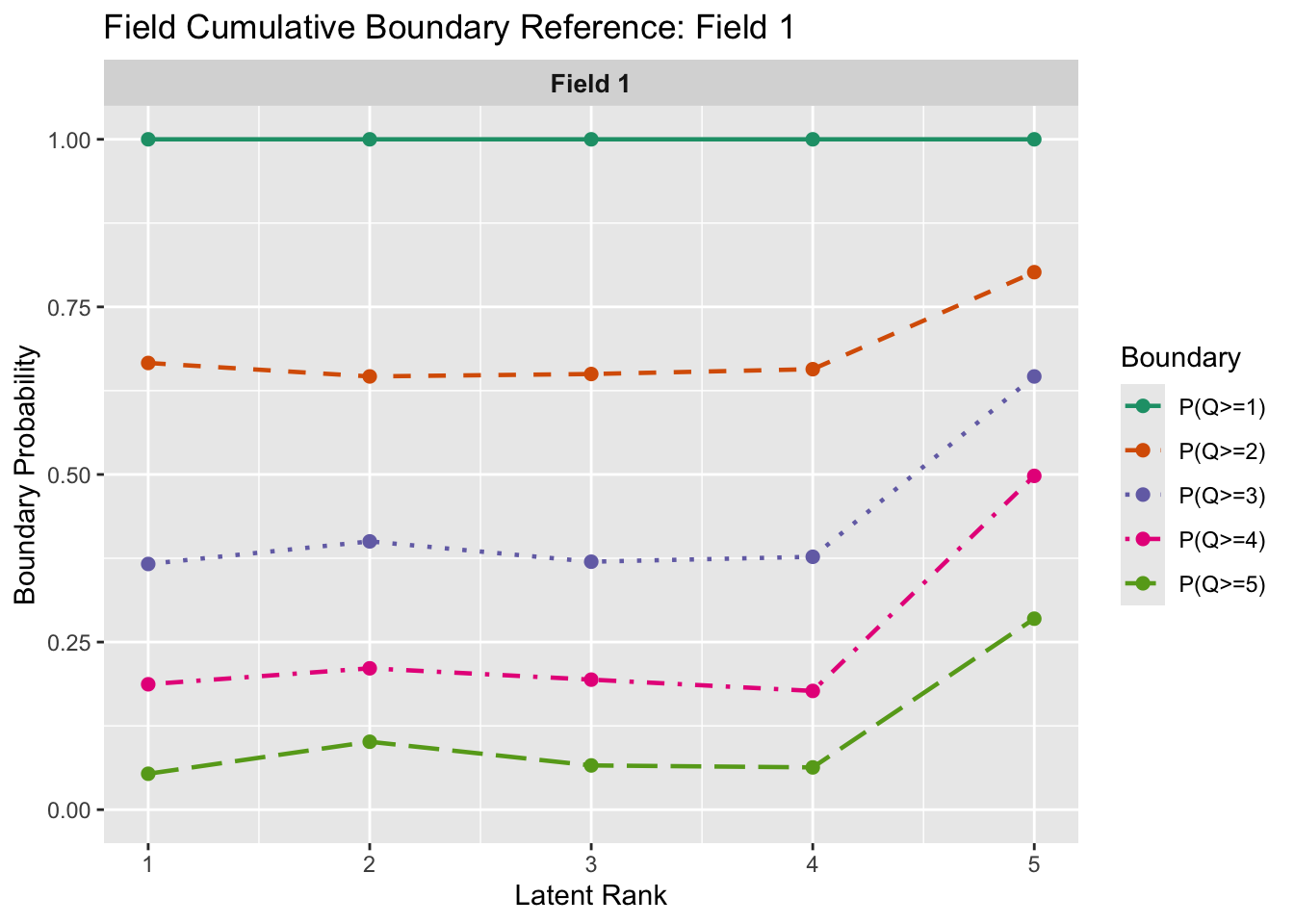
plotFCBR_gg(result.B.ord, fields = 1)

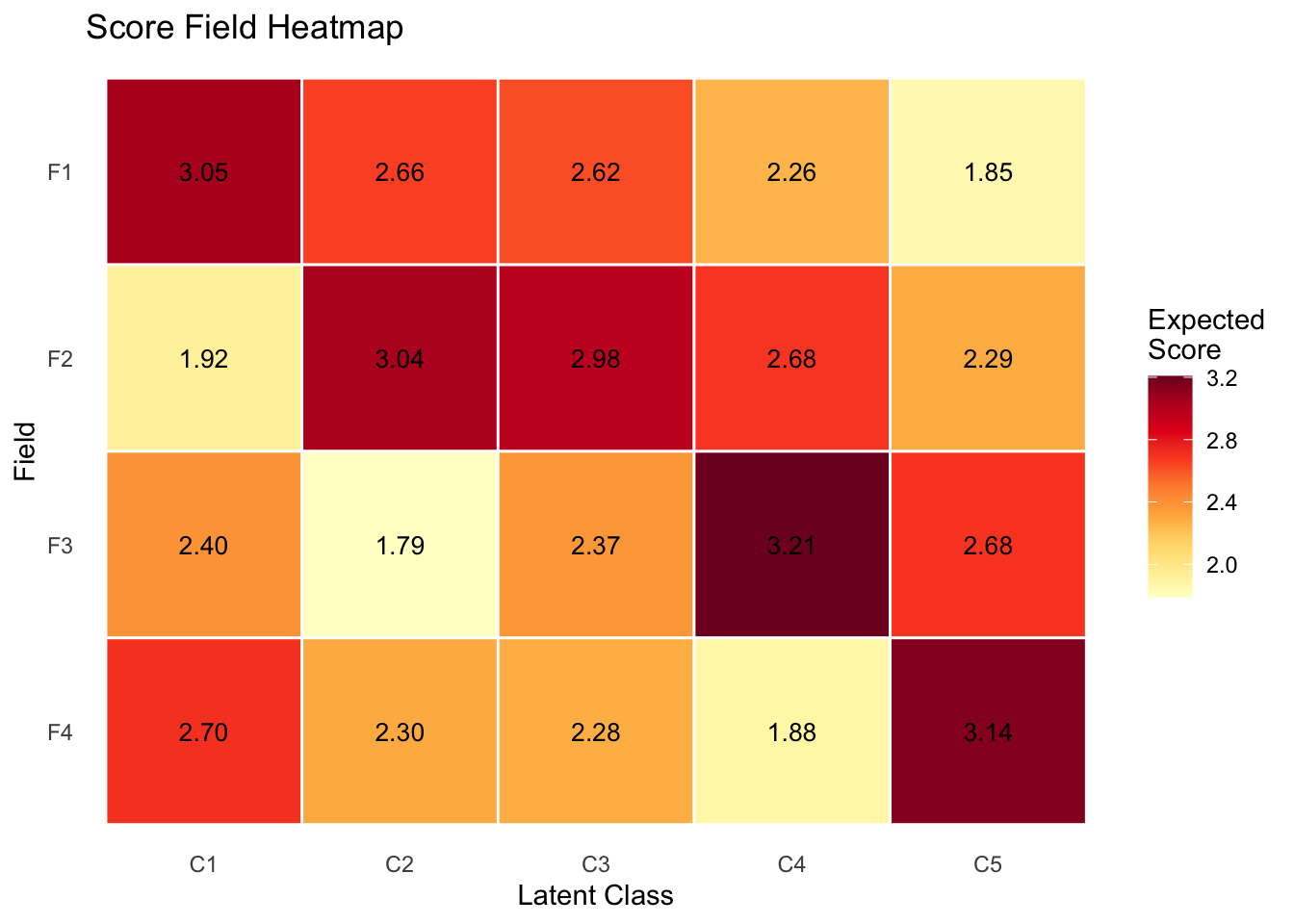
plotScoreField_gg(result.B.ord)

plotRRV_gg(result.B.ord)

6.6.2 名義データ

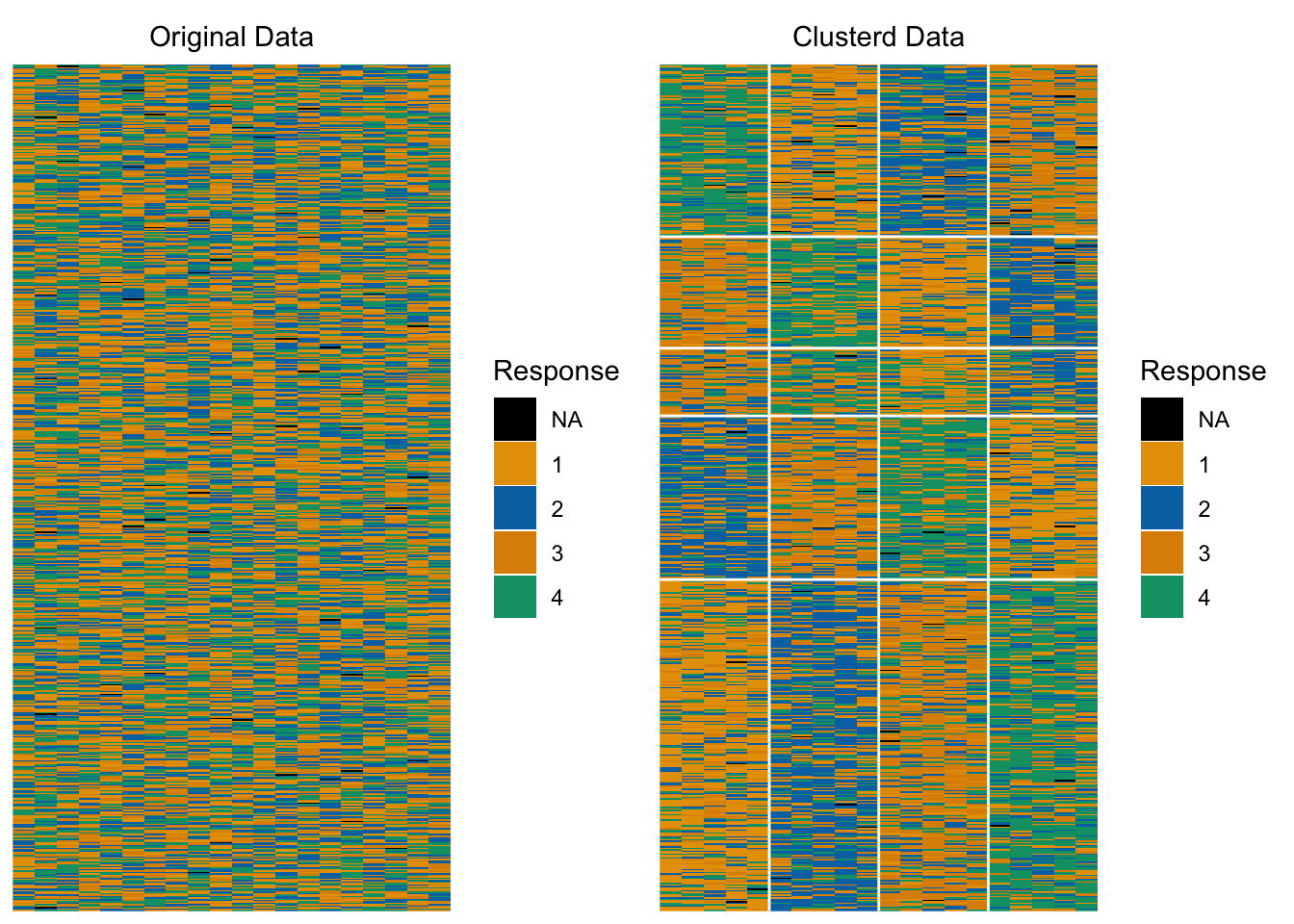
サンプルデータJ20S600(4カテゴリ・20項目・600人)を使用します。

result.B.nom <- Biclustering(J20S600, ncls = 5, nfld = 4)

iter 1 log_lik -16400.2 
iter 2 log_lik -16394.3 
iter 3 log_lik -16330.5 
iter 4
log_lik -15845.9 
iter 5 log_lik -14692 
iter 6 log_lik -14160.1 
iter 7 log_lik
-13964.5 
iter 8 log_lik -13927.8 
iter 9 log_lik -13935.1
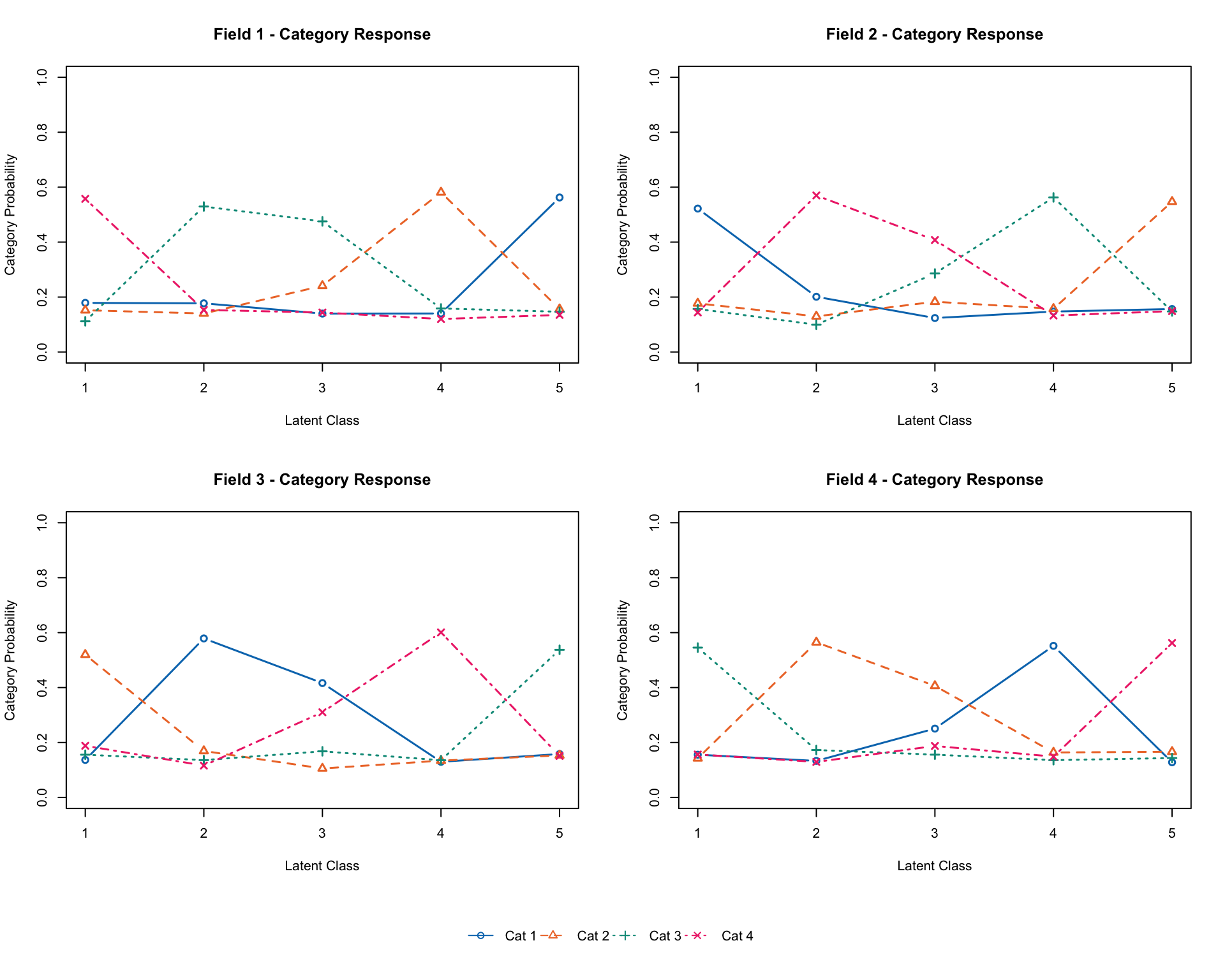
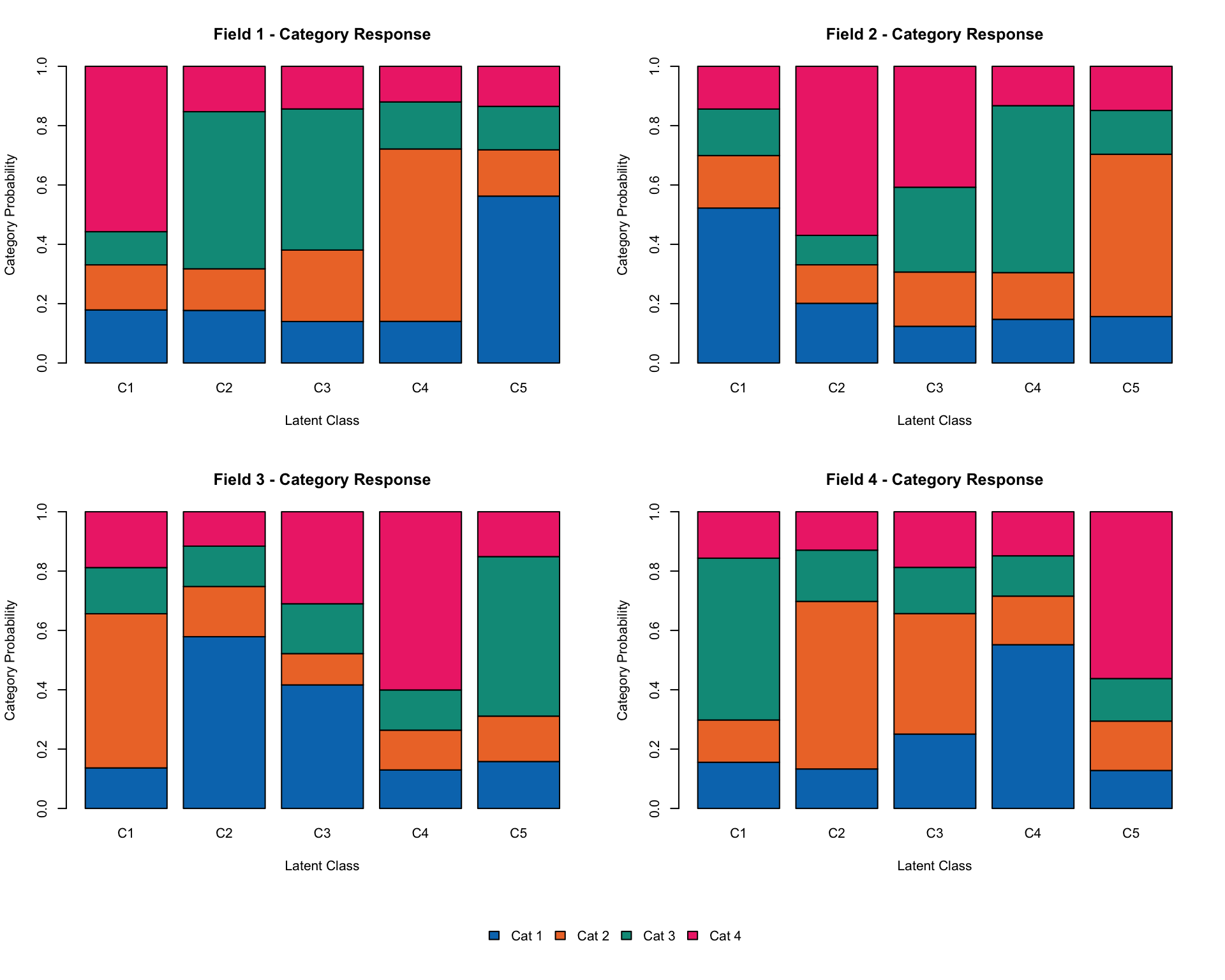
result.B.nom
Biclustering Reference Matrix Profile
For category 1 
        Class 1 Class 2 Class 3 Class 4 Class 5
Field 1   0.179   0.177   0.140   0.140   0.562
Field 2   0.522   0.201   0.124   0.147   0.156
Field 3   0.137   0.579   0.416   0.130   0.158
Field 4   0.156   0.133   0.251   0.552   0.128
For category 2 
        Class 1 Class 2 Class 3 Class 4 Class 5
Field 1   0.152   0.140   0.241   0.581   0.156
Field 2   0.177   0.130   0.183   0.157   0.547
Field 3   0.520   0.169   0.105   0.134   0.153
Field 4   0.142   0.565   0.406   0.164   0.166
For category 3 
        Class 1 Class 2 Class 3 Class 4 Class 5
Field 1   0.112  0.5296   0.476   0.159   0.146
Field 2   0.157  0.0992   0.286   0.563   0.148
Field 3   0.156  0.1360   0.168   0.136   0.538
Field 4   0.545  0.1727   0.156   0.136   0.143
For category 4 
        Class 1 Class 2 Class 3 Class 4 Class 5
Field 1   0.557   0.153   0.144   0.120   0.135
Field 2   0.144   0.570   0.408   0.133   0.149
Field 3   0.188   0.116   0.310   0.601   0.151
Field 4   0.156   0.129   0.187   0.149   0.562
                              Class 1 Class 2 Class 3 Class 4 Class 5
Latent Class Ditribution      122.000  79.000  48.000 116.000 235.000
Class Membership Distribution 121.939  76.326  57.859 111.444 232.433
Latent Field Distribution
           Field 1 Field 2 Field 3 Field 4
N of Items       5       5       5       5

Model Fit Indices
Number of Latent Class : 5
Number of Latent Field: 4
Number of EM cycle: 9 
                    value
model_log_like -13935.073
bench_log_like      0.000
null_log_like  -16424.042
model_Chi_sq    27870.147
null_Chi_sq     32848.085
model_df        11940.000
null_df         11980.000
NFI                 0.152
RFI                 0.149
IFI                 0.238
TLI                 0.234
CFI                 0.237
RMSEA               0.047
AIC              3990.147
CAIC           -60449.193
BIC            -48509.193
LogLik         -13935.073

6.6.2.1 可視化(baseグラフィックス)

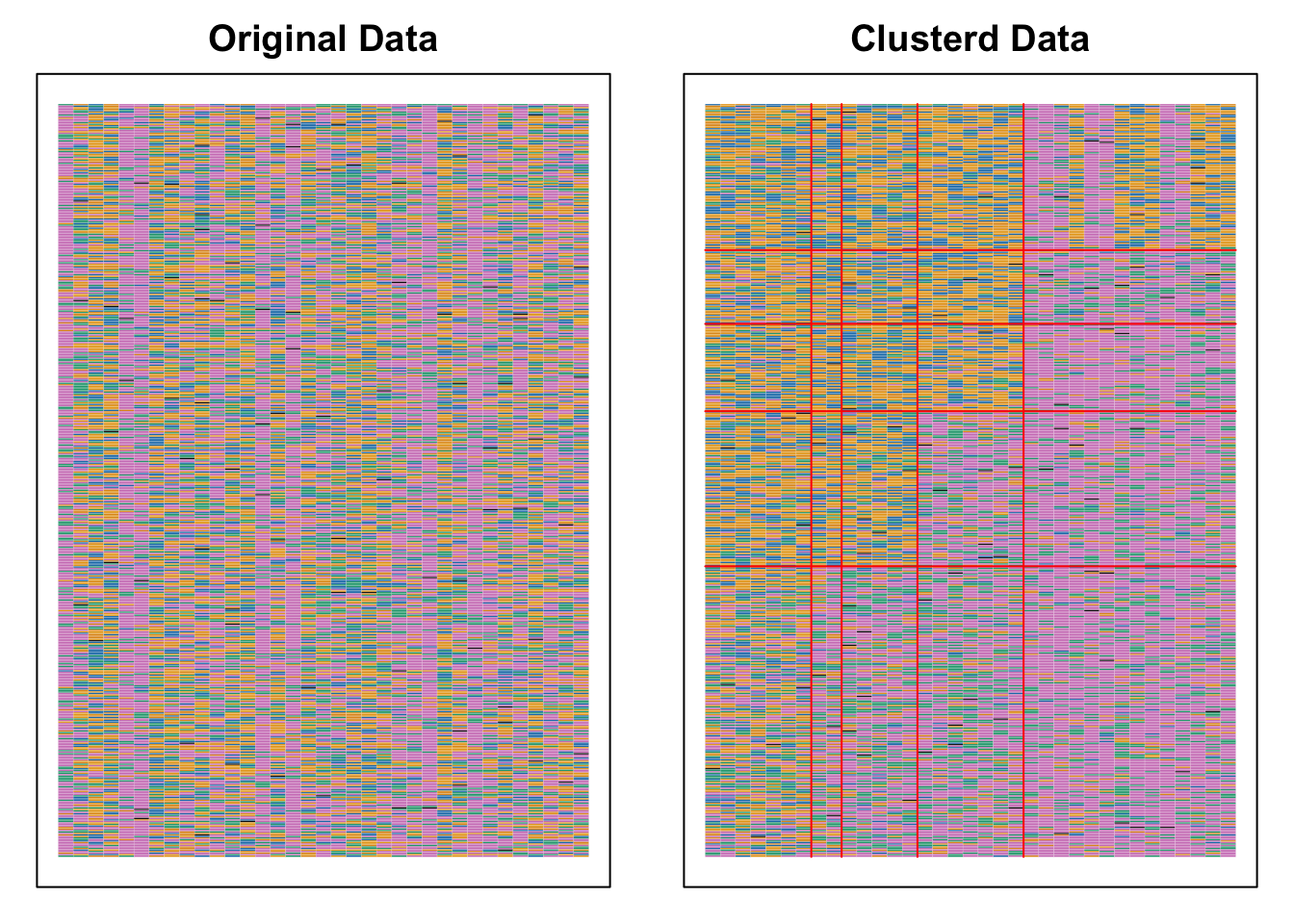
plot(result.B.nom, type = "Array")

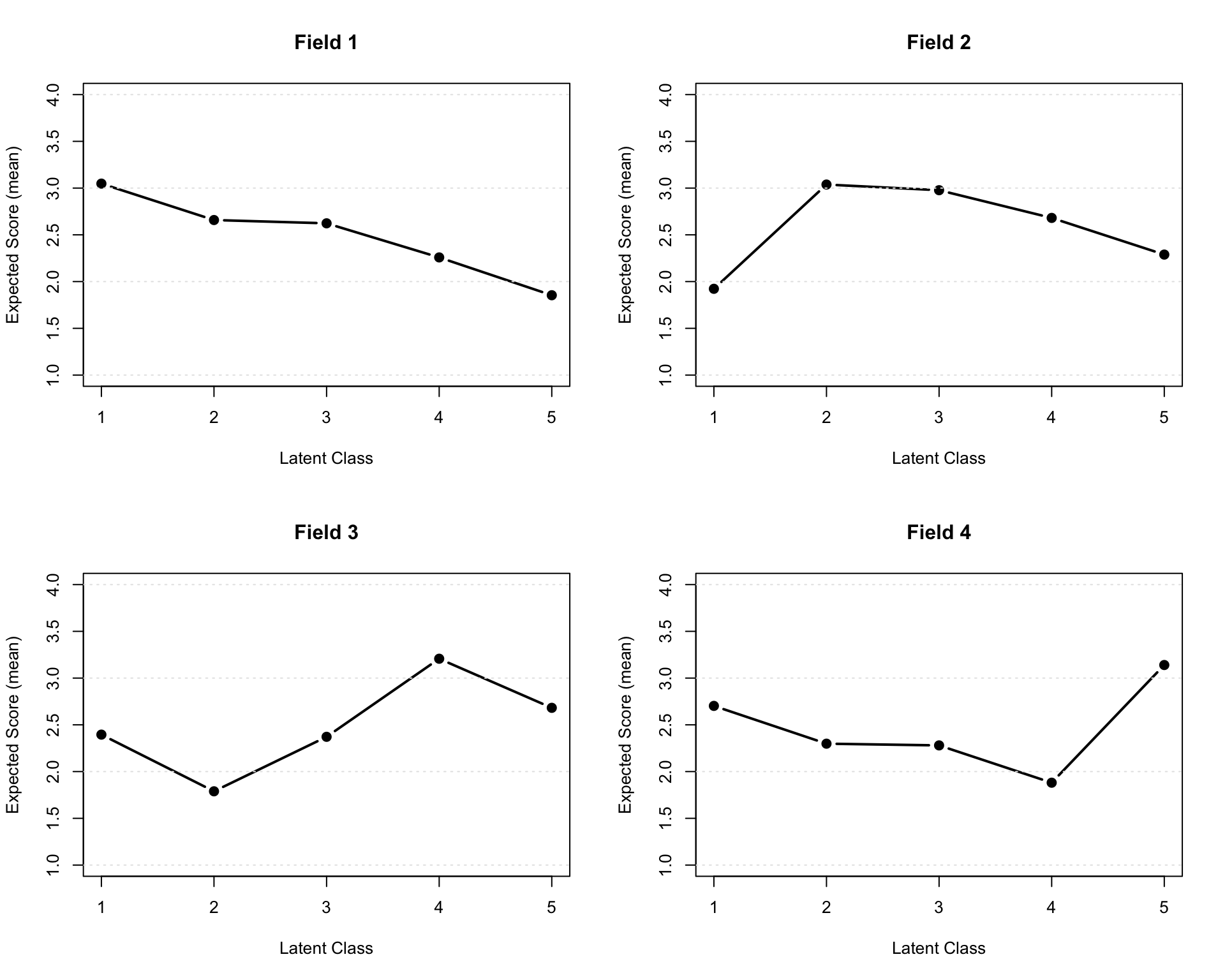
plot(result.B.nom, type = "FRP", nc = 2, nr = 2)

plot(result.B.nom, type = "FCRP", nc = 2, nr = 2)

plot(result.B.nom, type = "FCRP", style = "bar", nc = 2, nr = 2)

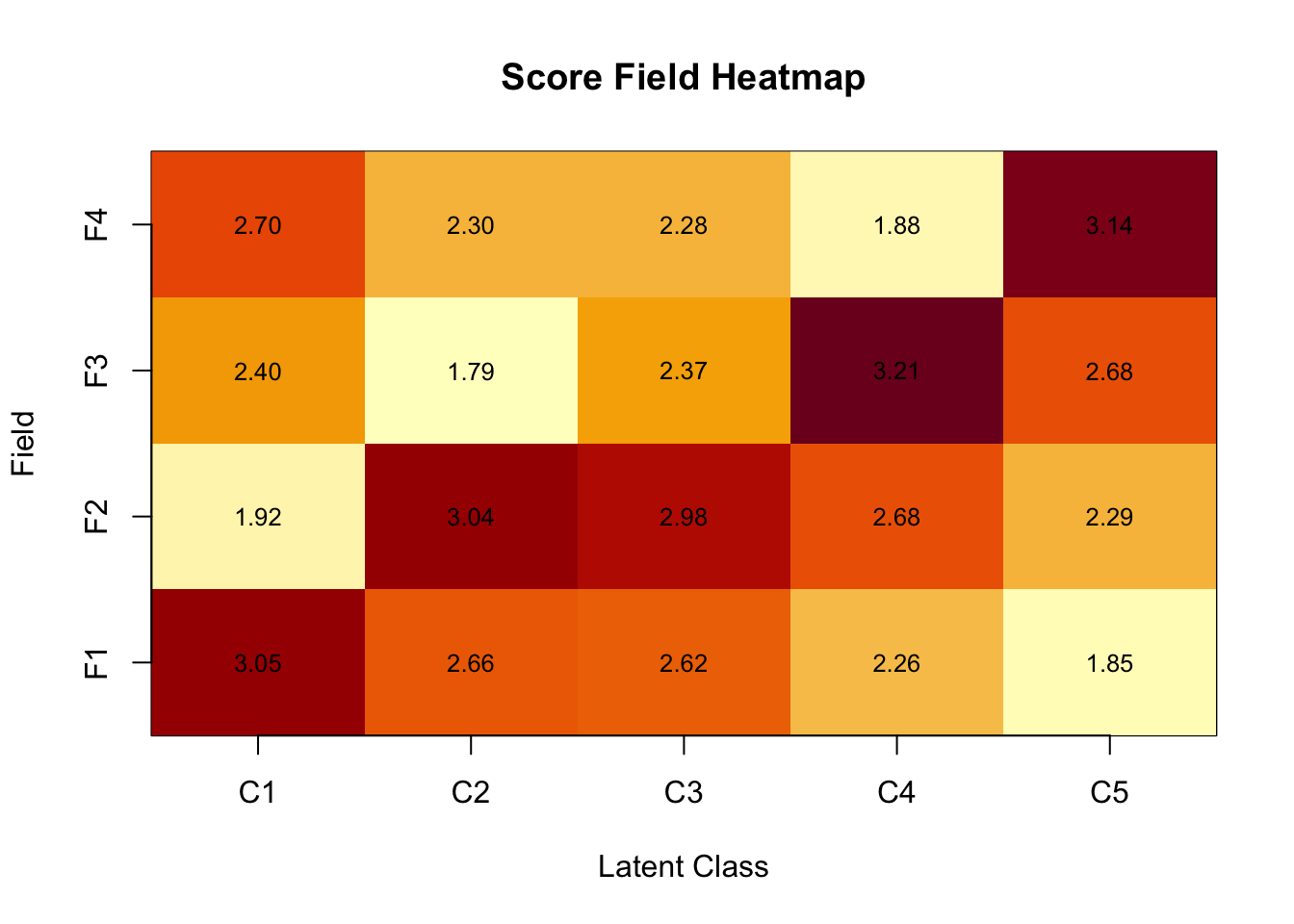
plot(result.B.nom, type = "ScoreField")

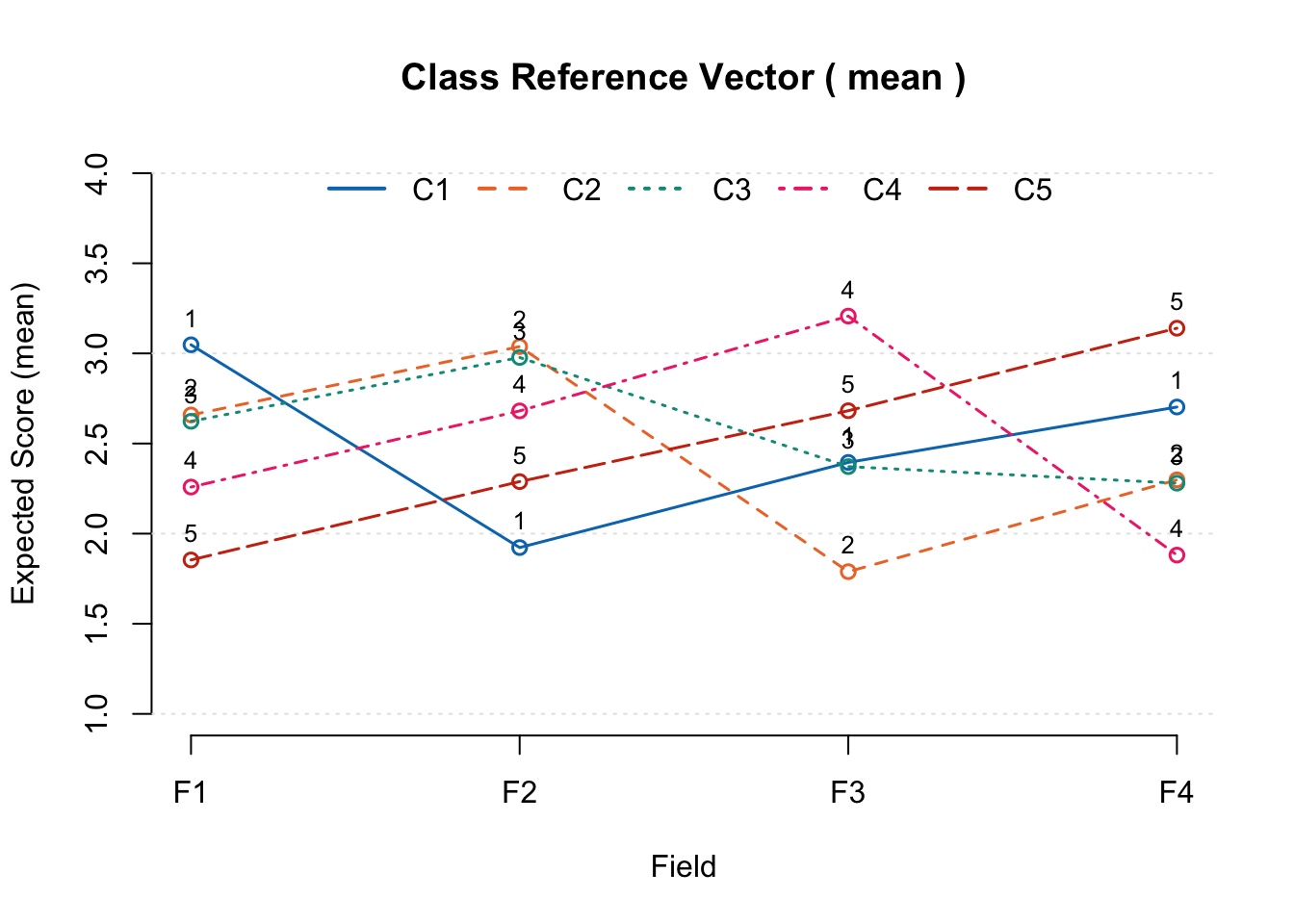
plot(result.B.nom, type = "RRV")

6.6.2.2 可視化(ggExametrika)

plotArray_gg(result.B.nom)

TableGrob (1 x 2) "arrange": 2 grobs
  z     cells    name           grob
1 1 (1-1,1-1) arrange gtable[layout]
2 2 (1-1,2-2) arrange gtable[layout]
plotFRP_gg(result.B.nom, fields = 1)

plotFCRP_gg(result.B.nom)

plotScoreField_gg(result.B.nom)

plotRRV_gg(result.B.nom)

6.7 バイクラスタリングの利点

  • 表面上の類似性に基づく分類であり,データ生成メカニズムを仮定しません
  • 個人間比較を必要としないため,社会的態度のような仮定を満たさない心理的データにも適用できます
  • スコアではなく反応パターンで項目や受検者を分類するため,生態学的妥当性の高い分析が可能です