Skip to contents

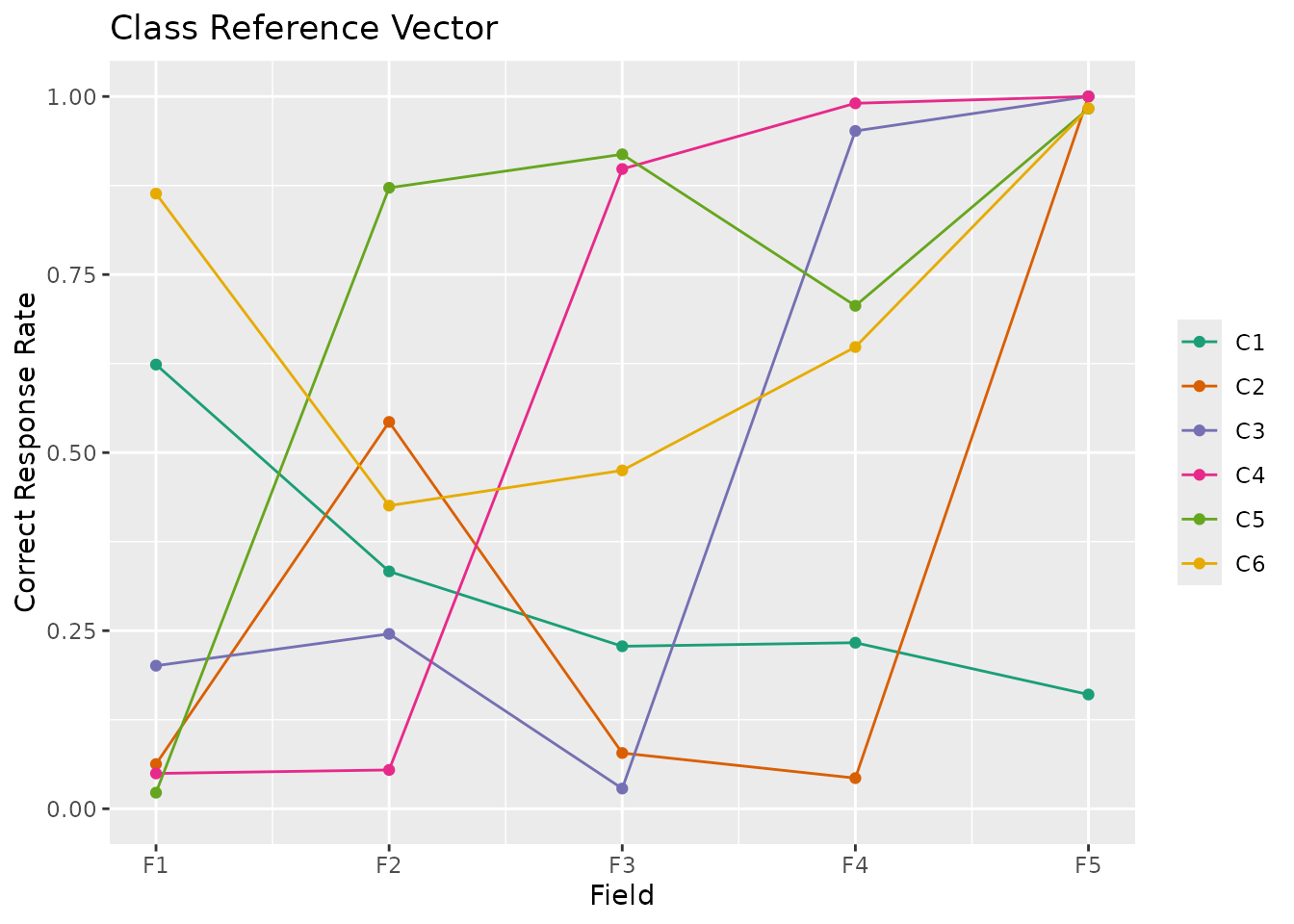
This function takes exametrika Biclustering output as input and generates a Class Reference Vector (CRV) plot using ggplot2. CRV shows how each latent class performs across fields, with one line per class.

Supports both binary (2-valued) and polytomous (multi-valued) biclustering models. For polytomous data, the stat parameter controls how expected scores are calculated from category probabilities.

Usage

plotCRV_gg(
  data,
  title = TRUE,
  colors = NULL,
  linetype = "solid",
  show_legend = TRUE,
  legend_position = "right",
  stat = "mean",
  show_labels = NULL
)

Arguments

data

An object of class c("exametrika", "Biclustering") from exametrika::Biclustering().

title

Logical or character. If TRUE (default), display an auto-generated title. If FALSE, no title. If a character string, use it as a custom title.

colors

Character vector of colors for each class. If NULL (default), a colorblind-friendly palette is used.

linetype

Character or numeric vector specifying the line types. If a single value, all lines use that type. If a vector, each class uses the corresponding type. Default is "solid".

show_legend

Logical. If TRUE (default), display the legend.

legend_position

Character. Position of the legend. One of "right" (default), "top", "bottom", "left", "none".

stat

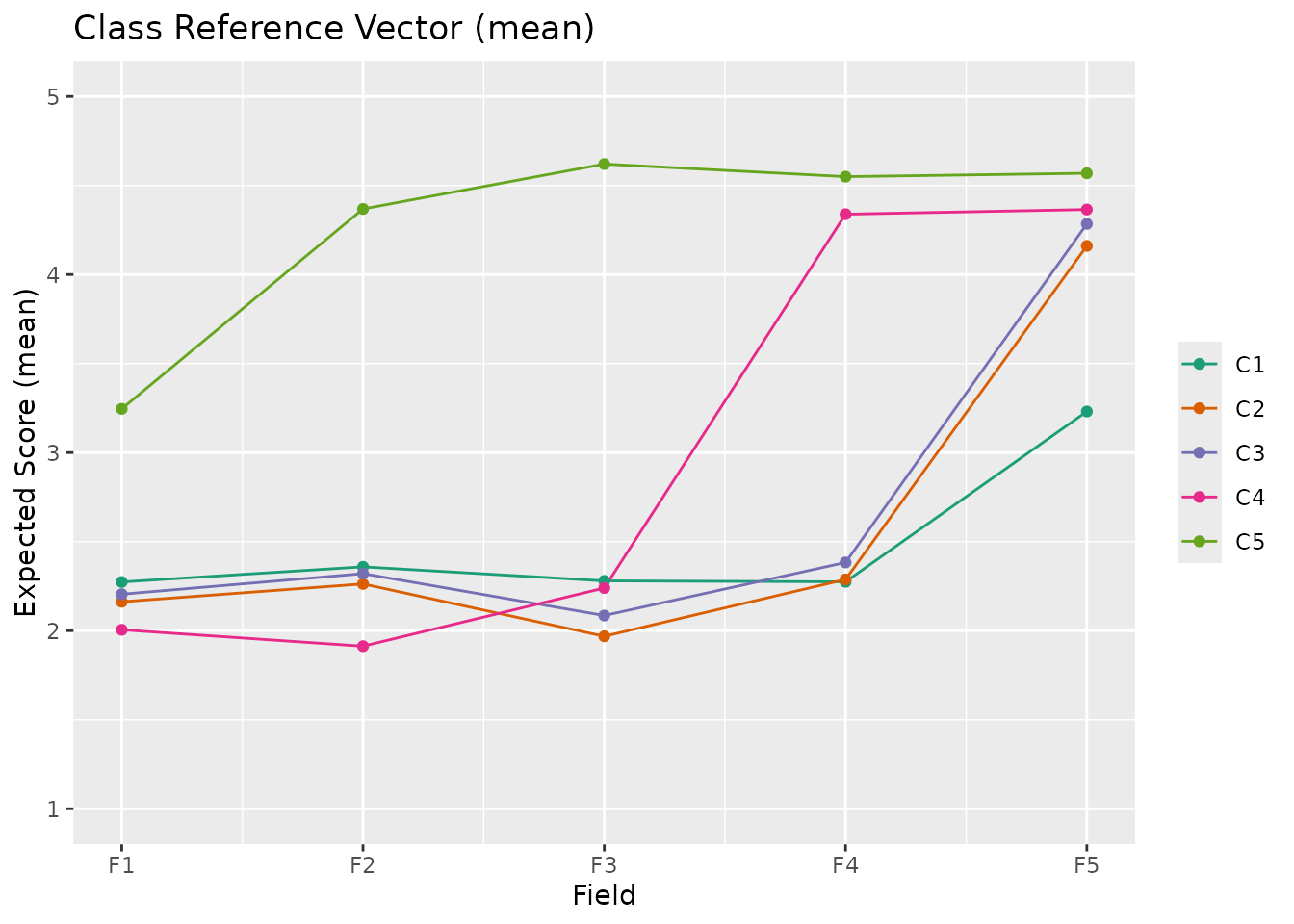
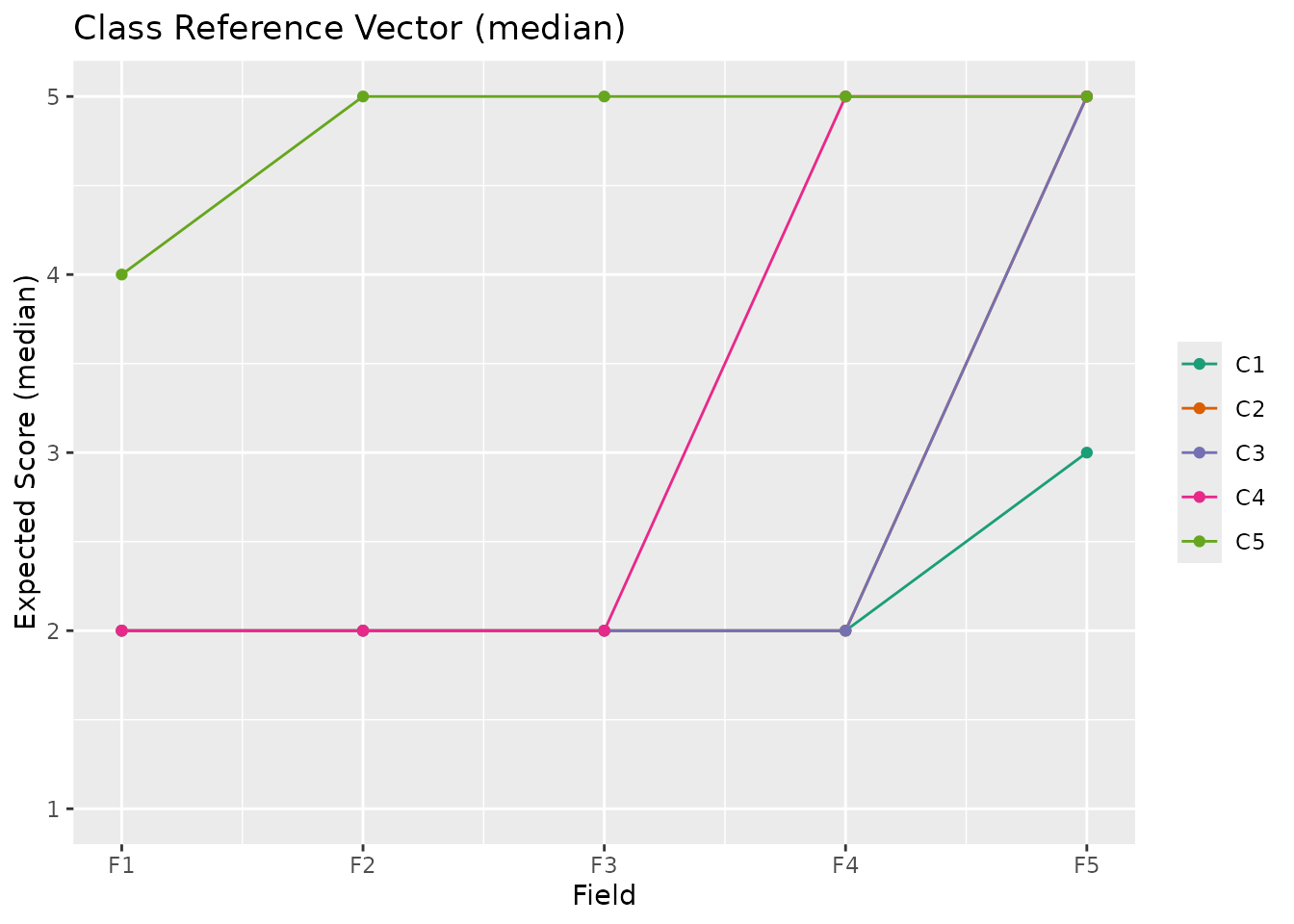
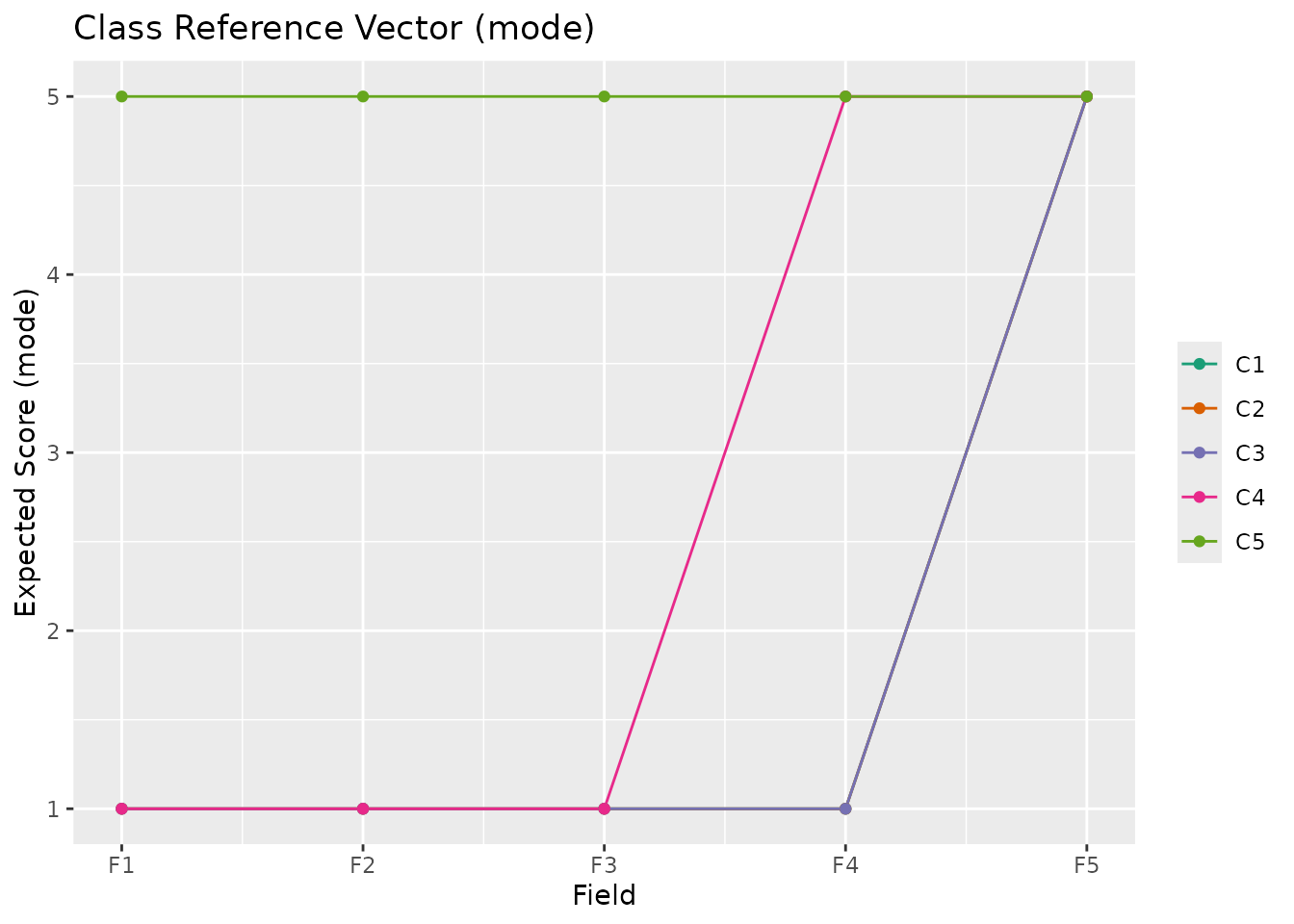
Character. Statistic for polytomous data: "mean" (default), "median", or "mode". For binary data, this parameter is ignored.

  • "mean": Expected score (sum of category x probability)

  • "median": Median category (cumulative probability >= 0.5)

  • "mode": Most probable category

show_labels

Logical. If TRUE, displays class labels on each point using ggrepel to avoid overlaps. Defaults to FALSE since the legend already provides class information.

Value

A single ggplot object showing the Class Reference Vector.

Details

The Class Reference Vector is the transpose of the Field Reference Profile (FRP). While FRP shows one plot per field, CRV displays all classes in a single plot with fields on the x-axis. Each line represents a latent class, showing its correct response rate pattern across fields.

Binary Data (2 categories):

  • Y-axis shows "Correct Response Rate" (0.0 to 1.0)

  • Values represent the probability of correct response

Polytomous Data (3+ categories):

  • Y-axis shows "Expected Score" (1 to max category)

  • Values are calculated using the stat parameter

  • Higher scores indicate better performance

CRV is used when latent classes are nominal (unordered). For ordered latent ranks, use plotRRV_gg instead.

Examples

# Binary biclustering
library(exametrika)
result <- Biclustering(J35S515, nfld = 5, ncls = 6)
#> Biclustering is chosen.
#> 
iter 1 log_lik -7966.66                                                         
#> 
iter 2 log_lik -7442.38                                                         
#> 
iter 3 log_lik -7266.35                                                         
#> 
iter 4 log_lik -7151.01                                                         
#> 
iter 5 log_lik -7023.94                                                         
#> 
iter 6 log_lik -6984.82                                                         
#> 
iter 7 log_lik -6950.27                                                         
#> 
iter 8 log_lik -6939.34                                                         
#> 
iter 9 log_lik -6930.89                                                         
#> 
iter 10 log_lik -6923.5                                                         
#> 
iter 11 log_lik -6914.56                                                        
#> 
iter 12 log_lik -6908.89                                                        
#> 
iter 13 log_lik -6906.84                                                        
#> 
iter 14 log_lik -6905.39                                                        
#> 
iter 15 log_lik -6904.24                                                        
#> 
iter 16 log_lik -6903.28                                                        
#> 
iter 17 log_lik -6902.41                                                        
#> 
iter 18 log_lik -6901.58                                                        
#> 
iter 19 log_lik -6900.74                                                        
#> 
iter 20 log_lik -6899.86                                                        
#> 
iter 21 log_lik -6898.9                                                         
#> 
iter 22 log_lik -6897.84                                                        
#> 
iter 23 log_lik -6896.66                                                        
#> 
iter 24 log_lik -6895.35                                                        
#> 
iter 25 log_lik -6893.92                                                        
#> 
iter 26 log_lik -6892.4                                                         
#> 
iter 27 log_lik -6890.85                                                        
#> 
iter 28 log_lik -6889.32                                                        
#> 
iter 29 log_lik -6887.9                                                         
#> 
iter 30 log_lik -6886.66                                                        
#> 
iter 31 log_lik -6885.67                                                        
#> 
iter 32 log_lik -6884.98                                                        
#> 
iter 33 log_lik -6884.58                                                        
#> 
#> No ID column detected. All columns treated as response data. Sequential IDs (Student1, Student2, ...) were generated. Use id= parameter to specify the ID column explicitly.
plotCRV_gg(result)


# \donttest{
# Ordinal biclustering (polytomous)
data(J35S500)
result_ord <- Biclustering(J35S500, ncls = 5, nfld = 5, method = "R")
#> Ranklustering is chosen.
#> 
iter 1 log_lik -22710.5                                                         
#> 
iter 2 log_lik -21311.9                                                         
#> 
iter 3 log_lik -21002.5                                                         
#> 
iter 4 log_lik -20945.8                                                         
#> 
iter 5 log_lik -20932.3                                                         
#> 
iter 6 log_lik -20929.2                                                         
#> 
iter 7 log_lik -20929.8                                                         
plotCRV_gg(result_ord) # Default: mean
plotCRV_gg(result_ord, stat = "median")
plotCRV_gg(result_ord, stat = "mode")
# }